
Last updated on September 4th, 2026 at 12:09 pm
Ready to transform how you manage your catalog? Start auto-tagging music with Cyanite
We know managing a large music catalog can feel overwhelming. When metadata is inconsistent or incomplete, tracks become difficult to find and hard to work with. The result is a messy catalog that you have to sort out manually—unless you use AI auto-tagging.
Read more to see how automatic music tagging reduces friction and helps you organize your catalog more accurately.
What is automatic music tagging?
Automatic music tagging is an audio analysis process that identifies a song’s mood, genre, energy, tempo, instrumentation, and other core attributes. A music analyzer AI listens to the track and applies these labels with consistent logic, providing stable metadata across your catalog.
AI tagging supports teams that depend on fast, accurate search. For example, if you run a sync marketplace that needs to respond to briefs quickly, you can surface the right tracks in seconds when the metadata aligns with the sound you’re looking for. If you work at a production library with thousands of incoming submissions, you can review new material more efficiently when the system applies consistent labels from day one. The same applies to music-tech platforms that want stronger discovery features without having to build their own models.
Benefits of auto-tagging for music professionals
AI auto-tagging brings value across the music industry. When tracks enter your system with clear, predictable metadata, teams can work with more confidence and fewer bottlenecks, supporting smoother catalog operations overall.
- Faster creative exploration: Sync and production teams can filter and compare tracks more quickly during pitches, making it easier to deliver strong options under time pressure.
- More reliable handoffs between teams: When metadata follows the same structure, creative, technical, and rights teams work from the same information without needing to reinterpret tags.
- Improved rights and version management: Publishers benefit from predictable metadata when preparing works for licensing, tracking versions, and organizing legacy catalogs.
- Stronger brand alignment in audio branding: Agencies working on global campaigns can rely on mood and energy tags that follow the same structure across regions, helping them maintain a consistent brand identity.
- Better technical performance for music platforms: When metadata is structured from the start, product and development teams see fewer ingestion issues, more stable recommendations, and smoother playlist or search behavior.
- Greater operational stability for leadership: Clear, consistent metadata lowers risk, supports scalability, and gives executives more confidence in the long-term health of their catalog systems.
Why manual music tagging fails at scale
There’s a time and a place for running a music catalog manually: if your track selection is small and your team has the capacity to listen to each song one by one and label them carefully. But as your catalog grows, that process will start to break down.
Tags can vary from person to person, and different editors will likely use different wording. Older metadata rarely matches newer entries. Some catalogs even carry information from multiple systems and eras, which makes the data harder to trust and use.
Catalog managers are not the only ones feeling this pain. This inconsistent metadata slows down the search for creative teams. Developers are also affected when this unreliable data disrupts user-facing recommendation and search features. So the more music you manage, the more this manual-tagging bottleneck grows.
When human collaboration is still needed
While AI can provide consistent metadata at scale, creative judgment still matters. People add the cultural context and creative insight that go beyond automated sound analysis. Also, publishers sometimes adapt tags for rights considerations or for more targeted sync opportunities.
The goal of AI auto-tagging is not to replace human input, but to give your team a stable foundation to build on. With accurate baseline metadata, you can focus on adding the context that carries strategic or commercial value.
Cyanite has maybe most significantly improved our work with its Similarity Search that allows us to enhance our searches objectively, melting away biases and subjective blind spots that humans naturally have.
How does AI music tagging work at Cyanite?
At Cyanite, our approach to music analysis is fully audio-based. When you upload a track, our AI analyzes only the sound of the file—not the embedded metadata. Our model listens from beginning to end, capturing changes in mood, instrumentation, and energy across the full duration.
We start by converting the MP3 audio file into a spectrogram, which turns the sound into a visual pattern of frequencies over time. This gives our system a detailed view of the track’s structure. From there, computer vision models analyze the spectrogram to detect rhythmic movement, instrument layers, and emotional cues across the song. After the analysis, the model generates a set of tags that describe these characteristics. We then refine the output through post-processing to keep the results consistent, especially when working with large or fast-growing catalogs.
This process powers our music tagging suite, which includes two core products:
- Auto-Tagging: identifies core musical attributes such as genre, mood, instrumentation, energy level, movement, valence–arousal position, and emotional dynamics. Each label is generated through consistent audio analysis, which helps maintain stable metadata across new and legacy material.
- Auto-Descriptions: complement tags with short summaries that highlight the track’s defining features. These descriptions are created through our own audio models, without relying on any external language models. They give you an objective snapshot of how the music sounds, which supports playlisting, catalog review, and licensing workflows that depend on fast context.
Inside Cyanite's tagging taxonomy
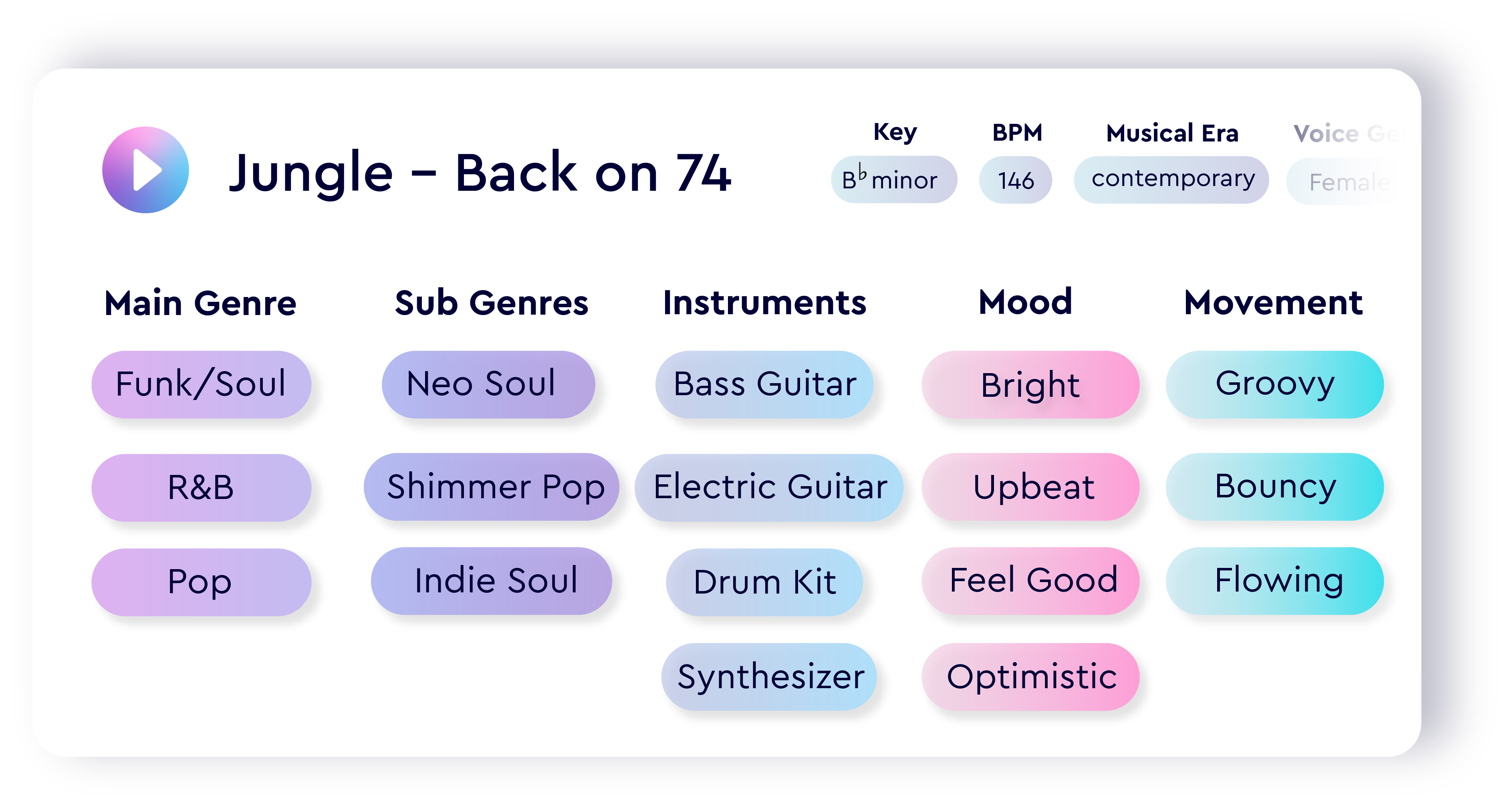
Here’s a taste of the insights our music auto-tagging software can generate for you:
- Core musical attributes: BPM, key, meter, voice gender
- Main genres and free genre tags: high-level and fine-grained descriptors
- Moods and simple moods: detailed and broad emotional categories
- Character: the expressive qualities related to brand identity
- Movement: the rhythmic feel of the track
- Energy level and emotion profile: overall intensity and emotional tone
- Energy and emotional dynamics: how intensity and emotion shift over time
- Valence and arousal: positioning in the emotional spectrum
- Instrument tags and presence: what instruments appear and how consistently
- Augmented keywords: additional contextual descriptors
- Most significant part: the 30-second segment that best represents the song
- Auto-Description: a concise summary created by Cyanite’s models
- Musical era: a high-level temporal categorization
Learn more: Check out our full auto-tagging taxonomy here.
To show how these elements work together, we analyzed Jungle’s “Back On 74” using our auto-tagging system. The table below reflects the exact values our model generated.
Step-by-step Cyanite Auto-Tagging integration
You can get started with Cyanite through our web app or by connecting directly to the Auto-Tagging API. The process is straightforward and designed to fit into both creative and technical workflows.
1. Sign up and verify your account
- Create a Cyanite account and verify your email address.
- Verification is required before you can create an integration or work with the API.
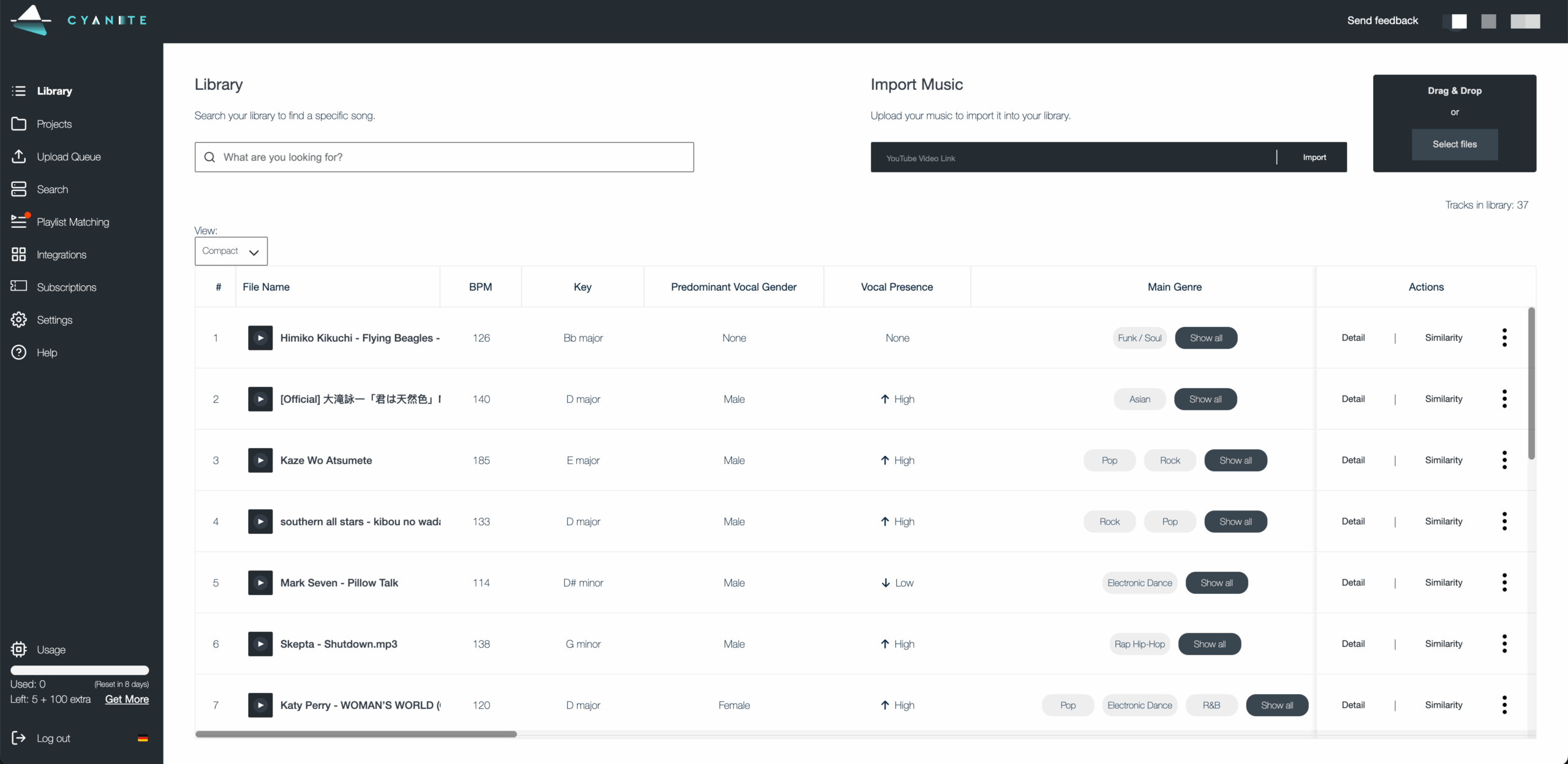
- Once logged in, you’ll land in the Library view, where all uploaded tracks appear with their generated metadata.
2. Upload your music
You can add music to your Library by:
- Dragging MP3 files into the Library
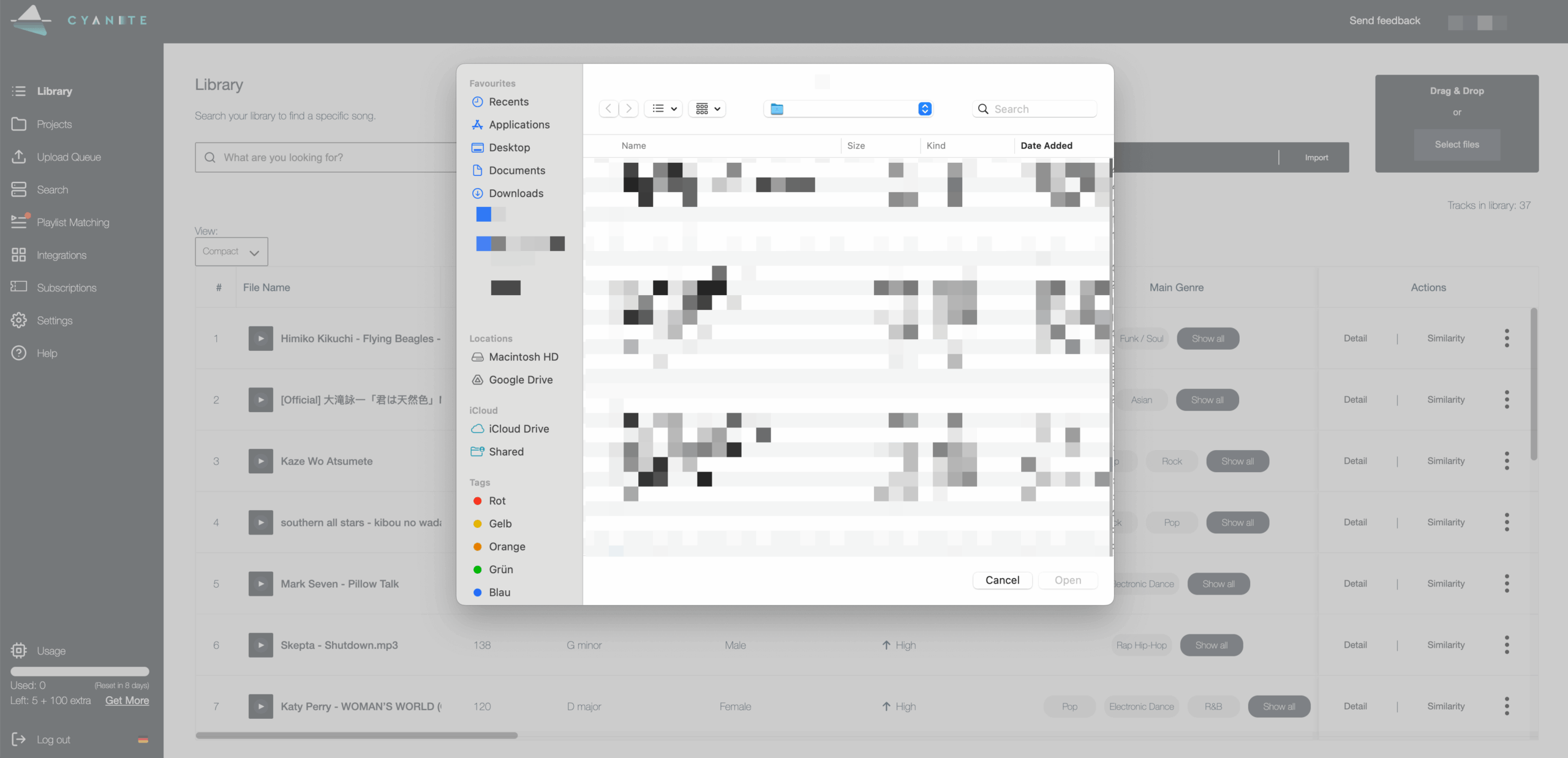
- Clicking Select files to browse your device
- Pasting a YouTube link and importing the audio
Analysis starts automatically, and uploads are limited to 15 minutes per track.
3. Explore your tags in the web app
Once a file is processed, you can explore all its tags inside the Library. In this view, you can discover:
- Your songs’ full tag output
- The representative segment, full-track view, or a custom interval
- Similarity Search with filters for genre, BPM, or key
- Quick navigation through your catalog using the search bar
This helps you evaluate your catalog quickly before integrating the results into your own systems.

4. Create an API integration (for scale and automation)
If you want to connect Cyanite directly to your internal tools, you can set up an API integration. Just note that coding skills are required at this stage.
- Open the Web App dashboard.
- Go to Integrations.
- Select Create New Integration.
- Select a title.
- Fill out the webhook URL and generate or create your own webhook secret.
- Click the Create Integration button.
After you create the integration, we generate two credentials:
- Access token: used to authenticate API requests
- Webhook secret: used to verify incoming events
Test your integration credentials following this link.
You must store the access token and webhook secret securely. You can regenerate new credentials at any time, but they cannot be retrieved once lost.
Pro tip: We have a sample integration available on GitHub to help you get started.
5. Start sending audio to the API
- Use your access token to send MP3 files to Cyanite for analysis.
Pro tip: For bulk uploads (>1,000 audios), we recommend using an S3 bucket upload to speed up ingestion.
6. Receive your tagging results
- Your webhook receives the completed metadata as soon as the analysis is finished.
- If needed, you can also export results as CSV or spreadsheet files.
- This makes it easy to feed the data into playlisting tools, catalog audits, licensing workflows, or internal search systems.
7. Start using your metadata
Once results are flowing, you can integrate them into the workflows that matter most:
- Search and recommendation tools
- Catalog management systems
- Playlist and curation workflows
- Rights and licensing operations
- Sync and creative pipelines
- Internal music discovery dashboards
Read more: Check out Cyanite’s API documentation
Auto-tag your tracks with Cyanite
AI auto-tagging helps you bring structure and consistency to your catalog. By analyzing the full audio, our models capture mood changes, instrumentation, and energy shifts that manual tagging often misses. The result is metadata you can trust across all your songs.
Our tagging system is already widely adopted; over 150 companies are using it, and more than 45 million songs have been tagged. The system gives teams the consistency they need to scale their catalogs smoothly, reducing manual cleanup, improving search and recommendation quality, and giving you a clearer view of what each track contains.
If you want to organize your catalog with more accuracy and less effort, start tagging your tracks with Cyanite.
FAQs
Q: What is a tag in music?
A: A tag is metadata that describes how a track sounds, such as its mood, genre, energy, or instrumentation. It helps teams search, filter, and organize music more efficiently.
Q: How do you tag music automatically?
A: Automatic tagging uses AI trained on large audio datasets. The model analyzes the sound of the track, identifies musical and emotional patterns, and assigns metadata based on what it hears.
Q: What is the best music tagger?
A: The best auto-tagging music software is the one that analyzes the full audio and delivers consistent results at scale. Cyanite is widely used in the industry because it captures detailed musical and emotional attributes directly from the sound and stays reliable across large catalogs.
Q: How specific can you get when tagging music with Cyanite
A: Cyanite captures detailed attributes such as mood, simple mood, genre, free-genre tags, energy, movement, valence–arousal, emotional dynamics, instrumentation, and more. Discover the full tagging taxonomy here.