
Last updated on September 4th, 2026 at 12:09 pm
See how Cyanite performs on your own catalog. Try it free for 14 days.
Many music catalogs are growing faster than manual workflows can handle. What used to be manageable with spreadsheets and human tagging now requires infrastructure that can make tens of thousands of tracks discoverable.
“AI tools for music” is one of the most searched terms in this space, but also one of the most misleading. Metadata generation, file management, distribution workflows, and search infrastructure each require different solutions. Choosing the wrong category is the most common reason implementations fail.
This guide focuses specifically on AI tagging and search infrastructure, so you can evaluate your options based on how these systems actually work.
What to look for in AI tagging and search infrastructure
Not all AI music tools are designed for the same purpose. Before evaluating specific tools, it helps to understand what separates infrastructure-grade systems from standalone tools.
- Audio-based vs. metadata-based analysis: Does the system analyze the audio signal directly, or rely on existing metadata and text inputs? Audio-based systems produce more consistent results, particularly for large or legacy catalogs where existing metadata is incomplete or unreliable.
- Tagging quality and consistency: Consistency matters more than coverage. A system that tags reliably at scale is more operationally valuable than one that only produces detailed results for some tracks.
- Search capabilities: Look for similarity search based on a reference song, the ability to use multiple tracks as a reference, and free-text search that understands natural language prompts rather than requiring exact keyword matches.
- Control over discovery: Good infrastructure lets you filter by tags or custom metadata, combine similarity search with business logic, and adjust ranking behavior based on your use case.
- API flexibility and integration depth: A system that cannot integrate cleanly into your existing pipelines doesn’t function as infrastructure. It’s a standalone tool.
- Catalog scale and processing performance: Evaluate processing speed per track, batch handling capacity, and how smoothly the system onboards a large or legacy catalog.
- Data security and ownership: Consider the following questions: Is your audio processed locally or on third-party servers? Is your data used to train external AI models? How does the system handle unreleased content? Is it GDPR-compliant?
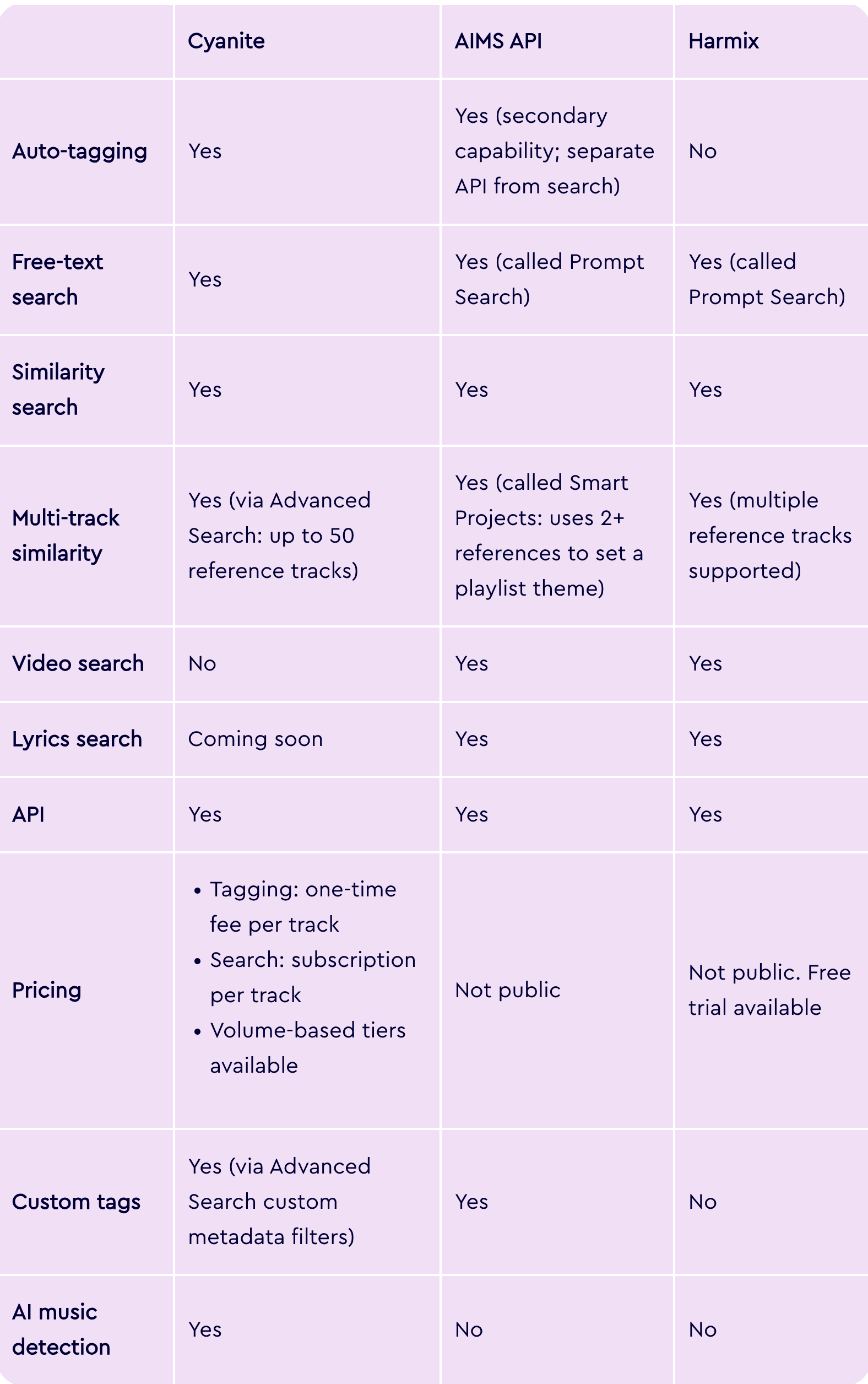
AI software for analyzing music at a glance
Before we dive into the leading AI tagging and search tools, here’s a quick feature overview.
Tool-by-tool breakdown
Cyanite
Cyanite serves over 200 music companies and 200,000 artists worldwide. It’s the only tool in this group that combines auto-tagging and search in a single end-to-end workflow, with audio that’s processed exclusively on EU-based servers and never used to train external AI models.
How you can get started with Cyanite:
- Via API integration into proprietary platforms
- Through the Cyanite web app, with no development required
- Via a Tagging Export, delivered as a CSV or Google Spreadsheet, for teams that need tagged metadata without building a full integration
We also integrate natively with major catalog management systems, including:
- SourceAudio
- Synchtank
- Reprtoir
- Harvest Media
- Cadenzabox
- Soundminer
- MusicMaster
Cyanite's Key features:
- Auto-Tagging: Analyzes the full audio of each track and generates structured metadata across 23 output categories, including genre and sub-genre, mood, character, movement, energy level, emotional dynamics, instrumentation, voice presence, BPM, key, meter, valence, arousal, musical era, and brand values, among others. Tags are applied consistently across the entire catalog, making legacy material and new releases equally searchable.
- Similarity Search: Finds tracks in your catalog that are sonically similar to a reference. References can be a track from your library, a YouTube link, or a Spotify preview. Library and YouTube tracks are analyzed in full. Similarity Search can be filtered by genre, key, BPM, and voice presence, and supports segment-based search so teams can match specific moments within a reference track rather than the full recording.
- Free Text Search: Allows teams to search for songs using natural language prompts, including full sentences, sync briefs, scene descriptions, or creative directions in any language. The system interprets semantic meaning and matches intent to sound.
- Advanced Search: An API-only add-on that extends both Similarity and Free Text Search with:
- Multi-track similarity using up to 50 reference tracks simultaneously
- Similarity scores per track and segment
- Custom metadata filters
- Most relevant segment
- Up to 500 results per query
- Auto-Descriptions: Generates concise, neutral summaries of how each track sounds. These are derived entirely from audio analysis without relying on external language models, giving teams immediate context without having to listen first.
- Visualizations: Displays analyzed metadata as interactive graphs per track, covering genre, mood, energy, instrument presence, and voice presence. Available in the web app and buildable via the API.
-
- AI Music Detection: Analyzes audio and delivers a probability score estimating the likelihood of AI generation by systems such as Suno, Udio, or ElevenLabs. Available via a new REST API.
Read more: From upload to output: how Cyanite turns audio into reliable metadata at scale
Cyanite is best suited for…
A broad range of catalog-intensive organizations that need tagging and search connected in a single scalable workflow.
- Music licensing platforms that need to tag large catalogs, enable faster brief responses, and surface relevant tracks from across their repertoire. For example, Melodie Music uses Cyanite to combine sound-based search with contextual metadata, helping teams find suitable tracks quickly while prioritizing local artists.
- Music libraries that want to embed Similarity Search and Free Text Search directly into their own platforms via API. For instance, Marmoset uses Cyanite to power sound-based search within its platform, improving how tracks are indexed and discovered as new content is ingested.
- Music tech platforms and streaming services that need a sound-based recommendation and personalization layer without building their own AI infrastructure. Thematic, for example, uses Advanced Search for personalized discovery, and you can read here how Anghami has partnered with Cyanite to improve music recommendations at scale.
- Distributors and record labels that need consistent metadata applied to high-volume incoming tracks.
- Audio branding agencies that use mood, character, and brand value tags to align music with brand identity.
Teams without developer resources can start with the web app or a Tagging Export, while those building products or embedding search into their own platforms integrate via API.
Learn more: Find all the API documentation here.
Cyanite's Limitations:
- Advanced Search requires developer resources. Teams without technical capacity cannot access Advanced Search features through the web app.
- Spotify references use 30-second previews only. Spotify only gives a 30-second snippet, so when you use a Spotify track as a similarity reference, only those 30 seconds are analyzed.
- Video search is not available. We don’t currently support video-to-music matching as a search input.
- Highly specific taxonomies still require human input. Context-driven tags such as film-specific categories, usage intent, or campaign labels cannot be generated reliably from audio alone and are better handled manually. We recommend a hybrid approach for these cases.
- Spotify Audio Features are not replicated. We don’t offer equivalents of Spotify-style attributes such as danceability or acousticness. Our taxonomy is built around audible musical characteristics rather than behavioral or platform-derived signals.
Pricing model:
Our pricing is structured around catalog size rather than query volume, which is a meaningful distinction for teams evaluating long-term infrastructure costs.
Tagging is billed as a one-time fee per track. Search is billed as a recurring subscription per track. Both use volume-based tiers, meaning the cost per track decreases as catalog size grows. Search queries are unlimited for both Similarity Search and Free Text Search, so costs don’t increase with usage.
Auto-Tagging and search can also be purchased independently. For example, many teams start with search alone and add tagging later.
This model provides cost predictability at scale, which helps teams evaluating infrastructure rather than a point solution. Usage-based pricing, where costs grow with query volume, can be harder to forecast as teams and catalogs expand.
To get an estimate based on your catalog size, take a look at our pricing calculator.
2. AIMS API
AIMS is an AI-powered music search platform built around audio-based technology.
Unlike systems that rely primarily on metadata, AIMS analyzes the audio signal directly to generate embeddings. These capture musical traits like rhythm, melody, and style. Search results are derived from those embeddings rather than from tags or text labels assigned to tracks.
AIMS is available in three ways:
- Via API integration into proprietary platforms
- As a plugin on existing catalog management platforms, including Synchtank, DISCO, Cadenzabox, and Harvest Media
- As a standalone web app for teams that want to get started without any development work
AIMS' Key features:
- Prompt Search: Natural language search that accepts sync briefs, scene descriptions, mood references, and cultural or pop culture references. Searches cover the full catalog, including alternate versions and submixes.
- Similarity Search: Finds tracks based on audio similarity to a reference. Accepts YouTube, Spotify, Apple Music, and TikTok links, uploaded audio files, or tracks from within the catalog. Includes segment search, BPM prioritization, vocal ignore, and highlight markers that show where in a result the similarity is strongest.
- Smart Projects and Dynamic Playlists: Uses multiple reference tracks to establish a playlist theme and generates an ongoing stream of on-theme tracks that automatically updates as new music is added to the catalog.
- Lyrics Search: Finds music based on the meaning and sentiment of lyrics rather than exact word matches. For catalogs without existing lyric data, AIMS offers AudioShake’s transcription technology to generate lyrics automatically.
- Video Search: Matches music to a video clip that’s up to one minute long, analyzing visual tone, pace, and emotion.
- Tagging: Audio-based auto-tagging with support for custom tags, multiple languages, and export to DSPs and UGC platforms. Available as a standalone product or connected to the Similarity Search API via webhook.
AIMS API is best suited for…
The standalone AIMS Platform is particularly well-suited to sync teams wanting immediate access to all search features without development resources. But, they need to be comfortable working within the AIMS interface.
Teams that want to surface AIMS capabilities through their own platform or client-facing website will need developer capacity to integrate via API.
AIMS' Limitations:
- Tagging is a secondary capability. AIMS’ core technology is audio similarity rather than tagging. The two operate as separate APIs that AIMS needs to connect on the backend.
- No similarity score is exposed via the API. Results are ranked by relevance but no numerical confidence value is returned, which limits developer control over how results are weighted or displayed in custom interfaces.
- Teams integrating via API must build their own front-end interface from scratch. AIMS provides no UI component library for this purpose, though the demo application and code samples are available as reference.
- Ranking behavior is fixed. Results are always sorted by descending similarity. It’s not possible to inject business logic, such as prioritizing new releases or boosting specific tracks in results.
- File format and size constraints apply to audio uploads. Supported formats are MP3, WAV, and AIF(F), with a 120 MB file size limit. Segment search is capped at 60 seconds.
- AI music detection is not available. AIMS does not offer technology to flag AI-generated music in your catalog or new submissions.
Pricing model:
Not publicly available. Pricing is available upon request directly from AIMS.
3. Harmix
Harmix is an AI music search platform built for production music companies, TV and movie productions, record labels, and publishers. Its core focus is search: helping teams find the right track from their catalog using natural language, audio references, video input, or lyric-based queries. A standalone auto-tagging product is not offered.
Harmix is available in two ways:
- Via API integration into proprietary platforms
- As a web platform that connects to your library without any coding required
Key features:
- Prompt Search: Natural language search based on the sonic characteristics of the music you need. Accepts descriptions of instrumentation, mood, tempo, and context, as well as sync briefs and reference artists.
- Similarity Search: Finds tracks based on audio similarity to one or more reference tracks. Accepts audio links and uploaded files, with segment selection to narrow the reference to a specific part of a track.
- Lyrics Story Search: Finds music based on the thematic meaning and narrative of lyrics rather than sonic qualities. Accepts keywords or a description of the story or emotional arc the song should convey.
- Video Search: Analyzes a video or image input and finds music that matches the mood and visuals.
Harmix is best suited for…
The web platform suits internal sync teams and music supervisors who want immediate access to AI search without development resources.
Teams wanting to surface capabilities through their own platform or client-facing website will need developer capacity to integrate Harmix via API.
Limitations:
- No auto-tagging or AI music detection product. Harmix doesn’t offer standalone tagging or AI music detection infrastructure. Teams that need to generate or enrich metadata at scale require a separate solution for that workflow.
- Metadata does not affect search results. According to the API documentation, metadata fields are used only for filtering, not for influencing search relevance.
- File format and size constraints apply to audio uploads. Supported formats are MP3, WAV, and M4A, with a 120 MB file size limit.
- The “Highlights” feature requires manual activation. It shows which segment of a result is most similar to the reference, but it’s not enabled by default. Teams need to contact Harmix support to activate.
Pricing model:
Not publicly available but can be requested via a scheduled demo. Teams that want to test the product before committing can use a free trial. Harmix also runs a referral program for existing customers and partners, offering 100% of a referred client’s first-month fee as cash or account credit.
4. Music.AI
Music.AI is an audio intelligence platform covering stem separation, chord recognition, beat detection, and lyrics transcription. Cyanite integrates with Music.AI as a third-party addition, making AI tagging accessible directly within Music.AI workflows without a separate integration.
AI infrastructure vs music CMS systems
A common source of confusion when evaluating music AI tools is the difference between AI tagging and search infrastructure vs. music content management systems. They solve different problems, and understanding that distinction helps clarify which category you actually need.
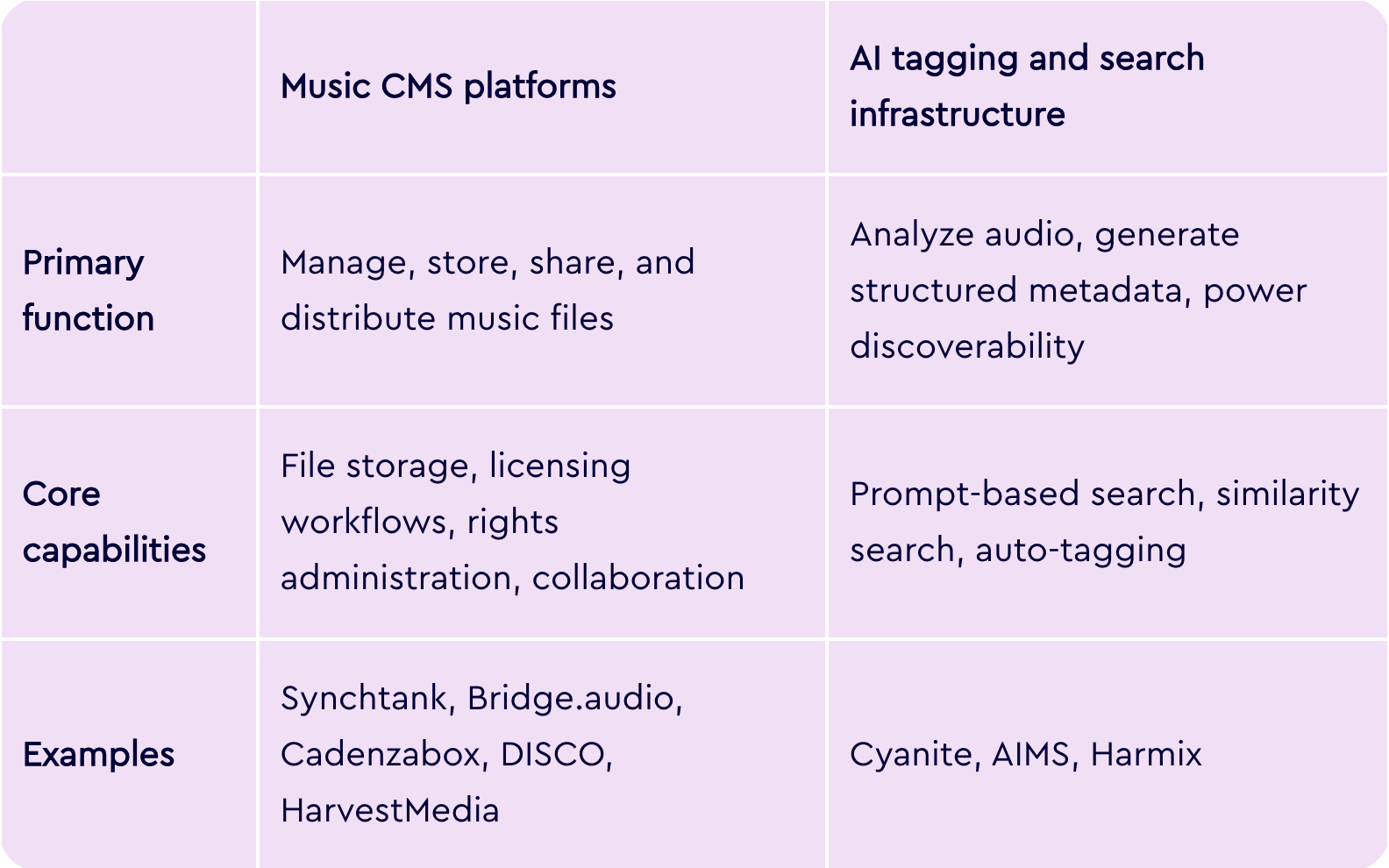
Bridge.audio is a good example of why this distinction matters. It’s a music workflow platform that combines catalog management, AI-assisted tagging, sync discovery, and file sharing in one place. Cyanite is different, since it focuses exclusively on the analysis and search layer, going deeper on tagging, sound-based search, and API-level infrastructure for embedding discovery into other products.
Cyanite is not a CMS, nor is it designed to replace one. It’s directly integrated into and supports many of the major CMS platforms used across the industry.
For teams using DISCO, for example, Cyanite’s tags can be exported as a CSV and re-imported into the platform. For most organizations, the two categories work in combination: the CMS handles operations, and AI like Cyanite handles the intelligence layer that makes the catalog searchable.
Read more: Music CMS solutions compatible with Cyanite
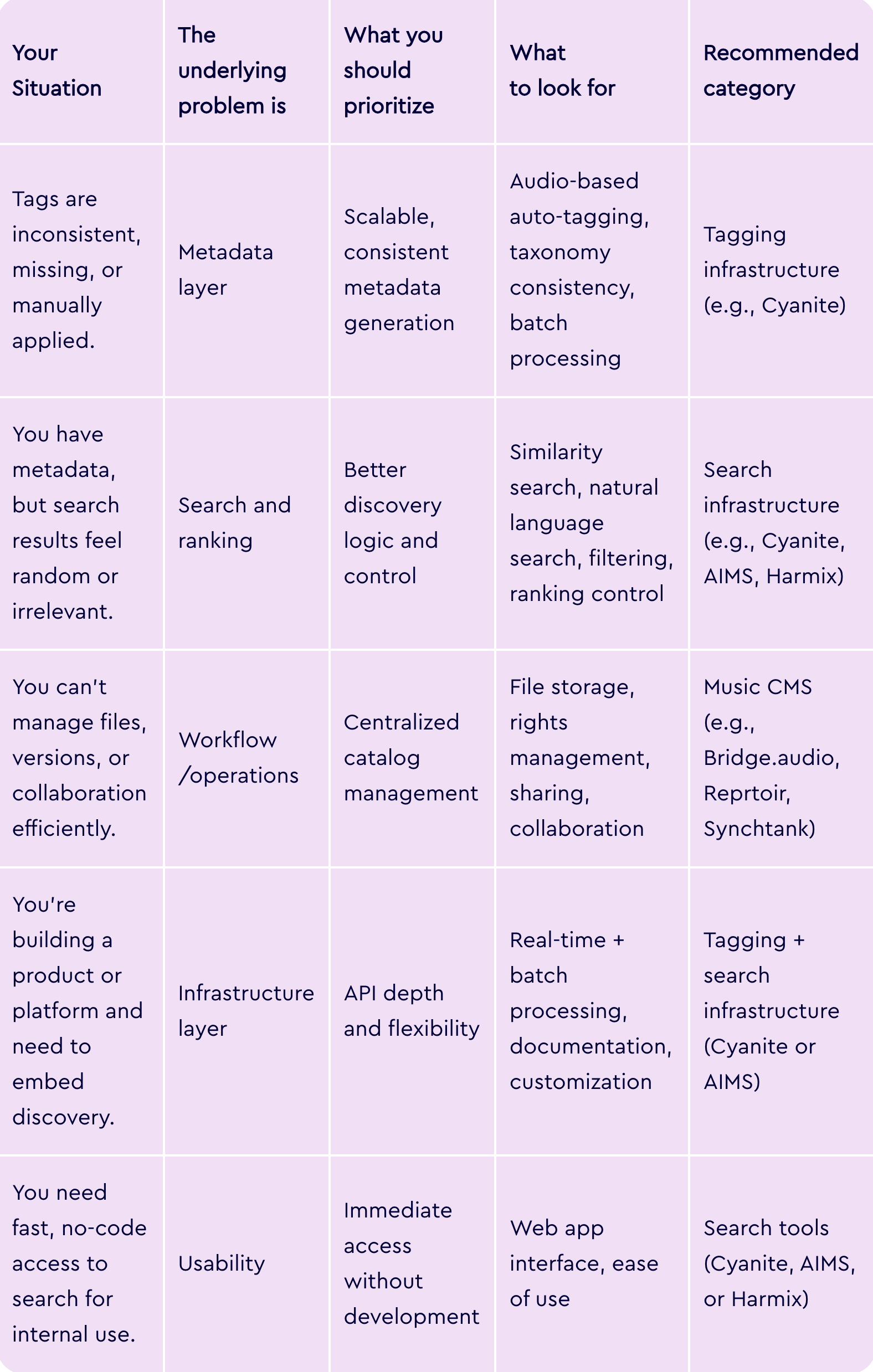
So, which tool is right for you?
The right system depends on what your core workflow actually requires.
If your catalog is hard to search, the issue is rarely search itself, but the metadata powering it. Search quality is downstream of metadata quality, so the first step is to identify where your discovery workflow actually breaks.
See what Cyanite can do for your catalog
The best way to evaluate Cyanite is to try it on your own music. Sign up for free, upload a set of tracks, and see how the tagging and search perform before making any commitment.
FAQs
Q: What software do music publishers use for metadata generation?
A: Most publishers use AI-based auto-tagging that analyzes audio directly rather than relying on manually entered data. Cyanite is widely used across the industry, with clients like BMG and APM Music.
Q: Can AI understand a sync brief and find matching tracks?
A: Yes. Free text search systems can interpret natural language briefs, including scene descriptions and mood references, and match them to tracks in your catalog. Cyanite’s Free Text Search works in any language and understands semantic meaning rather than requiring exact keyword matches.
Q: How do I clean up inconsistent music tagging across a large catalog?
Audio-based auto-tagging applies the same analysis logic to every track regardless of when it was added or who tagged it. This is the most reliable way to bring consistency to legacy catalogs with uneven or incomplete metadata.
Q: Is there software that lets me search my music catalog with prompts?
A: Yes. Cyanite, AIMS, and Harmix all support natural language search. Cyanite’s Free Text Search accepts full sentences, sync briefs, and scene descriptions in any language.
Q: What’s the best AI for analyzing music mood and genre?
A: Cyanite’s taxonomy covers 13 simple moods, 131 advanced moods, 23 main genres, 58 sub-genres, and over 5,000 free genre tags, all generated from audio analysis rather than user behavior or existing metadata.
Q: What’s the most accurate software for finding similar songs in a music library?
A: Accuracy depends on how deeply a system analyzes audio. Cyanite compares tracks across multiple acoustic dimensions simultaneously. It also supports segment-based search and multi-track references, filtering for genre, key, BPM, and voice presence to refine results further.