
Whether you’re already managing your music catalog in a CMS or evaluating which platform best fits your needs, having the right tools for tagging and searching your music can make a big difference.
Cyanite integrates with leading music catalog management platforms, bringing AI-powered tagging and music search directly into the systems where teams already work. This reduces manual metadata work, makes music easier to discover, and helps teams keep more of their tagging and search workflows within their existing platform.
In this article, we’ll look at which music CMS platforms integrate with Cyanite, what features are available in each, and how to get started.
What is music catalog management software?
Music catalog management software, also known as a music CMS, brings a company’s music assets and catalog data into one system. It connects recordings and compositions with metadata such as titles, credits, identifiers, ownership, and rights information, making the catalog easier to maintain and search.
These platforms serve different needs across the music industry. For example, Synchtank combines music catalog management with rights administration, licensing, and royalty workflows, while Reprtoir brings together catalog management, contracts, royalty accounting, and music sharing. Other platforms focus on areas such as production music licensing, music discovery, and radio programming.
Music publishers, record labels, production music libraries, sync teams, and broadcasters can choose a CMS based on the workflows that matter most to their business.
Why add AI tagging and search to your music catalog management software?
Managing a music catalog involves organizing new releases, finding the right tracks for creative briefs, and making catalogs easily searchable for colleagues and clients. Integrating AI-powered music analysis and search directly into a CMS can make these workflows significantly easier:
- Enrich your catalog automatically. Generate consistent descriptive metadata, including genre, mood, instrumentation, and energy, across your existing catalog and newly added tracks. This reduces manual tagging and makes your music easier to organize and discover.
- Find the right music faster. Go beyond traditional metadata filters with Similarity Search, which lets teams find tracks that sound like a reference song. Prompt Search also lets them search using creative briefs, such as “uplifting indie pop with female vocals.”
- Keep your workflows in one place. Instead of moving music between separate tools for analysis and discovery, teams can use supported Cyanite capabilities directly within their CMS. This helps streamline catalog preparation, music search, and pitching.
The exact capabilities depend on the CMS integration, but the underlying benefit is the same: making music easier to understand, manage, and discover within the tools your team already uses.
Read more: From upload to output: how Cyanite turns audio into reliable metadata at scale
Which music catalog management platforms integrate with Cyanite?
Cyanite integrates with a range of music catalog management platforms, allowing teams to access AI-powered music analysis and search within the software they already use.
Each integration supports a different set of Cyanite features, from automated tagging and track descriptions to Similarity Search, Prompt Search, and music visualizations.
Below, you’ll find an overview of the available integrations, the features each platform supports, and how to get started.
| Platform | Integration | Auto-Tagging | Auto-Descriptions | Similarity Search | Prompt Search | Visualizations | AI Music Detection |
|---|---|---|---|---|---|---|---|
| Synchtank | Native | Yes | Yes | Yes | Yes | — | — |
| Reprtoir | Native | Yes | Yes | Yes | Yes | Yes | — |
| SourceAudio | Native | Yes | Yes | Yes | Yes | — | Yes |
| Harvest Media | Native | Yes | Yes | Yes | Yes | — | — |
| MusicMaster | Native | Yes | — | — | — | Yes | — |
| Cadenzabox | Native | Yes | Yes | Yes | Yes | — | — |
| deliver.media | Native | Yes | Yes | — | — | Yes | Yes |
| DISCO | No native integration | Yes Via exported file | Yes Via exported file | — | — | — | Yes |
- Auto-Tagging analyzes audio to generate consistent metadata such as genre, mood, instrumentation, and energy across a catalog.
- Auto-Descriptions generates a short, neutral summary of how a track sounds based on Cyanite’s audio analysis.
- AI Music Detection analyzes audio to identify structural patterns inherited by generative AI models and supports you in assessing whether a track may be AI-generated.
- Segmentation analyzes audio to identify where one musical section ends and the next begins, and returns the timestamps of those boundaries.
- Similarity Search finds tracks that sound similar to a reference track, with filters to narrow the results.
- Prompt Search lets you search for music using natural language, including sync briefs and creative directions.
- Visualizations display analyzed music data in graphs that make characteristics such as mood, genre, and energy easier to understand and compare.
Synchtank + Cyanite
What is Synchtank?
Synchtank centers catalog management around rights and commercial data. Its configurable modules cover areas such as licensing, royalty processing, and asset management, allowing companies to build workflows around their repertoire and rights information.
What can you do with Cyanite in Synchtank?
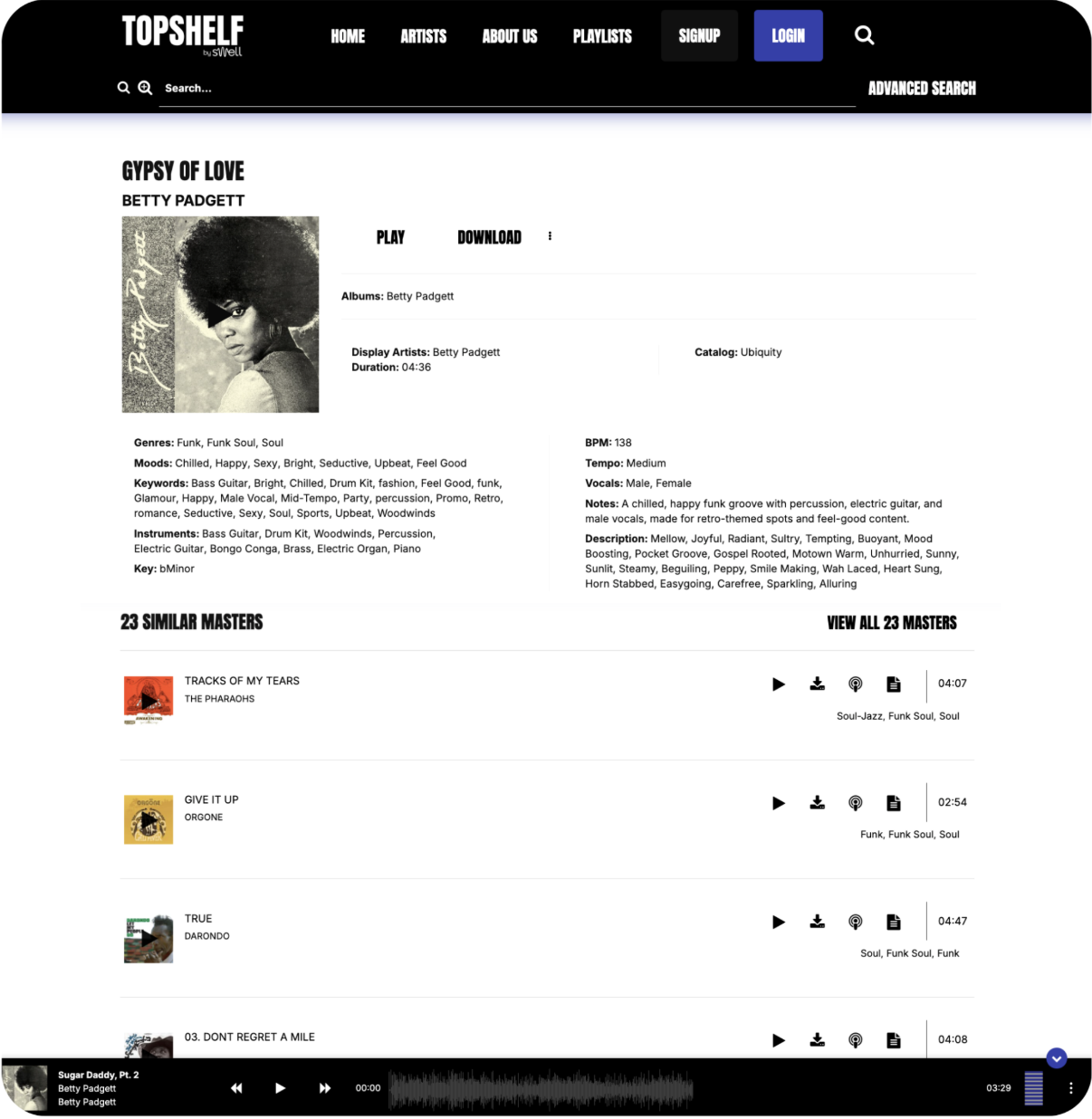
Cyanite is natively integrated with Synchtank, giving users access to Auto-Tagging, Auto-Descriptions, Similarity Search, and Prompt Search within their existing catalog workflow.
What customers say
“When a producer says, ‘I love that track. Find me 50 more just like it,’ Similarity Search finds music on albums I’d never think to look at and discovers cues I’d never find through a traditional search. Similarity Search is a shortcut.”
Ryan Neill
CEO at PrimalHouse Music
How to get started
- Contact the Synchtank team to add Cyanite to your Synchtank setup.
- Once Cyanite is active, use Auto-Tagging, Auto-Descriptions, Similarity Search, and Prompt Search directly in Synchtank.
Reprtoir + Cyanite
What is Reprtoir?
Reprtoir brings the operational side of running a music catalog into one workspace. Alongside catalog data, it handles contracts, royalty accounting, music sharing, and release preparation.
What can you do with Cyanite in Reprtoir?
Cyanite is natively integrated with Reprtoir through Audio AI, giving users access to Auto-Tagging, Auto-Descriptions, Similarity Search, Prompt Search, and Visualizations within their existing catalog workflow.
How to get started
- Contact the Reprtoir team to add Audio AI, its Cyanite-powered feature set, to your account.
- Once Audio AI is active, upload your music to Reprtoir to use Cyanite’s features in your workspace.
SourceAudio + Cyanite
What is SourceAudio?
SourceAudio is a music catalog management platform that combines catalog hosting, search, licensing, and distribution. It also provides tools for managing the metadata used to organize music and make it easier to find.
What can you do with Cyanite in SourceAudio?
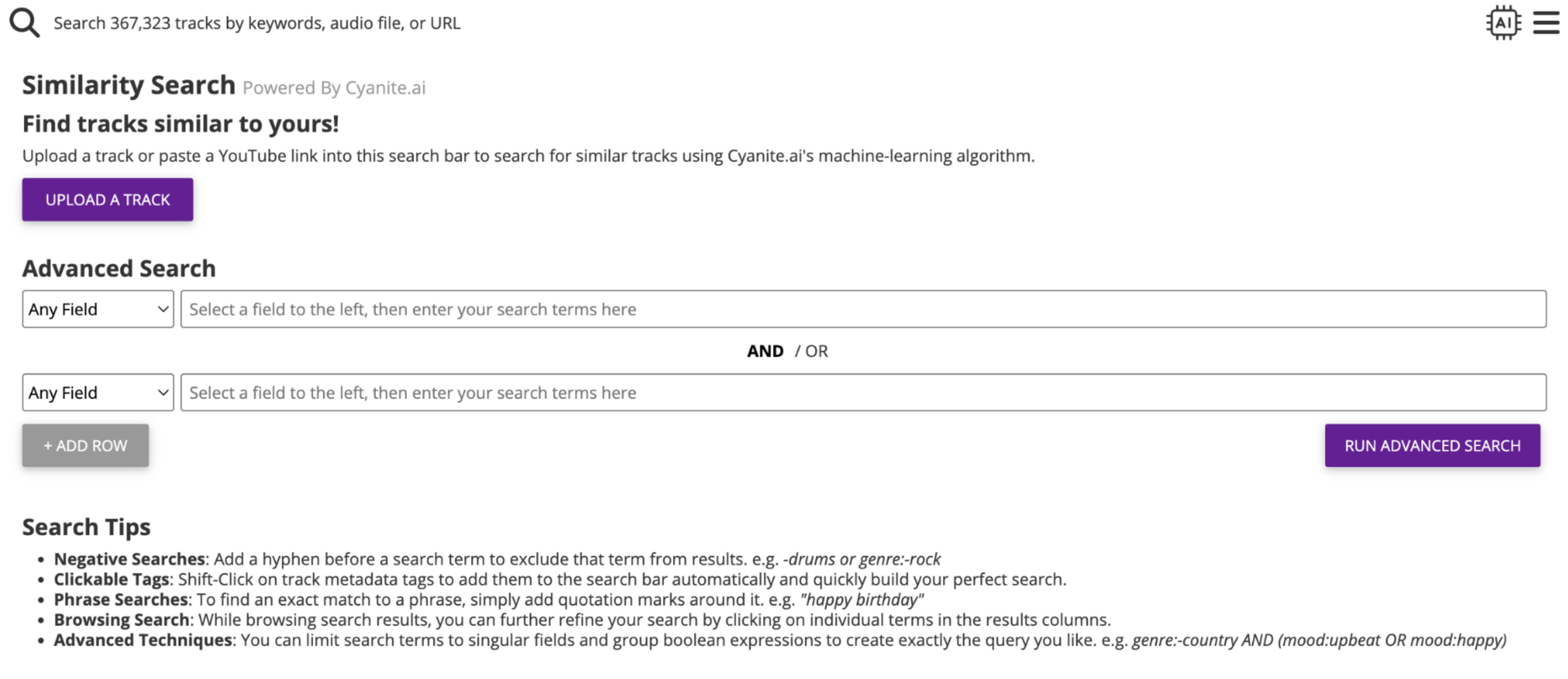
Cyanite is natively integrated with SourceAudio, giving users access to Auto-Tagging, Auto-Descriptions, Similarity Search, and Prompt Search within their existing catalog workflow.
How to get started
- Get in touch with the Cyanite team to activate the integration for your SourceAudio catalog.
- Once activated, Cyanite analyzes your audio and adds AI-generated metadata to your catalog.
- Use the new tags and Cyanite’s search features in SourceAudio to find and pitch tracks.
Harvest.music + Cyanite
What is Harvest.music?
Harvest.music provides cloud-based infrastructure, applications, and APIs for managing music files and metadata used in sync and licensing workflows. Music libraries, publishers, and labels use it to run branded music search websites for their clients, deliver tracks and metadata to sub-publishers and partners from a single upload, and manage licensing and royalty statements.
What can you do with Cyanite in Harvest.music?
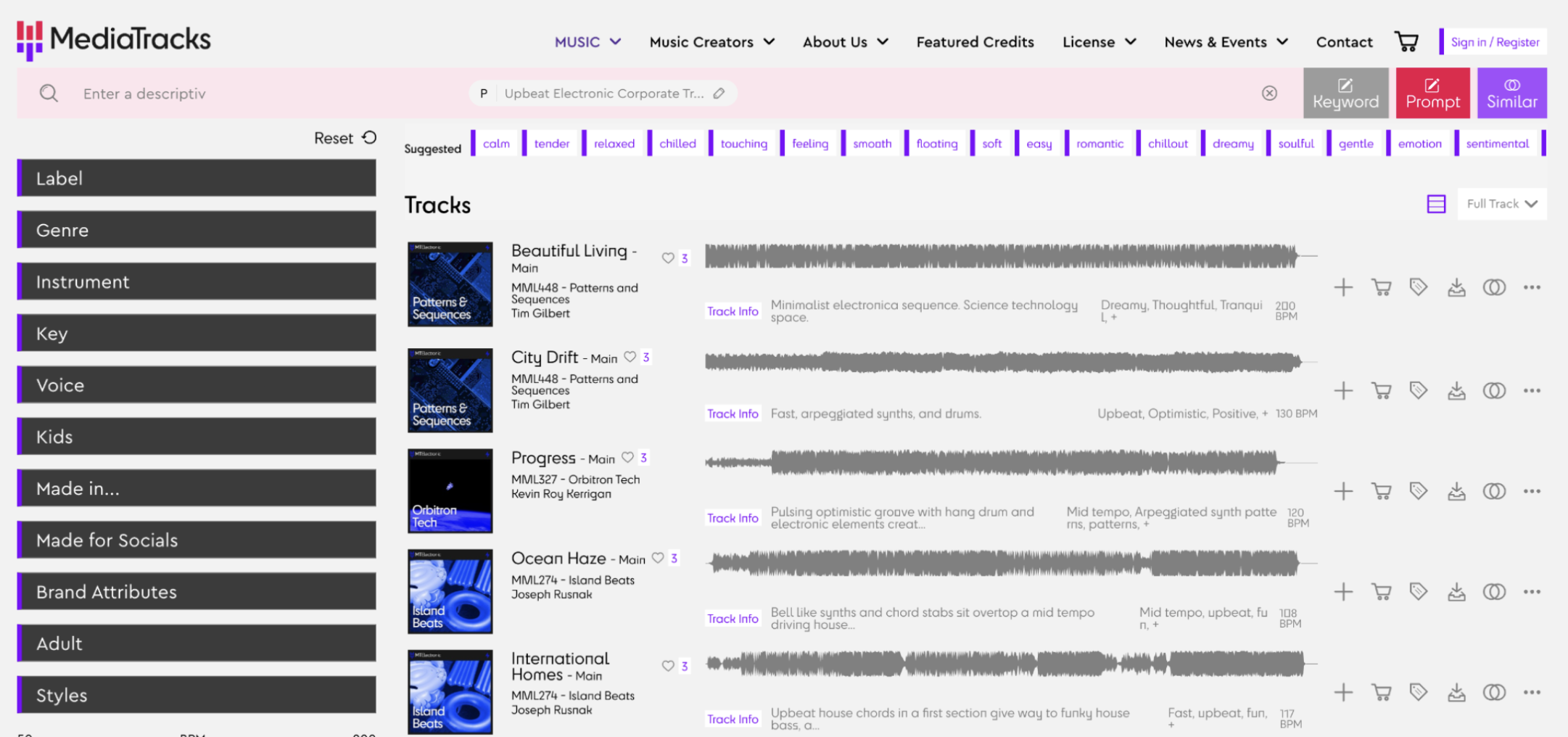
Harvest.music partners with Cyanite to offer Auto-Tagging, Auto-Descriptions, Similarity Search, and Prompt Search. Cyanite is also natively integrated into FLEX, Harvest.music’s customizable music search platform.
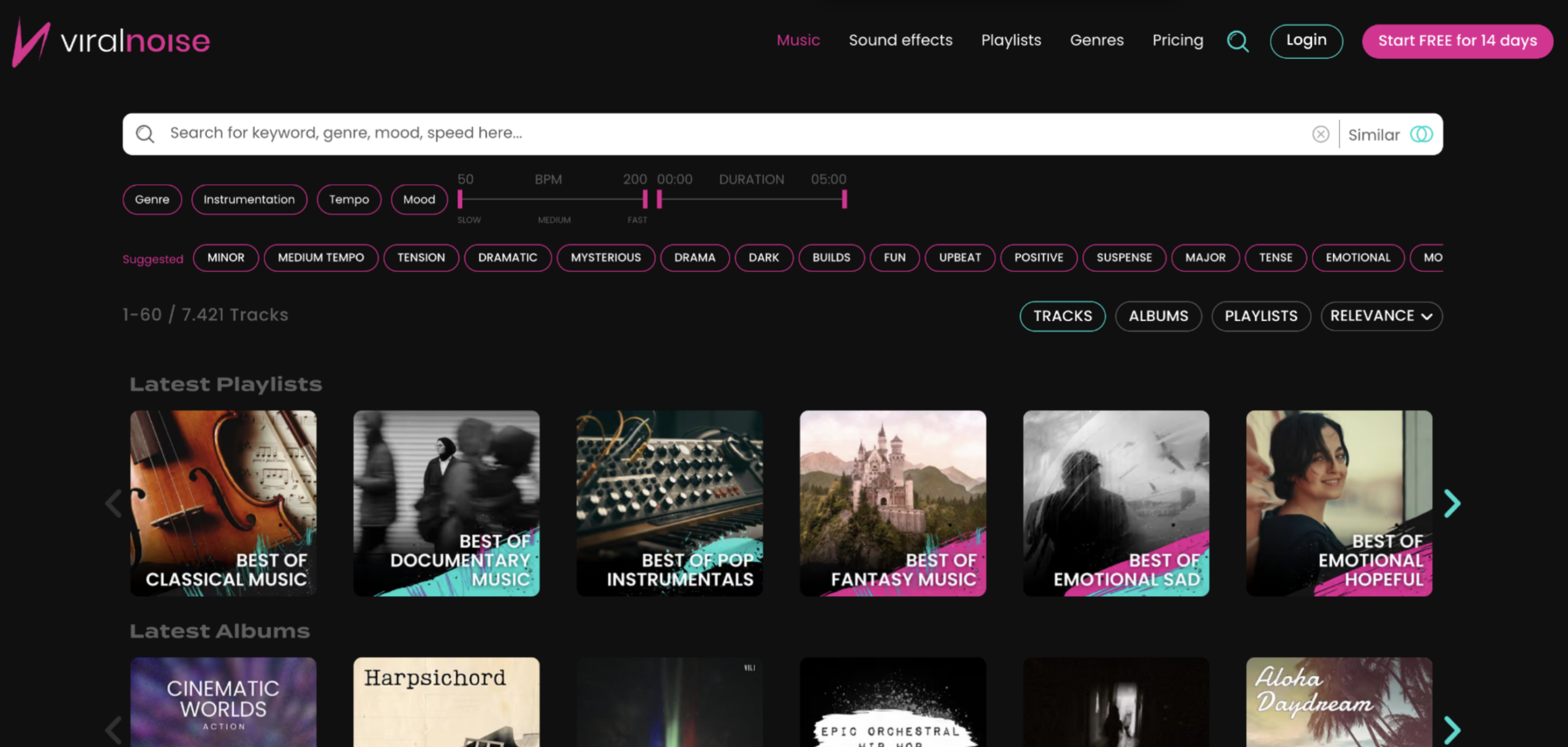
Human Librarian shows Cyanite-powered music search within a Harvest catalog. Users can browse by mood, genre, movement, and other tags, describe the sound they want in their own words, or use a reference track to find similar music.
What customers say
“The integration of Cyanite into Harvest Media’s FLEX platform helps us explore the MediaTracks catalog and uncover tracks that might otherwise be overlooked. It makes it easier to find music that matches the mood and direction of a creative brief, while giving our clients a more intuitive way to discover what we have to offer.”
William Saunders
Co-Owner and Creative Director of MediaTracks
“Cyanite has truly become an essential part of Haverst.music’s clients’ workflow as our catalog continues to grow. Navigating tens of thousands of tracks can be overwhelming, but Cyanite’s Similarity Search makes it simple and fast.”
Alec Puro
Founder & CEO of Viralnoise
How to get started
- Get in touch with the Cyanite team to activate the integration for your Harvest.music catalog.
- Once activated, use Cyanite’s tagging and search features with the music in your Harvest.music catalog.
MusicMaster + Cyanite
What is MusicMaster?
MusicMaster is the industry-standard software for professional music scheduling. It offers flexible rule-based planning, seamless integration with automation systems, and scalable tools for managing music programming across single radio stations or complex broadcast networks.
What can you do with Cyanite in MusicMaster?
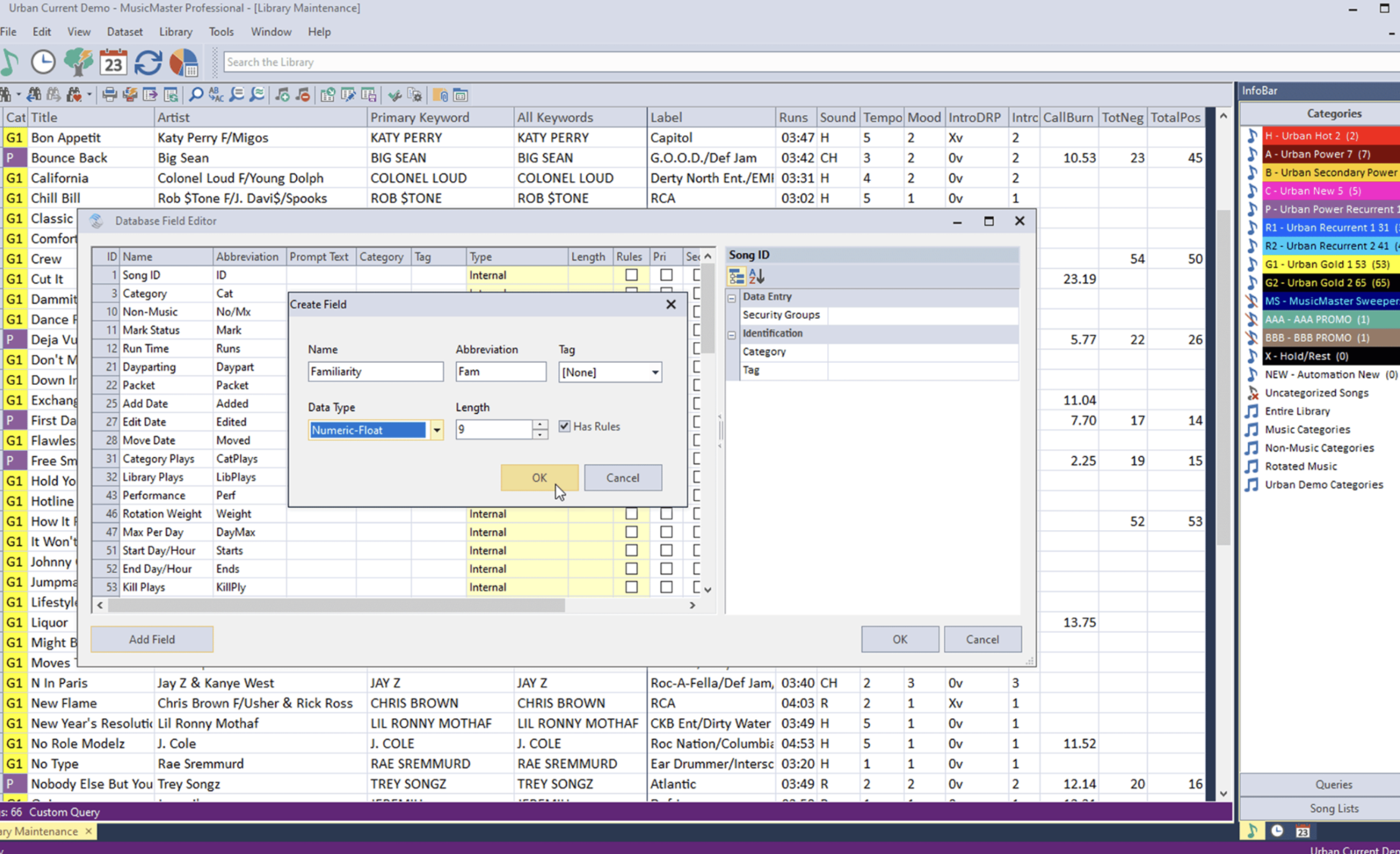
Cyanite opens up new data-driven opportunities for playlist design, helping broadcasters and content creators create listening experiences that are more targeted, engaging, and emotionally resonant. Music databases are enriched with detailed, structured metadata generated by Cyanite’s AI Music Tagging technology, including emotional profiles, mood dynamics, tempo, BPM, and musical key.
How to get started
- The integration of Cyanite is available through MusicMaster Connected Services.
- Please contact the MusicMaster team to discuss requirements, integration options, and implementation approach.
- Once the integration is configured, metadata generated by Cyanite is added to the music database seamlessly.
Cadenzabox + Cyanite
What is Cadenzabox?
Cadenzabox, developed by Idea Junction, is a white-label system for building branded music libraries. Each library can have its own interface, with Cadenzabox handling the underlying music catalog and data.
What can you do with Cyanite in Cadenzabox?
Cyanite is integrated with Cadenzabox, giving libraries access to Auto-Tagging, Auto-Descriptions, Similarity Search, and Prompt Search.
MusicMind Co. uses Cyanite with Cadenzabox to add AI-powered search to its music library. The video shows how users can search its catalog using Cyanite directly within the branded MusicMind interface.
What customers say
“I can’t say what a gamechanger Cyanite has been for O/S. Literally hours of tedious work replaced with a click of a button. Tagging is almost immediate, accurate, and more importantly, consistent and thorough. Love it!”
Duncan Schwier
Head of Music Production at OUT/STANDARD
How to get started
- Get in touch with the Cyanite team to activate the integration for your Cadenzabox library.
- Once activated, use Cyanite’s tagging and search features in your Cadenzabox setup.
deliver.media + Cyanite
What is musiccompanion. by deliver.media?
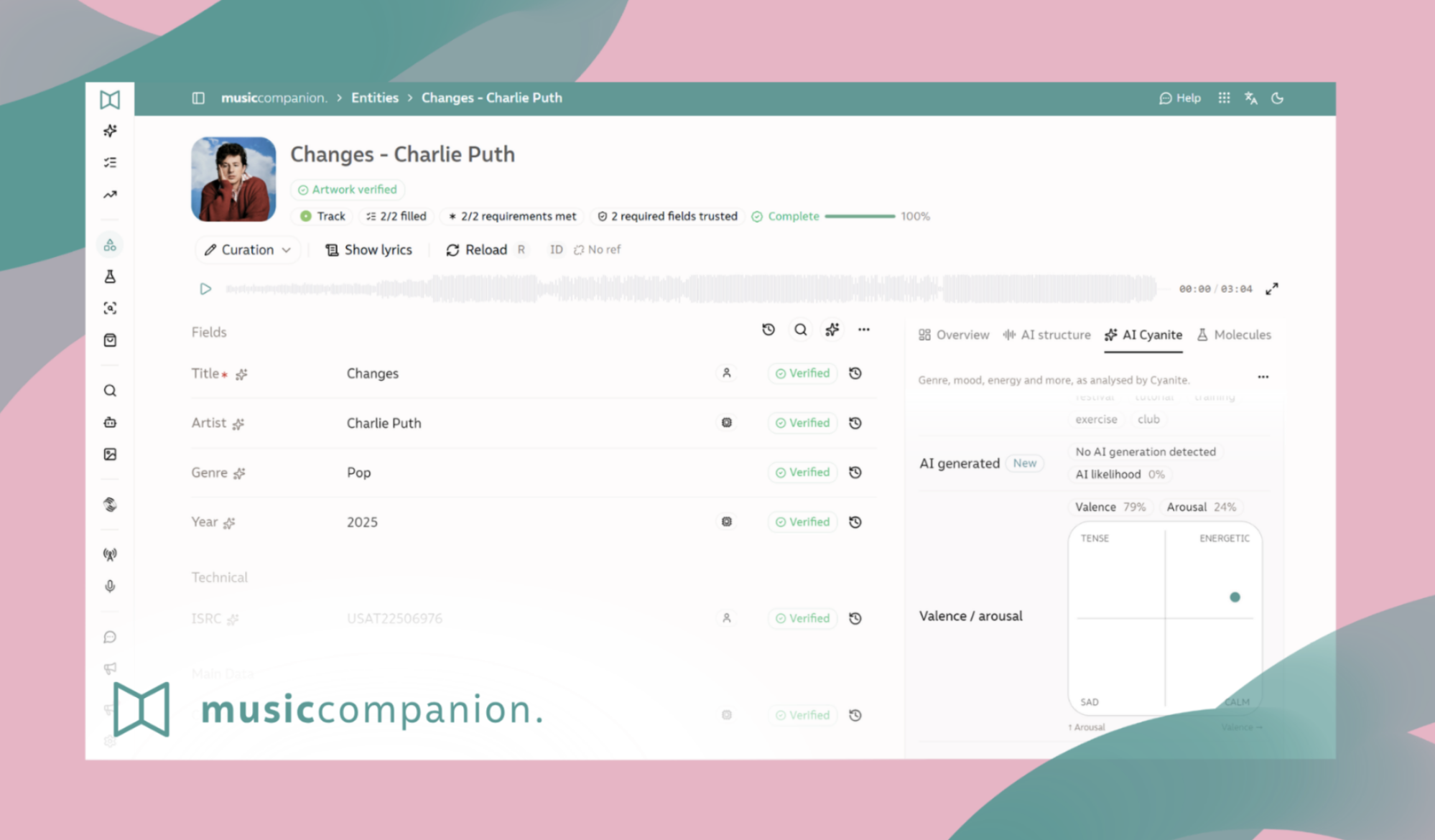
musiccompanion. is an AI-powered platform by deliver.media that helps radio stations automatically enrich their music catalogs with metadata, discover the latest music charts, optimize music programming, and create AI-generated voice content for radio broadcasts.
What can you do with Cyanite in musiccompanion?
Through Cyanite’s AI-powered music analysis and AI Music Detection integrated into musiccompanion., radio stations can automatically enrich their music catalogs with detailed information about mood, genre, energy, tempo, and instrumentation. They can also identify potentially AI-generated music.
These insights help music programmers better understand their catalogs, make informed programming decisions, create more consistent playlists, and streamline music scheduling through integrations with MusicMaster.
How to get started
- Contact the deliver.media team or visit their website and choose the plan with AI song tags included.
- Subscribe online and get access within one working day.
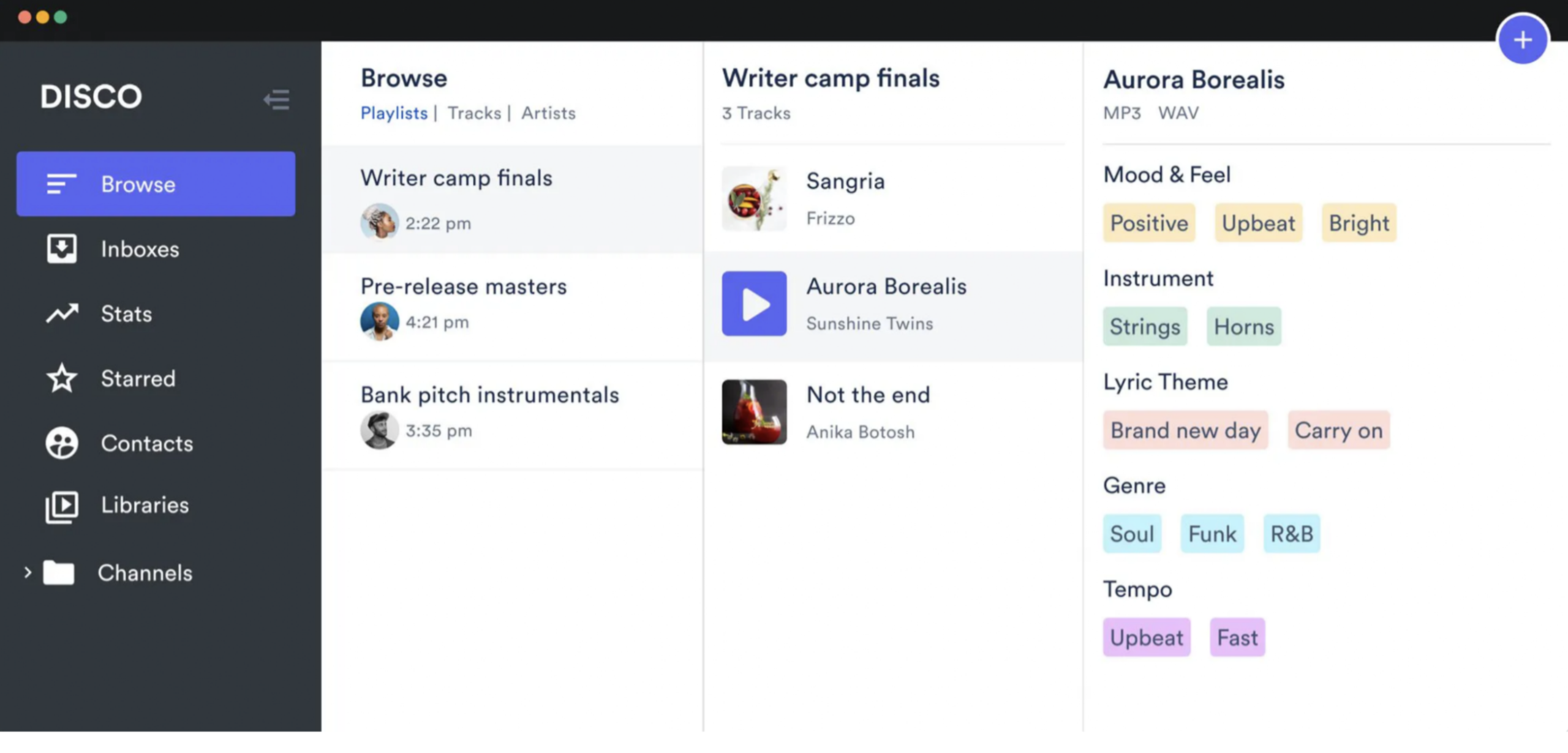
Unlike the platforms above, DISCO doesn’t currently offer a native Cyanite integration.
However, DISCO users can still enrich their catalogs with Cyanite’s AI-generated metadata through a CSV export and import workflow. This allows teams to add Cyanite’s music analysis to their existing DISCO catalogs, although it requires additional steps compared with a native integration.
“DISCO is an important part of how we manage and work with our music catalog. Enriching it with Cyanite’s audio-derived metadata gives us an additional layer of detail that helps us organize our music and make it easier to find for sync workflows.” Miriam Rech, Sync Manager at Meisel Music
For step-by-step instructions, read How to tag your DISCO catalog with Cyanite.
How to choose music catalog management software for your catalog
Consider these four factors when comparing platforms:
Catalog size
Consider how your catalog is organized and how you’ll maintain it as it grows.
A radio group sharing music across stations has different requirements from a publisher consolidating separate collections. For example, MusicMaster supports central libraries for broadcasters, while Synchtank has documented large-scale catalog consolidation. Think about how your collection is structured and whether the software can accommodate changes to it over time.
Team setup
Look at how work is divided across your team and who needs access to your music. If several departments work with the same catalog, shared access and permissions become relevant.
Synchtank, for example, supports configurable access to different libraries. If your clients need to find music independently, Cadenzabox lets you provide a branded, searchable library.
Look at how each platform fits the way your team collaborates and shares music.
AI features needed
Start with the tasks that take up your team’s time.
If you’re processing new releases, Auto-Tagging and Auto-Descriptions can reduce the work involved in preparing tracks for your catalog. For sync teams handling creative briefs, the ability to search using a reference track or a written description may be more relevant. Visualizations offer another way to explore your music and understand its characteristics.
Integration route
Check how Cyanite is activated on your platform.
Synchtank and Reprtoir customers purchase Cyanite directly through the CMS provider. SourceAudio, Harvest Media, and Cadenzabox customers contact Cyanite to activate the integration. MusicMaster provides Cyanite through On Air’s Vertex Framework. DISCO has no native integration and uses a separate export and import workflow.
If your CMS doesn’t have a native integration, our Web App and API offer other ways to add AI tagging and search without replacing your current system.
Read more: Best AI tools for music tagging and search infrastructure
Start using Cyanite with your music catalog
You now have a clearer picture of which platforms support Cyanite and what you can do with each integration. Explore the features available in your CMS, or use our Web App or API to bring Cyanite into your workflow. Whichever route you take, you can spend less time managing metadata and more time on creative work, like answering briefs and pitching music to clients.
Want to see how Cyanite works with your music? Upload your tracks to our Web App and explore the results.
FAQs
How do I choose music catalog management software?
Consider your catalog’s size, how your team works, and which features you need. Compare platforms based on their core functionality, available Cyanite features, and integration requirements.
Which music catalog platforms integrate with Cyanite?
Which music catalog platforms integrate with Cyanite?
Cyanite has native integrations with Synchtank, Reprtoir, SourceAudio, Harvest Media, MusicMaster, and Cadenzabox. The available features vary by platform.
What’s the difference between an integrated and a supported platform?
A native integration lets you access supported Cyanite features directly within your catalog platform. A supported platform without a native integration uses a separate workflow to receive Cyanite-generated metadata. DISCO, for example, uses a tagging export rather than a native integration.
Can I use Cyanite with DISCO?
Yes. You can use Cyanite’s Auto-Tagging and Auto-Descriptions through a tagging export. Cyanite analyzes your exported tracks and returns the generated metadata in a file formatted for import into DISCO.
Can I use Cyanite through a web app or an API instead of a CMS?
Yes. Our Web App lets you upload and analyze music without a CMS integration. You can review the generated metadata and search your tracks directly in Cyanite. Our API lets developers integrate these capabilities into their own systems.
Do I need a developer to use Cyanite in my catalog platform?
No. Native integrations work without developer support. Depending on your platform, activate Cyanite either through your CMS provider (Synchtank and Reprtoir) or by contacting Cyanite (SourceAudio, Harvest Media, and Cadenzabox). If you want a custom API integration, you will need developer support.