
Last updated on February 24th, 2026 at 04:39 pm
Ready to explore your catalog? Sign up for Cyanite.
As music catalogs grow, finding the right track gets harder. Metadata doesn’t always keep up, but teams are still expected to deliver fast, reliable results.
Libraries, publishers, sync teams, and the technical leads supporting them need systems that make large catalogs easier to understand and search. Cyanite is designed to support that work.
This guide provides a clear, high-level introduction to how Cyanite works and how it’s used in practice, giving teams a simple starting point before diving deeper into specific topics.
Learn more: Explore our FAQs to dig deeper into how Cyanite works.
The problem of scaling modern music catalogs
Once a catalog reaches a certain size, searching it becomes an inconsistent process. Music is described through tags and metadata that were added by different people, at different times, often for different needs. As the catalog grows, those descriptions stop lining up, which makes tracks harder to compare and surface reliably.
Over time, the same song can become discoverable in one context and invisible in another. Familiar tracks tend to show up first, while large parts of the catalog stay beneath the surface simply because their sound isn’t clearly represented in the data.
Scaling a modern music catalog means creating a shared, consistent way to describe sound, so music can be worked with confidently across teams and workflows, no matter how large the catalog becomes.
What Cyanite is (and what it is not)

Cyanite is an intelligent music system that works directly with sound. It analyzes each track and translates what can be heard into structured information that stays consistent across the catalog. That information is used both to tag music automatically and support sound-based search.
Teams can use Cyanite through the web app, integrate it into their own systems via an API, or access it directly within supported music CMS environments.
Cyanite is not a replacement for listening or creative judgment. It doesn’t decide what should be used, pitched, or licensed. It provides a consistent, sound-based foundation that helps teams work with music at scale while keeping human decision-making at the center.
How Cyanite analyzes music
Cyanite analyzes music through sound, not user behavior. Instead of relying on plays, clicks, or listening history, it focuses on the audio itself and produces a consistent, reliable sound description. This means each piece of music enters the system under the same logic, regardless of when it was added or who uploaded it.
Read more: How do music recommendation systems work?
Core capabilities
At its core, Cyanite helps teams organize and work with large music catalogs through music tagging and search. The same audio-based logic applied to every track creates consistent descriptions and keeps music easy to find, compare, and explore, even as catalogs grow.
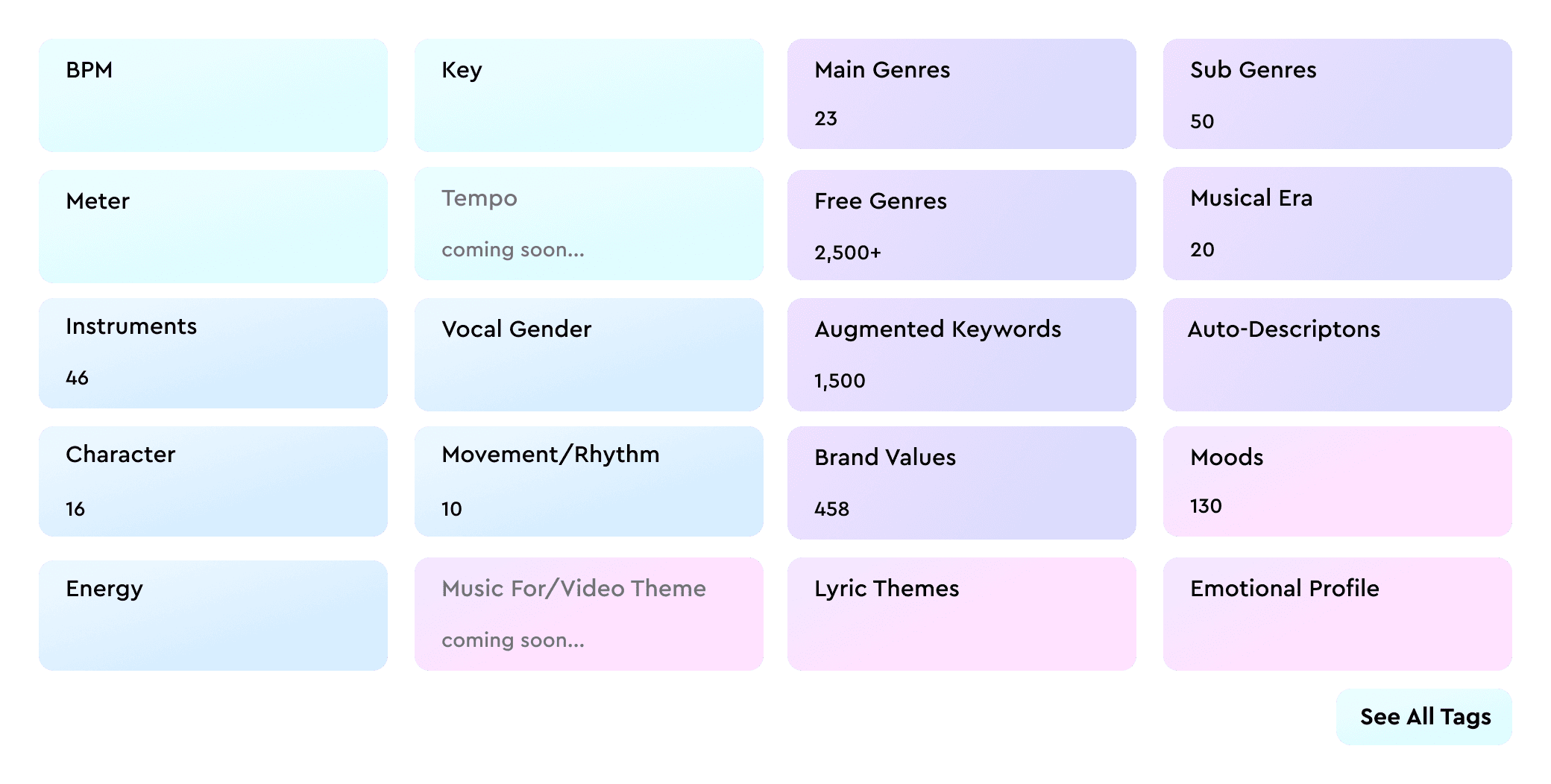
To make large catalogs easier to work with, Cyanite applies consistent labeling based on each track’s full audio.
- Auto-Tagging analyzes the audio to generate metadata like genre, mood, and tempo.
- Auto-Descriptions generate concise, neutral descriptions that highlight how a track sounds and give teams quick context without having to listen first.
Sound-based search: Similarity, Free Text, and Advanced Search
To help teams find music, Cyanite offers multiple ways to search a catalog.
- Similarity Search finds tracks with a similar sound to a reference song, whether it’s from your catalog, an uploaded file, or a YouTube preview. It’s often a good fit when a brief starts with a musical reference rather than a written description.
- Free Text Search allows teams to describe music in natural language, including full sentences and prompts in different languages. It then matches that intent to sound in the catalog.
- Advanced Search, available through the API as an add-on for Similarity and Free Text Search, adds more control as searches become more specific. It enables filters and visibility into why tracks appear in the results, making it easier to refine and compare matches.
Privacy-first, IP-safe audio analysis
Cyanite is built for professional music catalogs, with all data processed and stored on servers in the EU in line with GDPR. Audio files are stored securely, can be deleted at any time on request, and are not shared with third parties. All analysis and search algorithms are developed in-house. For additional protection, Cyanite also supports spectrogram-based uploads, allowing audio to be analyzed without being reconstructable into playable sound.
How teams combine AI and human expertise
Cyanite is used for organizing, pitching, searching, and curating a catalog. Automation applies a consistent, sound-based foundation across every track, while teams add context, intent, and custom metadata where it matters.
Because there are clear limits to what can be inferred from audio alone, most teams adopt a hybrid approach to their work. They use Cyanite to keep catalogs structured and searchable at scale, while human input shapes how the music is ultimately used.
How Cyanite fits into existing catalog systems
Cyanite is used at the point where teams need to explore a catalog for a pitch, brief, or curation task. It applies a consistent, sound-based foundation across all tracks, so decisions can be informed by reliable discovery results. With technology supporting the process, teams can confidently listen, compare, and narrow options, applying human judgment to make the selection.
Where to go deeper
Now that we’ve covered the basics, you can explore specific parts of Cyanite in more detail in the following articles:
- Tagging and search with Cyanite’s API
Learn how audio-based tagging and sound-based search work together in practice.
Read more: Music Analysis API: AI-Powered Tagging & Search - Search and discovery in large catalogs
See how Similarity Search helps teams find relevant tracks when discovery starts from sound rather than text.
Read more: Similar song finder AI for catalogs: use Cyanite to search your library by sound
Getting started with Cyanite
To evaluate Cyanite, the simplest starting point is a track sample analysis. Many teams begin with a small set of tracks to review tagging results and search behavior before deciding whether to scale further. This makes it easy to validate fit without committing a full catalog upfront.
For teams building products or integrating search into their own tools, integrating our API is a hands-on way to explore analysis, tagging, and similarity search in a live environment. You can create an API integration for free after registering via the web app.
When preparing for a larger evaluation, a bit of structure helps. Audio should be provided in MP3 and grouped into clear folders or batches that reflect how the catalog is organized. Most teams start with a representative subset and expand in phases once results and timelines are clear. If you are not able to deliver your music as MP3 files, reach out to support@cyanite.ai.

Our newsletter specifically for businesses.
New features, smarter workflows, and insider tips - straight from the Cyanite team.
Our newsletter specifically for businesses.
New features, smarter workflows, and insider tips - straight from the Cyanite team.