Why AI music detection is harder than it sounds

Why AI music detection is harder than it sounds

Wondering if a track is AI-generated or human-made? Sign up for early access to our AI music detection feature here.

An article by Roman Gebhardt, CAIO at Cyanite.

97% of music professionals want to know whether a track is AI-generated or human-made. That number alone, which comes from a survey we conducted with Marmoset and Mediatracks, tells you how urgent the matter of AI music detection has become.

But demand for detection is only half the story. We’re currently conducting an ongoing survey of artists, in which 80% of respondents have said they don’t trust self-disclosure, and more than 70% say they fear being wrongly labeled as AI-generated.

This highlights a core challenge the industry still needs to solve: how to provide detection signals that are reliable enough to be trusted in real-world decisions.

That’s what this article is about. We’ll look at why detection is genuinely hard, where the real risks lie, and how we’re approaching the problem at Cyanite.

AI music detection is not a simple classification problem

Detection is often framed as a binary issue question, as a track is either AI-generated or it isn’t. That framing suggests the solution is equally simple: just train a model on the right data and you’re done.

In practice, it’s far more complicated. The challenge lies in identifying which characteristics in the audio signal are reliable enough to support a confident conclusion. It’s not just about how a track sounds to a human listener. For instance, it could be partially generated, post-processed, or intentionally altered to remove detectable patterns. Different generation systems introduce different signatures. And as those systems evolve, so do the techniques designed to evade detection, a dynamic often called the “AI Arms Race.”

This means detection doesn’t always give us a clean yes or no answer. It involves assessing the strength of signals, and that strength varies depending on how a track was created. It also raises harder questions: can AI-generated elements be localized within a track? How should partial generation be represented in a meaningful way?

These are active areas of research. What they suggest is that AI music detection is not a fixed problem with a fixed solution.

No detection system can reliably identify all AI-generated music, and any system that claims otherwise should be treated with caution. The goal isn’t perfect recall across every model that exists. It should be trustworthy, reliable decision support under real-world conditions.

The real risk in AI music detection: false positives

The primary risk in AI detection is incorrectly labeling human-created music as AI-generated. These false positives directly impact artists and catalogs. They can lead to wrongful rejections and reputational damage, and ultimately, they can undermine trust in detection systems. 

This is why simple accuracy optimization alone is not enough. Detection systems must be designed to produce reliable, high-confidence signals and avoid overinterpretation.

A track should only be labeled as AI-generated when there is strong and consistent evidence to support that conclusion. When we developed our own detection models, that principle became the foundation: focus only on clear, well-understood indicators.

Cyanite’s conservative approach to AI music detection

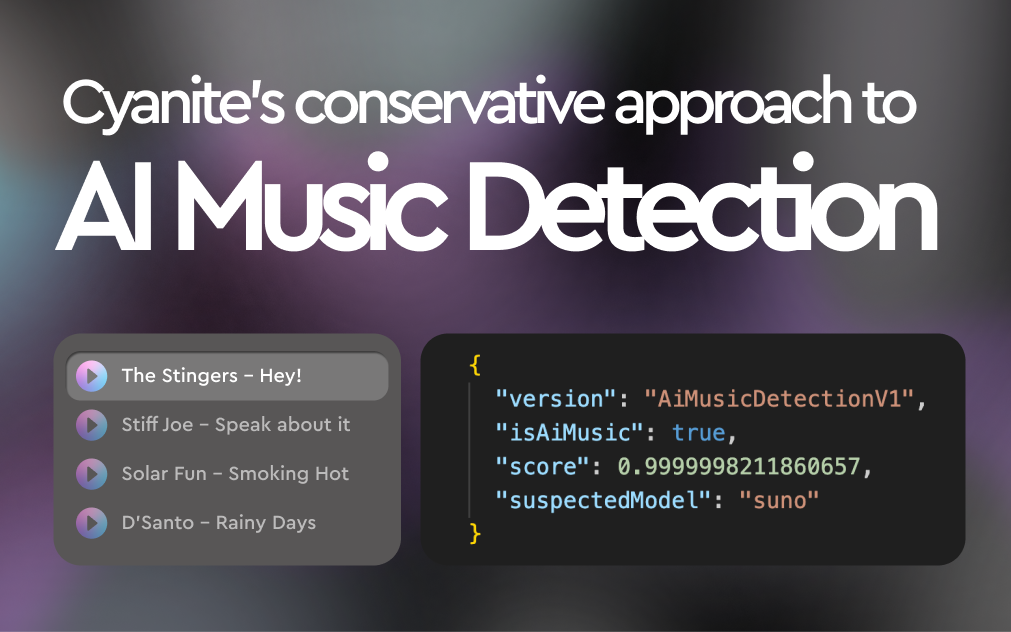
We approach AI music detection as a reliable transparency issue. It’s not just about classification. Instead of trying to detect everything, we focus on identifying high-confidence signals that can support real-world decisions. Our position is deliberately conservative: we would rather withhold a label than apply one we can’t stand behind.

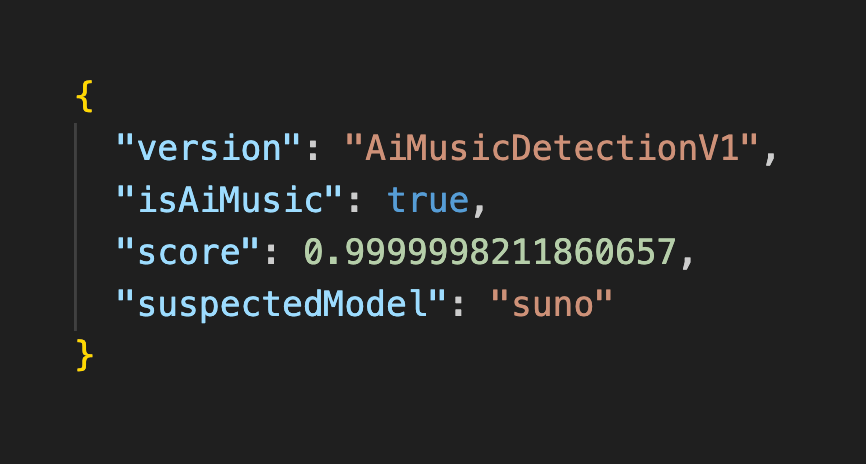
In practice, detection results are not binary flags. They are scores. Fully generated, unprocessed tracks tend to produce signals close to 1.0, indicating a very high likelihood of generated audio. Fully human-created material typically scores close to zero, reflecting the absence of detectable generation-specific patterns.

As content becomes more complex, through post-processing or mixing with human-created material, detection scores for AI-generated material can sit somewhere in between, and they need to be more carefully interpreted. Results should always be understood as signals to support decision-making, not definitive judgments.

Because AI generation is constantly evolving, our detection approach evolves with it. We continuously analyze new generation systems and develop methods based on signals we can validate and understand. In some cases that means model-specific detection. In others, we look for characteristics that generalize across different types of generative models. We combine approaches rather than relying on a single method.

In recent months, a growing ecosystem of tools and services has emerged that aim to obscure or remove detectable characteristics from generated audio. With this in mind, we test how our signals hold up under deliberate obfuscation. In our current testing, the signals we rely on remain detectable even after those modifications. This robustness is by design. It’s central to what makes detection trustworthy enough to act on.
Building independent detection the industry can trust

Detection systems will increasingly influence decisions with real legal and economic consequences: whether a track is accepted or rejected, whether an artist is flagged or cleared.

That kind of influence demands neutrality.

Detection shouldn’t be controlled by the same companies whose tools it’s meant to evaluate, or to any incentive that could quietly bias outcomes.

Independence is something we take seriously at Cyanite. It’s what allows the signals we produce to be relied on across platforms, catalogs, and workflows, by people who need to be able to trust the answer.

AI will continue to shape how music is created. The question is no longer whether it will be used, but whether the industry can build the transparency infrastructure to understand it responsibly. That requires continuous research, careful system design, and a commitment to getting it right rather than claiming to be able to detect everything.

It’s the approach we’ve taken with Cyanite AI Music Detection, and one we’ll keep developing as the landscape evolves.

Want to see our AI detection in action? Request early access here.
How Thematic uses AI-powered discovery to personalize music recommendations at scale

How Thematic uses AI-powered discovery to personalize music recommendations at scale

Ready to improve your music discovery workflows? Try Similarity Search in Cyanite.

AI-powered discovery is the engine that powers our community. When the right song finds the right creator, an artist gains a new fan, the next match gets smarter, and the creative process becomes that much more effortless.

Audrey Marshall

Co-Founder and COO, Thematic

Thematic is a creative community built for discovery, collaboration, and growth. Co-founded by Michelle Phan, a pioneering creator who helped define how influencers build and monetize audiences online, Thematic was optimized for the creative experience from the start and is now trusted by over 1 million creators.

When a creator features a Thematic song in their video, they create a promotional moment for that artist. The artist can track exactly which videos by which creators used their music and how many new fans they gained as a result.

Every interaction feeds back into the recommendation engine, creating a virtuous loop of value between creators and artists. It’s a collaborative ecosystem where both sides of the creative equation create, connect, and grow together.

Thematic’s goal was to turn music discovery into a win for all by giving creators better options. However, in practice, their growing catalog meant creators had to navigate an overwhelming amount of choice in a space already defined by decision fatigue. As Thematic continued to scale, so did the pressure to make discovery smarter.

When finding the right track becomes a problem

Before building anything new, the team listened carefully. One-on-one interviews, surveys, support ticket analysis, and community feedback all pointed to the same problem. Finding the right song was taking too long.

The size of the catalog wasn’t the issue. It was the mismatch between how creators think and how search tools work.

Tags and genres are a poor way to describe music. Creators don’t fall in love with a song because it’s ‘indie folk with a male vocalist at 120 BPM,’” explains Audrey. “They connect with it because of how it sounds, how it makes them feel, and the emotional resonance of the lyrics.”

Traditional keyword search asks users to translate a feeling into a music tag formula,” as Audrey puts it. Most creators know what they want when they hear it. Forcing people into a keyword search box creates a time-consuming cycle: sampling track after track, exploring a genre only to find it missed the mark, then starting over.

But Thematic serves both creators and artists, so improving discovery efficiency would have a double impact: saving creators time finding the perfect-fit song, while driving higher placement opportunities for artists.

“Think about the difference between flipping through cable channels versus opening a feed that already knows what you like,” says Audrey. “The channel count doesn’t matter. What matters is whether the right thing surfaces at the right moment.”

The new Thematic

Thematic homepage highlighting trending music from real artists, featured tracks, and call-to-action buttons

To address this, Thematic launched a rebuilt platform alongside a complete rebrand. The product had grown significantly since its initial launch, and the visual identity needed to catch up.

The rebuild focused on two areas: 

  • A personalized For You experience based on each creator’s usage history and music taste, updated tagging infrastructure to improve search and filtering accuracy, and the ability to find sonically similar songs to any track, whether on Thematic or Spotify.
  • Deepening the creator community through a points leaderboard, upgraded creator and artist profiles, and better visibility into the value exchange happening on the platform.

At the center of the smarter discovery experience was Cyanite.

AI as a workflow tool, not a replacement

Music search results in Thematic with filters for song type, genre, access, and keyword-based track results<br />

The decision to incorporate AI-based audio analysis came down to one thing: saving creators time.

We treat AI as a great workflow improvement tool for creators,” says Audrey.
Its ability to analyze large datasets and surface the most relevant information can be genuinely time-saving, especially when trying to identify songs that have a similar sound, not just similar music attributes and tags.”

Sound-based search has removed the need to translate intent into search terms. Instead of asking creators to describe what they’re looking for, it lets them start from a reference track and find cleared, licensed music on Thematic that matches that sonic profile. What used to take hours can now happen in seconds.

From there, creators can quickly build a full set of songs that fit their overall aesthetic by exploring complementary recommendations. What used to be a slow, trial-and-error process becomes fast, flexible, and far more creatively aligned.

Cyanite was the only solution that offered the full music infrastructure we needed, from song attribute tagging to AI analysis and similarity search.

Audrey Marshall

Co-Founder and COO, Thematic

Thematic playlist page showing songs similar to “forgiveness” with track list, search bar, and sorting options

The For You page: where it all comes together

Personalized Thematic dashboard showing weekly song matches, playlists, leaderboard, and music recommendations

When the right song finds you instead of the other way around, music can become an earlier, more integral part of how a video comes together, potentially shaping the edit, not just scoring it. That’s a meaningful shift in how creators work, and we think it’s just the beginning. The future of music discovery isn’t a better search bar. It’s a creative collaborator that already knows your voice.

Audrey Marshall

Co-Founder and COO, Thematic

PR: Anghami partners with Cyanite | Music discovery with AI-powered metadata across 2.5 million songs

PR: Anghami partners with Cyanite | Music discovery with AI-powered metadata across 2.5 million songs

PRESS RELEASE

Berlin 24.03.2026 -Anghami, the leading music and entertainment streaming platform in the MENA region with over 120 million registered users, has partnered with Cyanite to enrich 2.5 million songs using AI-generated music metadata.

By integrating Cyanite’s auto-tagging API, Anghami has enhanced its catalog with detailed audio-based metadata across mood, genre, energy, instrumentation, and more. This structured data layer feeds directly into Anghami’s internal recommendation systems, enabling more precise and scalable music discovery.

At a catalog scale of millions of tracks, metadata quality becomes a strategic driver of personalisation. Structured and consistent tagging enables streaming platforms to better match songs with listeners, surface long-tail content, and improve personalization across diverse repertoires.

For Anghami, the partnership also underscores its commitment to accurately representing the richness of Arabic music. A significant share of its catalog consists of regional content that is often underrepresented in Western-centric AI systems.

Because Cyanite analyses audio directly, rather than relying on behavioural signals or language-based metadata, its models operate consistently across musical cultures and languages.

Anghami operates one of the most culturally diverse music catalogs in the world. Ensuring that Arabic repertoire is tagged with the same precision as Western music is not trivial. We’re proud that our audio-based AI can support music discovery at this scale and across such a rich regional landscape.

Markus Schwarzer

CEO & Founder, Cyanite

Arabic music carries immense depth, emotion and cultural nuance. Through our partnership with Cyanite, we’re ensuring that this richness is understood at a data level, allowing us to power more accurate personalisation and elevate discovery for millions of listeners.

Elias El Khoury

VP Information & Content Systems, Anghami

About Anghami Inc. (NASDAQ: ANGH):

Anghami is the leading multi-media technology streaming platform in the Middle East and North Africa (“MENA”) region, offering a comprehensive ecosystem of exclusive premium video, music, podcasts, live entertainment, audio services and more. Since its launch in 2012, Anghami has led the way as the first music streaming platform to digitize MENA’s music catalog, reshaping the region’s entertainment landscape.

In a strategic move in April 2024, Anghami joined forces with OSN+, a leading video streaming platform, forming a digital entertainment powerhouse. This pivotal transaction strengthened Anghami’s position as a go-to destination, boasting an extensive library of over 18,000 hours of premium video, including exclusive HBO content, alongside 100+ million Arabic and International songs and podcasts.

With a user base exceeding 120 million registered users and 2.5 million paid subscribers, Anghami has partnered with 47 telcos across MENA, facilitating customer acquisition and subscription payment, in addition to establishing relationships with major film studios, entertainment giants, and music labels, both regional and international.

Headquartered in Abu Dhabi, UAE, Anghami operates in 16 countries across MENA, with offices in Beirut, Dubai, Cairo, and Riyadh.

To learn more about Anghami, please visit: https://anghami.com

For media inquiries, please contact:
Umar Gulamnabi – Associate, Integrated Media, Current Global
osncg@currentglobal.com
+971 56 827 1966

About Cyanite

Cyanite is an AI music intelligence platform that helps streaming services, publishers, and music platforms enrich and organize their catalogs. Its auto-tagging API analyzes audio directly to generate structured metadata across genre, mood, energy, instrumentation, and more. Cyanite has tagged over 40 million songs and is trusted by more than 200 companies worldwide, including Warner Chappell, BMG, Epidemic Sound, and APM Music.

Media contact
Jakob Höflich
CMO at Cyanite
jakob@cyanite.ai

For interview requests or additional data, please contact: jakob@cyanite.ai

How To Prompt: The Guide to Using Cyanite’s Free Text Search

How To Prompt: The Guide to Using Cyanite’s Free Text Search

Ready to search your catalog in natural language? Try Free Text Search.

Do you have trouble translating your vision for music into precise keywords? If so, this guide on how to prompt using Cyanite’s Free Text Search is for you.

It’s a more natural way to search your music catalog and discover tracks. You can use complete sentences to describe soundscapes, film scenes, daily situations, activities, or environments. Prompts can be written in different languages and can include cultural references, so you’re not forced to reduce your idea to a fixed set of tags.

Before you explore what Free Text Search can do, keep in mind that prompt-based search works best when your input is specific. The clearer you are, the easier it is to find what you’re looking for. 

Read more: What is music prompt search?

Why music catalogs struggle with discovery

Most large catalogs contain inconsistent metadata. Many were built before modern tagging standards, then expanded over time through different workflows. New music arrives faster than metadata teams can standardize it, especially with the volume from UGC and AI-generated releases, while older tracks remain described in ways that don’t always support how music is searched for today.

Traditional search relies on tags and keyword logic. This approach can be effective for many searches, but it has limits when ideas are already highly specific, like with a detailed creative brief or a particular scene description. Translating concrete, nuanced needs into tags often loses critical details and context.

That’s where natural language search makes a difference. Instead of defining a specific vision in terms of available tags, you can describe what you need directly or even paste a brief into the search bar. The system interprets intent, mood, and context in ways that complement tag-based discovery.

This helps sync and licensing teams work faster with detailed requests, and gives catalog teams another tool to surface relevant music, especially from underused parts of the catalog.

Read more: How to use AI music search for your music catalog

How Free Text Search amplifies music discovery

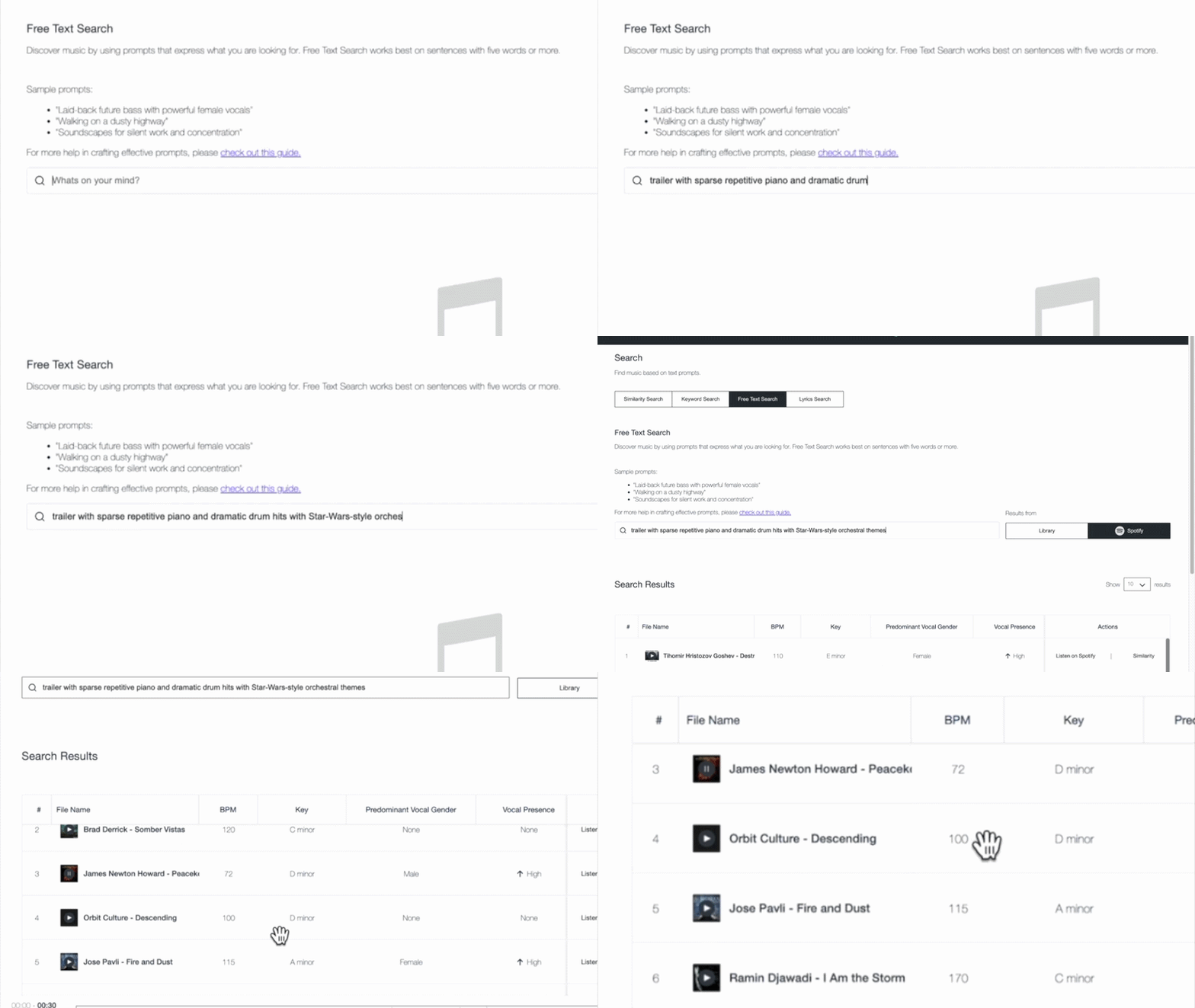
Free Text Search lets you look for music in the way you would naturally describe it. Write detailed prompts in full sentences, and Cyanite’s AI interprets the meaning behind your words to match intent with how tracks actually sound in your catalog.

This type of search is designed for situations where intent doesn’t translate cleanly into keywords. Tag-based searches work well when attributes are fixed and clearly defined, and Similarity Search is useful when you already have a reference track and want to find music that sounds close to it. Teams often get good results when they search in their own words first, then move into other search modes to refine the selection.

How to use Free Text Search effectively

In real-life workflows, searches rarely begin from the same place. Sometimes you’ll start with sound, sometimes with a scene, and sometimes with context. 

Not every idea can be reduced to tags or tied to a specific track. Choosing music is a creative process, so the way people search is often creative too. Free Text Search meets users where they are, allowing them to describe intent in natural language and shape discovery around how they think. 

1. Describing sound

With Free Text Search, you can add context and even cultural references to your search, making it possible to find the perfect soundtrack for your project and get the most out of your music catalog. 

This approach is commonly used when responding to sync briefs that describe musical detail and tone.

Sound-focused prompts should name what musical elements are present, then add how those elements are played or arranged. An extra cue about character or attitude can be included when it helps clarify intent.

[Instruments or sound sources] + [how they are played or arranged] + [optional: character or stylistic cue]

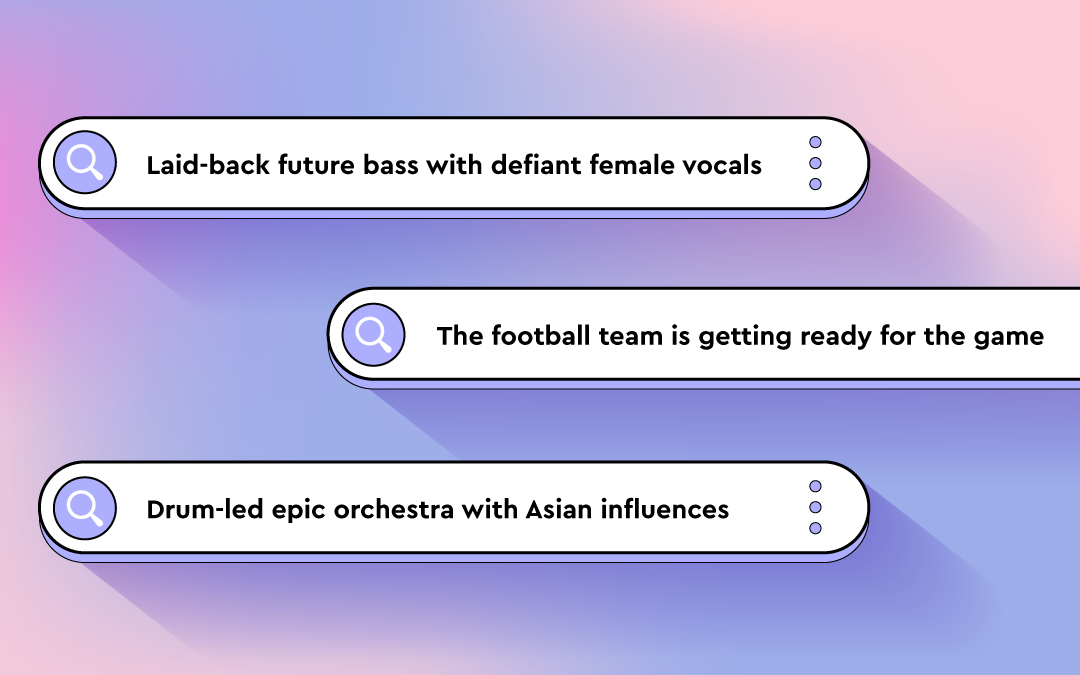
  • “Trailer with sparse repetitive piano and dramatic drum hits with Star-Wars-style orchestra themes”
  • “Laid-back future bass with defiant female vocal”
  • “Staccato strings with a piano playing only single notes”
  • “Solo double bass played dramatically with a bow”

These prompts work because they are specific, but not rigid. That level of detail helps surface relevant tracks faster and reduces reliance on perfectly maintained tags, which is especially valuable in large or uneven catalogs.

Common mistakes to avoid

  • Staying too abstract: Words like “cinematic” or “emotional” on their own don’t give enough information to form a clear sound.
  • Listing elements without context: Naming instruments or genres without describing how they are played or arranged often leads to broad results.
  • Overloading the prompt: Packing too many ideas into one sentence can blur intent and pull results in different directions.
  • Writing like a tag list: Free Text Search works best when the prompt reads like a description, not a stack of keywords.

Read more: AI search tool for music publishing: best 3 ways

2. Describing film scenes

Film scenes can evoke a wide range of emotions and visuals. When using Free Text Search for this purpose, consider whether your prompt captures objective elements of the scene or your own interpretation of it.

Publishers often use scene-based prompts to explore deeper parts of their catalog and surface music suited to narrative use cases beyond obvious genre labels.

You can reference popular movies or shows like Pirates of the Caribbean or Stranger Things in your search prompts.

It helps to think like a director. Focus on the action or moment in the scene and what the viewer is experiencing. The clearer the image you describe, the easier it is for the search to interpret what kind of music belongs there, without needing a list of musical traits.

[Action or moment] + [optional: setting or situation] + [optional: stylistic cue]

  • “Riding a bike through Paris”
  • “Thriller score with Stranger-Things-style synths “
  • “Tailing the suspect through a Middle Eastern bazaar”
  • “The football team is getting ready for the game”

An example result for the prompt: “Riding a bike through Paris”

These prompts work because they describe a cinematic moment rather than a list of musical characteristics. A scene like “riding a bike through Paris” suggests a certain musical style and progression, which helps frame how the music should unfold. That context gives Free Text Search a clearer sense of what the track needs to communicate.

To fine-tune your search, add different keywords, like “orchestral,” “industrial rock,” or “hip-hop,” to steer it in the direction you want.

Common mistakes to avoid

  • Writing scenes that only make sense to you personally: Prompts should be interpretable without extra explanation.
  • Dropping the visual context: Turning a scene into a genre description removes what makes this approach effective.
  • Using obscure references: If the reference is not widely known, it may not clarify the scene.

3. Describing activities, situations, and moods

Free Text Search empowers you to be as specific as your project demands. You can describe when and where music will be heard, and what it should communicate. Combining activity, situation, and mood helps direct discovery toward abstract or niche ideas that don’t translate cleanly into tags, making it easier to surface music that fits its intended use.

When writing the prompts, focus on how the music will be used and what it needs to communicate in that situation. Providing clear usage context helps the search narrow results without requiring detailed musical instruction.

[Style or sound] + [intended use or context] + [optional: tone or functional role]

  • “Latin trap for fitness streaming catalog”
  • “Mellow California rock for sports highlight content”
  • “Colorful pop music for lifestyle brand campaign”
  • “Subtle ambient textures for background use”

Example result for the prompt: Mellow California rock for a road trip”

Common mistakes to avoid

  • Leaving out the use case: Mood alone often leads to broad results without direction.
  • Mixing conflicting contexts: Background use and high-impact language can work against each other.
  • Lack of clarity: When the prompt doesn’t include enough context, results stay generic.

Free Text Search is available in the Cyanite web app. You can test prompts, explore results, and refine searches in minutes.

Using prompts to improve discovery

With Free Text Search, you can explore your music catalog using detailed descriptions. This lets you search based on how music is described in real projects, making it easier to find tracks that fit a specific brief, scene, or use case.

Whether you’re pitching music for sync, artists, or labels, looking to underscore a film scene, or setting the mood for an activity, Free Text Search empowers you to explore music in a whole new way.

As you craft your prompts, try to be specific and objective, as this will return better results. Use concrete details like instruments, playing styles, and specific scenes or activities. 

You already have the resources in your catalog. Free Text Search helps you access them more effectively.

Everything you’ve ever wanted to know about Cyanite (answering your FAQs)

Everything you’ve ever wanted to know about Cyanite (answering your FAQs)

Ready to explore your catalog? Sign up for Cyanite.

As music catalogs grow, finding the right track gets harder. Metadata doesn’t always keep up, but teams are still expected to deliver fast, reliable results.

Libraries, publishers, sync teams, and the technical leads supporting them need systems that make large catalogs easier to understand and search. Cyanite is designed to support that work.

This guide provides a clear, high-level introduction to how Cyanite works and how it’s used in practice, giving teams a simple starting point before diving deeper into specific topics.

Learn more: Explore our FAQs to dig deeper into how Cyanite works.

The problem of scaling modern music catalogs

Once a catalog reaches a certain size, searching it becomes an inconsistent process. Music is described through tags and metadata that were added by different people, at different times, often for different needs. As the catalog grows, those descriptions stop lining up, which makes tracks harder to compare and surface reliably.

Over time, the same song can become discoverable in one context and invisible in another. Familiar tracks tend to show up first, while large parts of the catalog stay beneath the surface simply because their sound isn’t clearly represented in the data.

Scaling a modern music catalog means creating a shared, consistent way to describe sound, so music can be worked with confidently across teams and workflows, no matter how large the catalog becomes.

What Cyanite is (and what it is not)

Cyanite is an intelligent music system that works directly with sound. It analyzes each track and translates what can be heard into structured information that stays consistent across the catalog. That information is used both to tag music automatically and support sound-based search.

Teams can use Cyanite through the web app, integrate it into their own systems via an API, or access it directly within supported music CMS environments.

Cyanite is not a replacement for listening or creative judgment. It doesn’t decide what should be used, pitched, or licensed. It provides a consistent, sound-based foundation that helps teams work with music at scale while keeping human decision-making at the center.

How Cyanite analyzes music

Cyanite analyzes music through sound, not user behavior. Instead of relying on plays, clicks, or listening history, it focuses on the audio itself and produces a consistent, reliable sound description. This means each piece of music enters the system under the same logic, regardless of when it was added or who uploaded it.

Read more: How do music recommendation systems work?

Core capabilities

At its core, Cyanite helps teams organize and work with large music catalogs through music tagging and search. The same audio-based logic applied to every track creates consistent descriptions and keeps music easy to find, compare, and explore, even as catalogs grow.

A table showing Cyanite's AI-Tagging Taxonomy

To make large catalogs easier to work with, Cyanite applies consistent labeling based on each track’s full audio.

  • Auto-Tagging analyzes the audio to generate metadata like genre, mood, and tempo.
  • Auto-Descriptions generate concise, neutral descriptions that highlight how a track sounds and give teams quick context without having to listen first.

Sound-based search: Similarity, Free Text, and Advanced Search

To help teams find music, Cyanite offers multiple ways to search a catalog. 

  • Similarity Search finds tracks with a similar sound to a reference song, whether it’s from your catalog, an uploaded file, or a YouTube preview. It’s often a good fit when a brief starts with a musical reference rather than a written description.
  • Free Text Search allows teams to describe music in natural language, including full sentences and prompts in different languages. It then matches that intent to sound in the catalog.
  • Advanced Search, available through the API as an add-on for Similarity and Free Text Search, adds more control as searches become more specific. It enables filters and visibility into why tracks appear in the results, making it easier to refine and compare matches.

Privacy-first, IP-safe audio analysis

Cyanite is built for professional music catalogs, with all data processed and stored on servers in the EU in line with GDPR. Audio files are stored securely, can be deleted at any time on request, and are not shared with third parties. All analysis and search algorithms are developed in-house. For additional protection, Cyanite also supports spectrogram-based uploads, allowing audio to be analyzed without being reconstructable into playable sound.

How teams combine AI and human expertise

Cyanite is used for organizing, pitching, searching, and curating a catalog. Automation applies a consistent, sound-based foundation across every track, while teams add context, intent, and custom metadata where it matters. 

Because there are clear limits to what can be inferred from audio alone, most teams adopt a hybrid approach to their work. They use Cyanite to keep catalogs structured and searchable at scale, while human input shapes how the music is ultimately used.

How Cyanite fits into existing catalog systems

Cyanite is used at the point where teams need to explore a catalog for a pitch, brief, or curation task. It applies a consistent, sound-based foundation across all tracks, so decisions can be informed by reliable discovery results. With technology supporting the process, teams can confidently listen, compare, and narrow options, applying human judgment to make the selection.

Where to go deeper

Now that we’ve covered the basics, you can explore specific parts of Cyanite in more detail in the following articles:

Getting started with Cyanite

To evaluate Cyanite, the simplest starting point is a track sample analysis. Many teams begin with a small set of tracks to review tagging results and search behavior before deciding whether to scale further. This makes it easy to validate fit without committing a full catalog upfront.

For teams building products or integrating search into their own tools, integrating our API is a hands-on way to explore analysis, tagging, and similarity search in a live environment. You can create an API integration for free after registering via the web app.

When preparing for a larger evaluation, a bit of structure helps. Audio should be provided in MP3 and grouped into clear folders or batches that reflect how the catalog is organized. Most teams start with a representative subset and expand in phases once results and timelines are clear. If you are not able to deliver your music as MP3 files, reach out to support@cyanite.ai