Can Meta’s audio aesthetic model actually rate the quality of music?

Can Meta’s audio aesthetic model actually rate the quality of music?

Last year, Meta released Audiobox Aesthetics (AES), a research model that proposes scoring audio based on how people would rate it. The model outputs four scores: Production Quality (PQ), Production Complexity (PC), Content Enjoyment (CE), and Content Usefulness (CU). 

The study suggests that audio aesthetics can be broken into these axes, and that a reference-free model can predict these scores directly from audio. If that holds, the scores could start informing decisions and become signals people lean on when judging music at scale.

I took a closer look to understand how the model frames aesthetic judgment and what this means in practice. I ran Audiobox Aesthetics myself and examined how its scores behave with real music.

What Meta’s Audiobox Aesthetics paper claims

Before jumping into my evaluation, let’s take a closer look at what Meta’s Audiobox Aesthetics paper set out to do.

The paper introduces a research model intended to automate how audio is evaluated when no reference version exists. The authors present this as a way to automate listening judgments. They describe human evaluations as costly and inconsistent, leading them to seek an automated alternative.

To address this need, the authors propose breaking audio evaluation into four separate axes and predicting a separate score for each:

  • Production Quality (PQ) looks at technical execution, focusing on clarity and fidelity, dynamics, frequency balance, and spatialization.
  • Production Complexity (PC) reflects how many sound elements are present in the audio.
  • Content Enjoyment (CE) reflects how much listeners enjoy the audio, including their perception of artistic skill and overall listening experience.
  • Content Usefulness (CU) considers whether the audio feels usable for creating content.

The model is trained using ratings from human listeners who follow the same guidelines across speech, music, and sound effects. It analyzes audio in short segments of around 10 seconds. For longer tracks, the model scores each segment independently and provides an average. 

Beyond the audio itself, the model has no additional context. It does not know how a track is meant to be used or how it relates to other music. According to the paper, the scores tend to align with human ratings and could help sort audio when it’s not possible to listen to it all. In that way, the model is presented as a proxy for listener judgment.

Why I decided to evaluate the model

I wasn’t the only one who was curious to look into this model. Jeffrey Anthony’s “Can AI Measure Beauty? A Deep Dive into Meta’s Audio Aesthetics Model,” for instance, offers a deep, philosophical examination of what it means to quantify aesthetic judgment, including questions of ontology and judgment. I decided to tackle the topic even more with a hands-on approach, testing the model on some real-world examples to understand whether we could find some interesting patterns in the model’s predictions. 

What caught my attention most was how these scores are meant to be used. Once aesthetic judgments are turned into numbers, they start to feel reliable. They look like something you can sort by, filter on, or use to decide what gets heard and what gets ignored.

This matters in music workflows. Scores like these could influence how catalogs are cleaned up, how tracks are ranked for sync, and how large libraries of music are evaluated without listening. With a skeptical but open mindset, I set out to discover how these scores behave with real-world data.


What I found when testing the model

A) Individual-track sanity checks

I began with a qualitative sanity check using individual songs whose perceptual differences are unambiguous to human listeners. The tracks I selected represent distinct production conditions, stylistic intentions, and levels of artistic ambition.

I included four songs:

The motivation for this test was straightforward. A model claiming to predict Production Quality should assign a lower PQ to “Funky Town” (low-quality MP3) than to “Giorgio by Moroder.” A model claiming to estimate production or musical complexity should recognize “Blue Calx” by Aphex Twin as more complex than formulaic late-90s pop-trance such as DJ Visage’s “Schumacher Song.” Likewise, enjoyment and usefulness scores should not collapse across experimental electronic music, audiophile-grade disco-funk, old-school pop-trance, and degraded consumer audio.

You can see that the resulting scores, shown in the individual-track comparison plot above, contradict these expectations. “Funky Town” receives a PQ score only slightly lower than “Giorgio by Moroder,” indicating near insensitivity to codec degradation and mastering fidelity. Even more strikingly, “Blue Calx” is assigned the lowest Production Complexity among the four tracks, while “The Schumacher Song” and “Funky Town” receive higher PC scores. This directly inverts what most listeners would consider to be structural or compositional complexity.

Content Enjoyment is highest for “Funky Town” and lowest for “Blue Calx,” suggesting that the CE dimension aligns more closely with catchiness or familiarity than with artistic merit or aesthetic depth.

Taken together, these results indicate that AES is largely insensitive to audio fidelity. It fails to reflect musical or structural complexity, and instead appears to reward constant spectral activity and conventional pop characteristics. Even at the individual track level, the semantics of Production Quality and Production Complexity don’t match their labels.

B) Artist-level distribution analysis

Next, I tested whether AES produces distinct aesthetic profiles for artists with musical identities, production aesthetics, and historical contexts that are clearly different. I analyzed distributions of Production Quality, Production Complexity, Content Enjoyment, and Content Usefulness for Johann Sebastian Bach, Skrillex, Dream Theater, The Clash, and Hans Zimmer.

If AES captures musically meaningful aesthetics, we would expect to see systematic separation between these artists. For example, Hans Zimmer and Dream Theater might have a higher complexity score than The Clash. Skrillex’s modern electronic productions might have a higher quality score than early punk recordings. Bach’s works might show high complexity but variable enjoyment or usefulness depending on the recording and interpretation.

Instead, the plotted distributions show strong overlap across artists for CE, CU, and PQ, with only minor shifts in means. Most scores cluster tightly within a narrow band between approximately 7 and 8, regardless of artist. PC exhibits slightly more variation, but still fails to form clear stylistic groupings. Bach, Skrillex, Dream Theater, and Hans Zimmer largely occupy overlapping regions, while The Clash is not consistently separate.

This suggests that AES doesn’t meaningfully encode artist-level aesthetic or production differences. Despite extreme stylistic diversity, the model assigns broadly similar aesthetic profiles, reinforcing the interpretation that AES functions as a coarse estimator of acceptability or pleasantness rather than a representation of musical aesthetics.

C) Bias analysis using a balanced gender-controlled dataset

Scoring models are designed to rank, filter, and curate songs in large music catalogs. If these models encode demographic-correlated priors, they can silently amplify existing biases at scale. To test this risk, I analyzed whether AES exhibits systematic differences between tracks with female lead vocals and tracks without female lead vocals.

In our 2025 ISMIR paper, we showed that common music embedding models pick up non-musical singer traits, such as gender and language, and exhibit significant bias as a result. Because AES is intended to judge quality, aesthetics, and usefulness, it would be particularly problematic if it had similar biases. They could directly influence which music is considered “better” or more desirable.

I constructed a balanced dataset using the same methodology used in our 2025 paper, equalizing genre distribution and singer language across groups.

For each group, I computed score distributions for Content Enjoyment, Content Usefulness, Production Complexity, and Production Quality, visualized them, and performed statistical testing using Welch’s t-test alongside Cohen’s d effect sizes. For context, Welch’s t-test is a statistical test that compares whether the average scores between two groups are significantly different. Cohen’s d is a measure of effect size that quantifies how large that difference is in standardized units.

The results show consistent upward shifts for female-led tracks in CE, CU, and PQ. All three differences are statistically significant with small-to-moderate effect sizes. In contrast, there is virtually no difference in Production Complexity score between groups.

This pattern indicates that the model systematically assigns higher enjoyment, usefulness, and quality scores to material with female vocals, even under controlled conditions. Because complexity remains unaffected, the effect doesn’t appear to stem from structural musical differences. Instead, it likely reflects correlations in training data and human annotations, or the model treating certain vocal timbres and production styles associated with female vocals as implicit quality indicators.

These findings suggest that AES encodes demographic-correlated aesthetic priors, which is problematic for a model intended to judge musical quality, aesthetics, and usefulness.

When a measure becomes a target, it ceases to be a good measure.

Charles Goodhart

Economist

Why this matters for the industry

Economist Charles Goodhart famously observed that “when a measure becomes a target, it ceases to be a good measure.” He was describing what happens when a metric starts to drive decisions rather than just being an indicator. Once a number is relied on, it begins to shape how people think and choose.

That idea applies directly to aesthetic scoring. A score, once it exists, carries weight. It gets used as a shortcut in decisions, even when its meaning is incomplete. This matters in music workflows because aesthetic judgment depends on context and purpose. 

When a simplified score is treated as reliable, systems can start favoring what scores well rather than what actually sounds better or serves a creative goal. Over time, that can quietly steer decisions away from how audio is perceived and used in practice.

How we approach audio intelligence at Cyanite

At Cyanite, music isn’t judged in a vacuum, and neither are the decisions built on top of it. That’s why we don’t rely on single aesthetic scores. Instead, we focus on making audio describable and searchable in ways that stay transparent and grounded in context.

Aesthetic scoring can give the illusion of precision, but it often lumps together different technical qualities, genres, and styles. In music search and discovery, a single score doesn’t explain why a track is surfaced or excluded. That reasoning matters to us. Not to decide what’s “good,” but to give teams tools they can understand and trust.

We see audio intelligence as a way to expose structure, not replace judgment. Our systems surface identifiable musical attributes and relationships, knowing that the same track can be the right or wrong fit depending on how it’s used. The goal is to support human decision-making, not substitute it with scores.

Experimentation has a place, but in music, automation works best when it’s explainable and limit-aware.

What responsible progress in music AI should look like

Progress in music and AI is underpinned by transparency. Teams should be able to understand how a model was trained and how its outputs relate to the audio. When results are interpretable, people can see why a track surfaces and judge for themselves whether the signal makes sense in their own context.

That transparency depends on data choices. Music spans styles, cultures, eras, and uses, and models reflect whatever they are fed. Developers need to work with broad, representative data and be clear about where coverage is thin. Being open about what a model sees, and what it does not, makes its behavior more predictable and its limits easier to manage.

Clear communication matters just as much once tools are in use. For scores and labels to be applied responsibly, teams need a shared understanding of what those signals reflect and where their limits are. Otherwise, even well-intentioned metrics can be stretched beyond what they are able to support.

This kind of openness helps the industry build tools people can understand and trust in real workflows. 

We explored how these expectations show up in practice in “The state of AI transparency in music 2025,” a report developed with MediaTracks and Marmoset on how music licensing professionals make decisions around AI, creator background, and context. You can read the full report here.

So… does Meta’s model provide meaningful ratings for music?

Based on these tests, the answer is no. The model produces stable scores, but they don’t map cleanly to how musical quality or complexity are assessed in real catalog work. Instead, the model appears to align more with easily detectable production traits than with the distinctions people consistently make when judging music in context.

That doesn’t make Audiobox Aesthetics insignificant. It can support research by defining a clear scoring framework, showing how reference-free predictors can be trained across speech, music, and sound, and making its models and data available for inspection and comparison. It also illustrates where AES scores can be useful, particularly when large volumes of audio need to be filtered or monitored but full listening is impractical.

Problems emerge when scores like these begin shaping decisions. When a score is presented as a measure of quality, people need to know what it’s actually measuring so they can judge whether it applies to their use case. Without that clarity, it becomes easy to trust the number even when it’s not a good fit.

At Cyanite, we see this as a reminder of the importance of responsibility in music and AI. Progress is driven by systems that stay grounded in real listening behavior and make their assumptions visible.

The Power of Automatic Music Tagging with AI

The Power of Automatic Music Tagging with AI

Ready to transform how you manage your catalog? Start auto-tagging music with Cyanite

We know managing a large music catalog can feel overwhelming. When metadata is inconsistent or incomplete, tracks become difficult to find and hard to work with. The result is a messy catalog that you have to sort out manually—unless you use AI auto-tagging.

Read more to see how automatic music tagging reduces friction and helps you organize your catalog more accurately.

What is automatic music tagging?

Automatic music tagging is an audio analysis process that identifies a song’s mood, genre, energy, tempo, instrumentation, and other core attributes. A music analyzer AI listens to the track and applies these labels with consistent logic, providing stable metadata across your catalog.

AI tagging supports teams that depend on fast, accurate search. For example, if you run a sync marketplace that needs to respond to briefs quickly, you can surface the right tracks in seconds when the metadata aligns with the sound you’re looking for. If you work at a production library with thousands of incoming submissions, you can review new material more efficiently when the system applies consistent labels from day one. The same applies to music-tech platforms that want stronger discovery features without having to build their own models.

Benefits of auto-tagging for music professionals

AI auto-tagging brings value across the music industry. When tracks enter your system with clear, predictable metadata, teams can work with more confidence and fewer bottlenecks, supporting smoother catalog operations overall.

  • Faster creative exploration: Sync and production teams can filter and compare tracks more quickly during pitches, making it easier to deliver strong options under time pressure.

  • More reliable handoffs between teams: When metadata follows the same structure, creative, technical, and rights teams work from the same information without needing to reinterpret tags.

  • Improved rights and version management: Publishers benefit from predictable metadata when preparing works for licensing, tracking versions, and organizing legacy catalogs.

  • Stronger brand alignment in audio branding: Agencies working on global campaigns can rely on mood and energy tags that follow the same structure across regions, helping them maintain a consistent brand identity.

  • Better technical performance for music platforms: When metadata is structured from the start, product and development teams see fewer ingestion issues, more stable recommendations, and smoother playlist or search behavior.

  • Greater operational stability for leadership: Clear, consistent metadata lowers risk, supports scalability, and gives executives more confidence in the long-term health of their catalog systems.

Why manual music tagging fails at scale

There’s a time and a place for running a music catalog manually: if your track selection is small and your team has the capacity to listen to each song one by one and label them carefully. But as your catalog grows, that process will start to break down.

Tags can vary from person to person, and different editors will likely use different wording. Older metadata rarely matches newer entries. Some catalogs even carry information from multiple systems and eras, which makes the data harder to trust and use.

Catalog managers are not the only ones feeling this pain. This inconsistent metadata slows down the search for creative teams. Developers are also affected when this unreliable data disrupts user-facing recommendation and search features. So the more music you manage, the more this manual-tagging bottleneck grows.

When human collaboration is still needed

While AI can provide consistent metadata at scale, creative judgment still matters. People add the cultural context and creative insight that go beyond automated sound analysis. Also, publishers sometimes adapt tags for rights considerations or for more targeted sync opportunities.

The goal of AI auto-tagging is not to replace human input, but to give your team a stable foundation to build on. With accurate baseline metadata, you can focus on adding the context that carries strategic or commercial value.

Cyanite has maybe most significantly improved our work with its Similarity Search that allows us to enhance our searches objectively, melting away biases and subjective blind spots that humans naturally have.

William Saunders

Co-Owner & Creative Director, MediaTracks

How does AI music tagging work at Cyanite?

At Cyanite, our approach to music analysis is fully audio-based. When you upload a track, our AI analyzes only the sound of the file—not the embedded metadata. Our model listens from beginning to end, capturing changes in mood, instrumentation, and energy across the full duration.

We start by converting the MP3 audio file into a spectrogram, which turns the sound into a visual pattern of frequencies over time. This gives our system a detailed view of the track’s structure. From there, computer vision models analyze the spectrogram to detect rhythmic movement, instrument layers, and emotional cues across the song. After the analysis, the model generates a set of tags that describe these characteristics. We then refine the output through post-processing to keep the results consistent, especially when working with large or fast-growing catalogs.

This process powers our music tagging suite, which includes two core products:

  • Auto-Tagging: identifies core musical attributes such as genre, mood, instrumentation, energy level, movement, valence–arousal position, and emotional dynamics. Each label is generated through consistent audio analysis, which helps maintain stable metadata across new and legacy material.

  • Auto-Descriptions: complement tags with short summaries that highlight the track’s defining features. These descriptions are created through our own audio models, without relying on any external language models. They give you an objective snapshot of how the music sounds, which supports playlisting, catalog review, and licensing workflows that depend on fast context.

Inside Cyanite’s tagging taxonomy

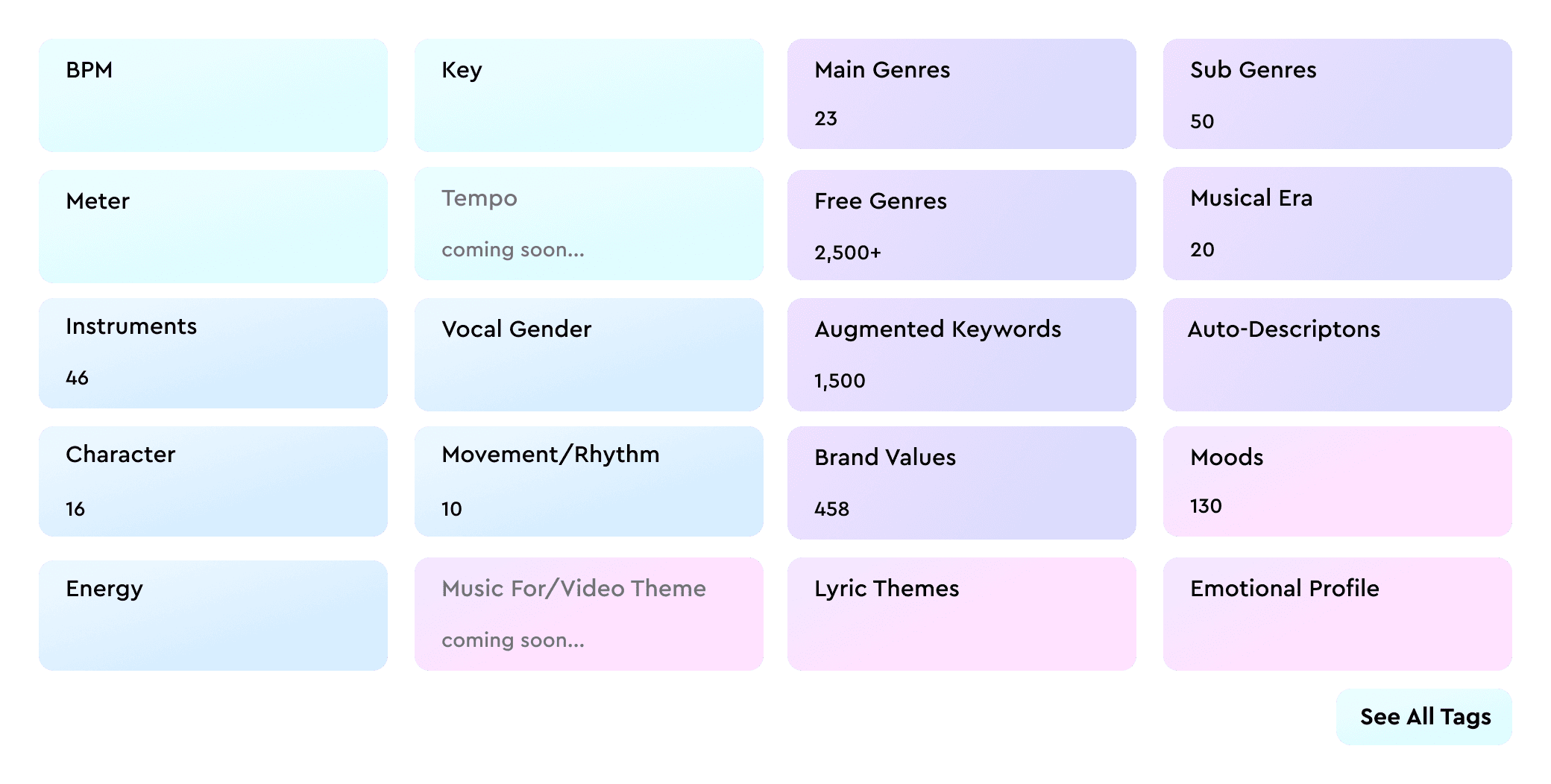
Here’s a taste of the insights our music auto-tagging software can generate for you: 

  • Core musical attributes: BPM, key, meter, voice gender
  • Main genres and free genre tags: high-level and fine-grained descriptors
  • Moods and simple moods: detailed and broad emotional categories
  • Character: the expressive qualities related to brand identity
  • Movement: the rhythmic feel of the track
  • Energy level and emotion profile: overall intensity and emotional tone
  • Energy and emotional dynamics: how intensity and emotion shift over time
  • Valence and arousal: positioning in the emotional spectrum
  • Instrument tags and presence: what instruments appear and how consistently
  • Augmented keywords: additional contextual descriptors
  • Most significant part: the 30-second segment that best represents the song
  • Auto-Description: a concise summary created by Cyanite’s models
  • Musical era: a high-level temporal categorization

Learn more: Check out our full auto-tagging taxonomy here.

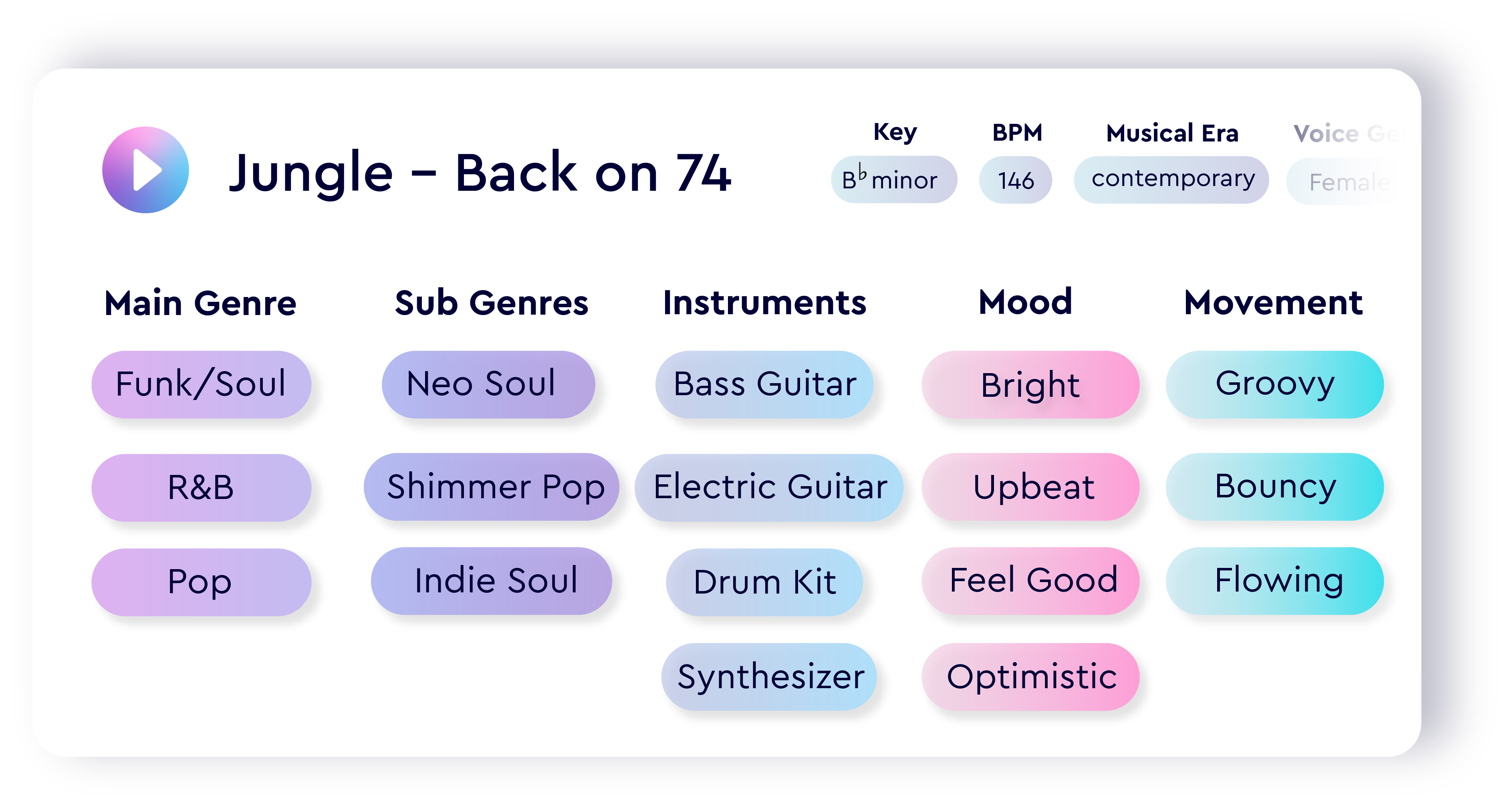
To show how these elements work together, we analyzed Jungle’s “Back On 74” using our auto-tagging system. The table below reflects the exact values our model generated.

Visualization of an auto-tagging example song.

Step-by-step Cyanite Auto-Tagging integration

You can get started with Cyanite through our web app or by connecting directly to the Auto-Yagging API. The process is straightforward and designed to fit into both creative and technical workflows.

1. Sign up and verify your account

  • Create a Cyanite account and verify your email address.
  • Verification is required before you can create an integration or work with the API.
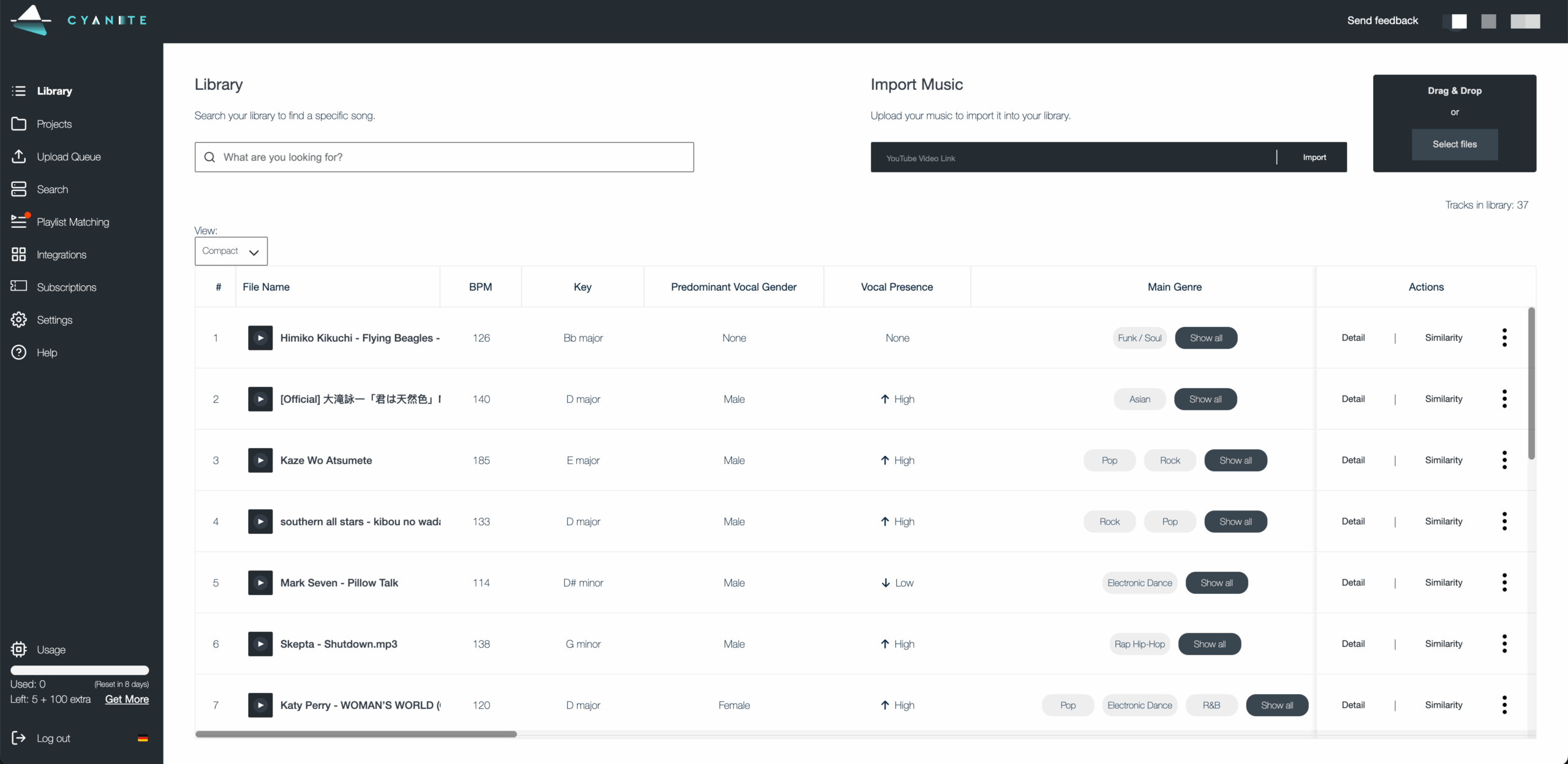
  • Once logged in, you’ll land in the Library view, where all uploaded tracks appear with their generated metadata.
A screenshot of a music library with tags

2. Upload your music

You can add music to your Library by:

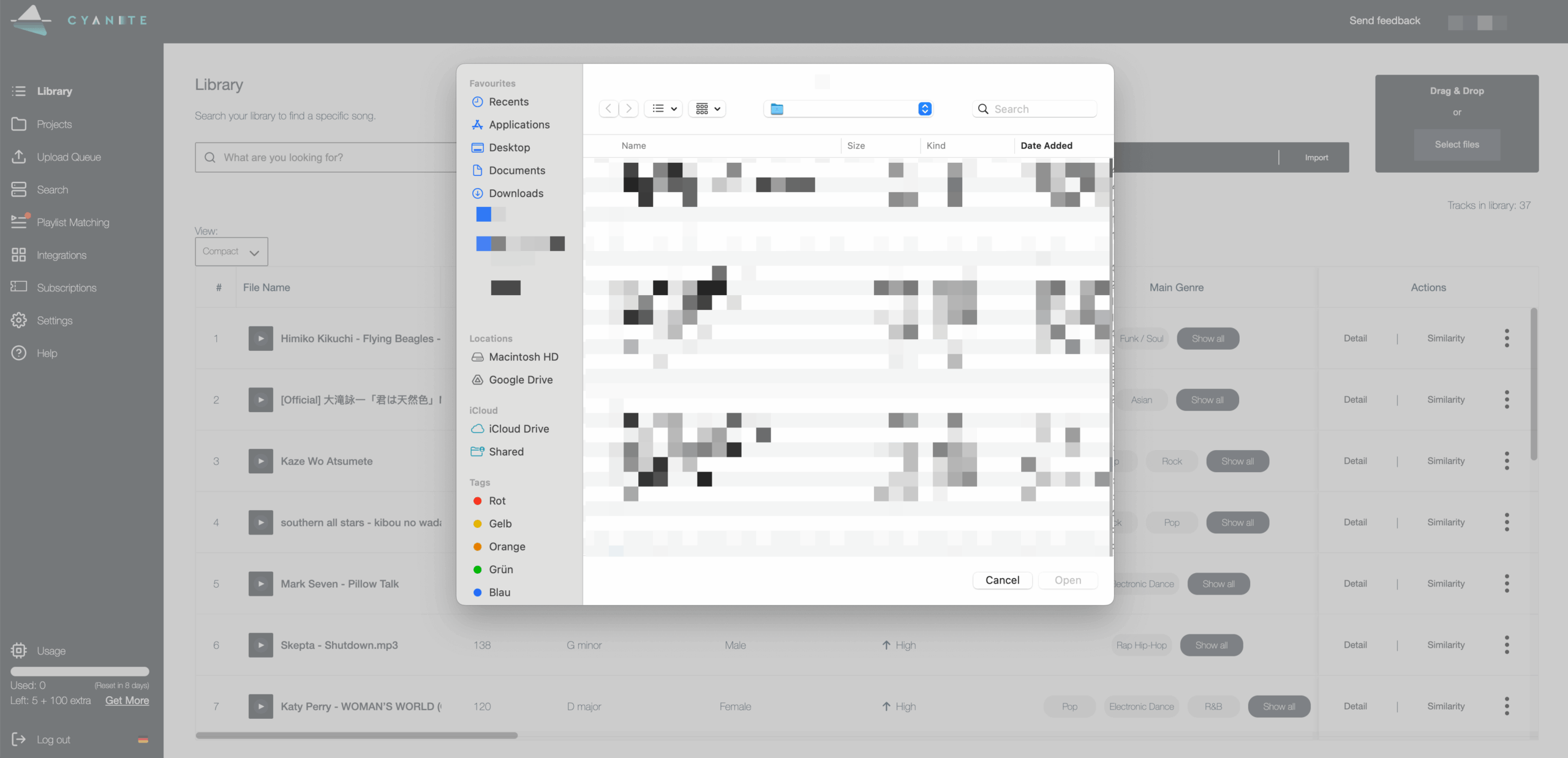
  • Dragging MP3 files into the Library
  • Clicking Select files to browse your device
  • Pasting a YouTube link and importing the audio

Analysis starts automatically, and uploads are limited to 15 minutes per track.

A screenshot of a music library with an upload window

3. Explore your tags in the web app

Once a file is processed, you can explore all its tags inside the Library. In this view, you can discover:

  • Your songs’ full tag output
  • The representative segment, full-track view, or a custom interval
  • Similarity Search with filters for genre, BPM, or key
  • Quick navigation through your catalog using the search bar

This helps you evaluate your catalog quickly before integrating the results into your own systems.

A screenshot of a music library with an upload window

4. Create an API integration (for scale and automation)

If you want to connect Cyanite directly to your internal tools, you can set up an API integration. Just note that coding skills are required at this stage.

  1. Open the Web App dashboard.
  2. Go to Integrations.
  3. Select Create New Integration.
  4. Select a title.
  5. Fill out the webhook URL and generate or create your own webhook secret.
  6. Click the Create Integration button.

After you create the integration, we generate two credentials:

  • Access token: used to authenticate API requests
  • Webhook secret: used to verify incoming events

Test your integration credentials following this link.

You must store the access token and webhook secret securely. You can regenerate new credentials at any time, but they cannot be retrieved once lost.

Pro tip: We have a sample integration available on GitHub to help you get started.


5. Start sending audio to the API

  • Use your access token to send MP3 files to Cyanite for analysis.

Pro tip: For bulk uploads (>1,000 audios), we recommend using an S3 bucket upload to speed up ingestion.

6. Receive your tagging results

  • Your webhook receives the completed metadata as soon as the analysis is finished.
  • If needed, you can also export results as CSV or spreadsheet files.
  • This makes it easy to feed the data into playlisting tools, catalog audits, licensing workflows, or internal search systems.

7. Start using your metadata

Once results are flowing, you can integrate them into the workflows that matter most:

  • Search and recommendation tools
  • Catalog management systems
  • Playlist and curation workflows
  • Rights and licensing operations
  • Sync and creative pipelines
  • Internal music discovery dashboards

Read more: Check out Cyanite’s API documentation

Auto-tag your tracks with Cyanite

AI auto-tagging helps you bring structure and consistency to your catalog. By analyzing the full audio, our models capture mood changes, instrumentation, and energy shifts that manual tagging often misses. The result is metadata you can trust across all your songs.

Our tagging system is already widely adopted; over 150 companies are using it, and more than 45 million songs have been tagged. The system gives teams the consistency they need to scale their catalogs smoothly, reducing manual cleanup, improving search and recommendation quality, and giving you a clearer view of what each track contains.

If you want to organize your catalog with more accuracy and less effort, start tagging your tracks with Cyanite.

FAQs

Q: What is a tag in music?

A: A tag is metadata that describes how a track sounds, such as its mood, genre, energy, or instrumentation. It helps teams search, filter, and organize music more efficiently.

Q: How do you tag music automatically?

A: Automatic tagging uses AI trained on large audio datasets. The model analyzes the sound of the track, identifies musical and emotional patterns, and assigns metadata based on what it hears.

Q: What is the best music tagger?

A: The best auto-tagging music software is the one that analyzes the full audio and delivers consistent results at scale. Cyanite is widely used in the industry because it captures detailed musical and emotional attributes directly from the sound and stays reliable across large catalogs.

Q: How specific can you get when tagging music with Cyanite

A: Cyanite captures detailed attributes such as mood, simple mood, genre, free-genre tags, energy, movement, valence–arousal, emotional dynamics, instrumentation, and more. Discover the full tagging taxonomy here.

AI Search Tool for Music Publishing: Best 3 Ways

AI Search Tool for Music Publishing: Best 3 Ways

In the ever-evolving landscape of sync and music publishing, leveraging advanced technology is essential for staying competitive. Cyanite offers an AI search tool for music publishing – enhancing workflows and maximizing your catalog’s potential. 

Here are three of the best ways to utilize Cyanite as a music publisher.

1. Using Cyanite’s Web App as an Internal AI Search Tool for Sync

Cyanite’s web app can serve as an AI search tool for music publishing, allowing publishers to quickly locate the right tracks for sync briefs. This streamlines the entire creative sync process:


    • Leverage reference tracks: Use reference tracks through Cyanite’s Similarity Search to swiftly scan your catalog for songs with similar sounds and vibes.

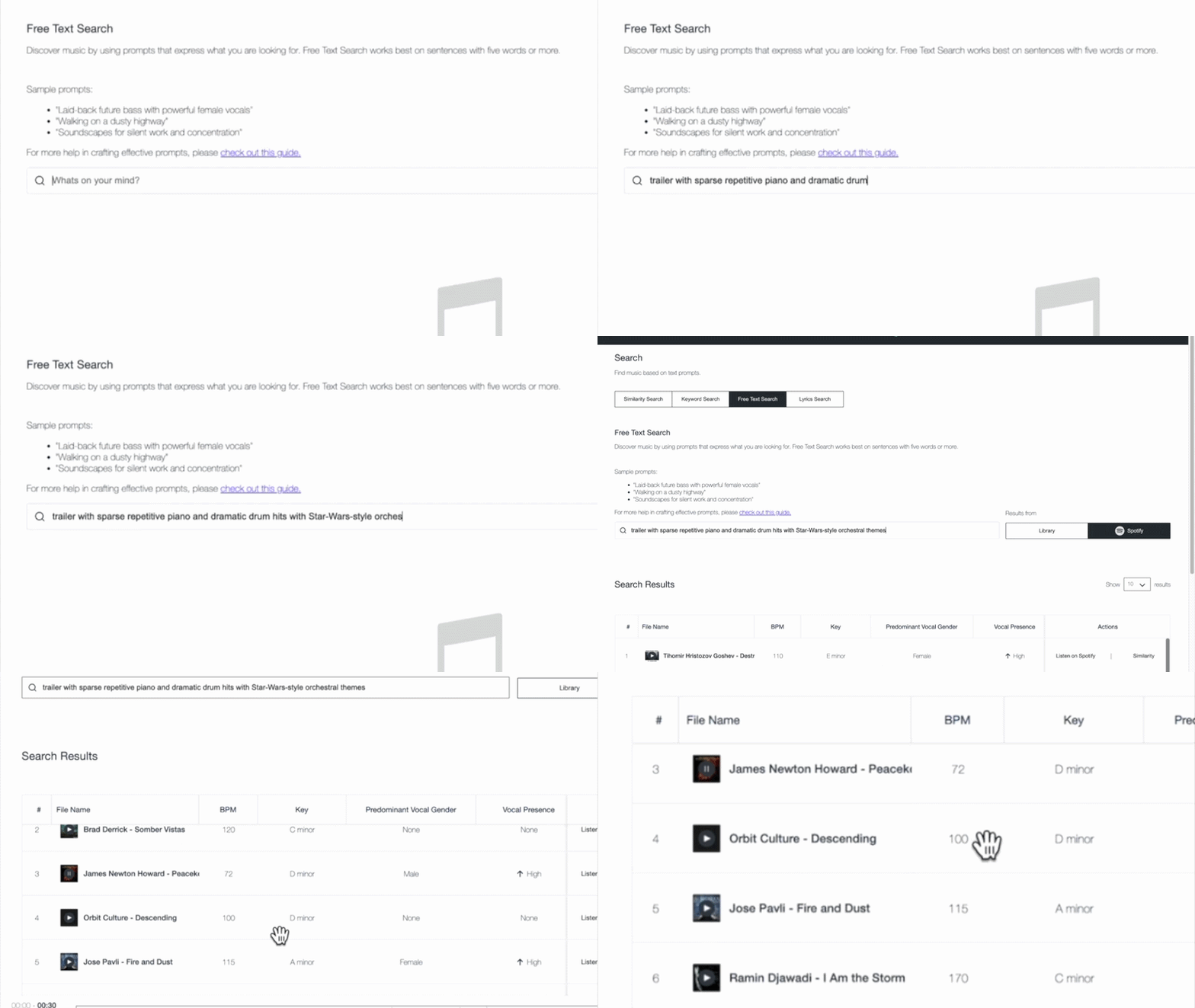
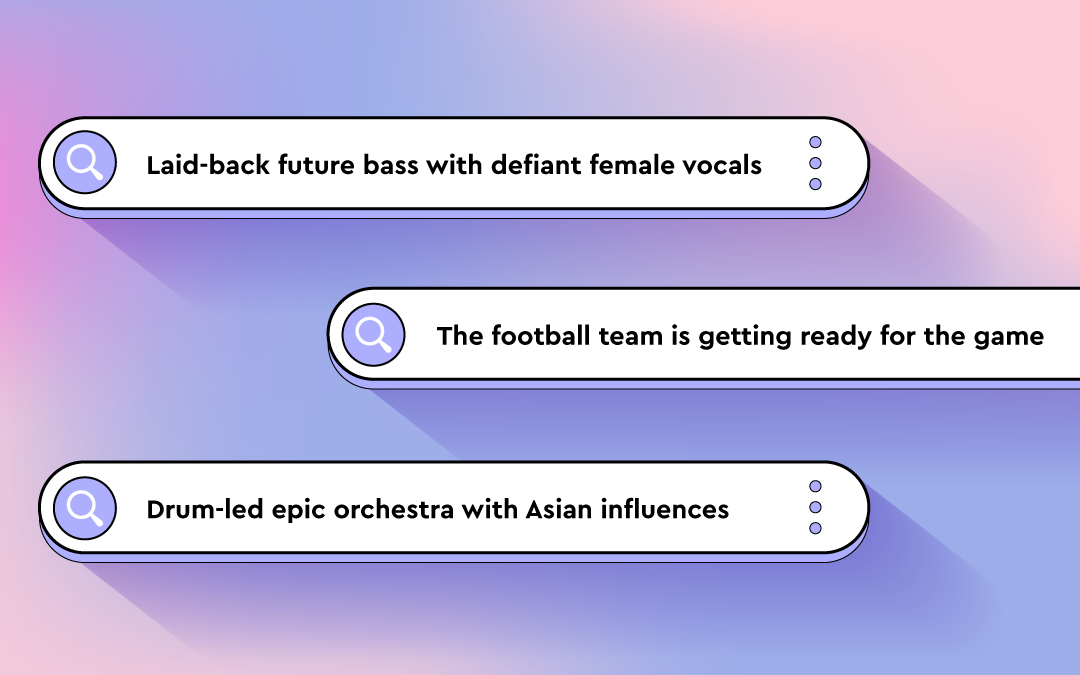
    • Utilize Free Text Search: Enter full briefs, scene descriptions, and other prompts (find examples here) to discover suitable music.

    • Enhance Your Pitches with Visualizations: Enrich your presentations with objective data visualizations to persuade even the most data-driven clients.

All of this not only saves time but lets anyone from your team quickly work with your entire repertoire. It also enhances the likelihood of securing sync placements, and your company’s profile to be able to find surprising, yet appropriate songs.

  •  

With the help of Cyanite’s AI tags and the outstanding search results, we were able to find forgotten gems and give them a new life in movie productions. Without Cyanite, this might never have happened.

Miriam Rech

Sync Manager, Meisel Music

2. Enriching Your DISCO Library or Source Audio with Cyanite Tags

Integrating Cyanite’s tagging capabilities into your DISCO or Source Audio library can significantly enhance your catalog’s discoverability. By automatically tagging tracks with detailed descriptors such as mood, tempo, genre, and lyrical themes, Cyanite enriches your library with objective and consistent language. This ensures you, your team, and your clients find the right music.

This enriched tagging not only improves the user experience but also increases the chances of placements by ensuring that the right tracks are easily searchable. Furthermore, providing your team with tools that deliver meaningful insights contributes to improved employee satisfaction, making their work more efficient and enjoyable.

Read more on how to upload Cyanite tags to your DISCO and Source Audio library.

When integrating catalogs from new signings, acquisitions, or sub-publishing deals, using Cyanite ensures we have consistent & unified tagging across all of our repertoire, regardless of its origin. Both on and off DISCO.

Aaron Mendelsohn

Digital Asset Manager , Reservoir Media

3. Leveraging Music CMS with Cyanite

Cyanite seamlessly integrates with various music content management systems (CMS) such as Reprtoire, Synchtank, Cadenzabox, and Harvest Media, providing music publishers with an AI search tool within their preferred platforms. This integration streamlines catalog management and enhances search functionalities, allowing publishers to efficiently find and manage their music assets.

Cyanite also offers an API for publishers who have developed their own software solutions. This enables direct access to our powerful AI music search features, allowing for customized integration and automation tailored to specific business needs.

By leveraging these integration options, music publishers can optimize their workflows, generate data-driven insights, and respond swiftly to client demands, ultimately enhancing their overall operational efficiency.

We are committed to using AI technologies to optimize our revenues so we can speed the flow of royalties to artists and songwriters. We are delighted to be working with Cyanite to enhance our Synch services.

Gaurav Mittal

CTO, BMG

Conclusion

Cyanite’s AI search tool for music publishing & sync offers publishers powerful tools to optimize their workflows, enhance catalog discoverability, and improve sync licensing processes. By using Cyanite’s web app for internal searches, enriching DISCO and Source Audio libraries with AI-generated tags, and leveraging the CMS or API for seamless integration, publishers can stay ahead in a competitive industry.

Contact us today to learn more about our services and explore the opportunity to try Cyanite for free—no strings attached.

  •  
AI Music Search Algorithms: Gender Bias or Balance?

AI Music Search Algorithms: Gender Bias or Balance?

This is part 1 of 2. To dive deeper into the data we analyzed, click here to check out part 2.

Gender Bias in AI Music: An Introduction

Gender Bias in AI Music Search is often overlooked. With the upcoming release of Cyanite 2.0, we aim to address this issue by evaluating gender representation in AI music algorithms, specifically comparing male and female vocal representation across both our current and updated models.

Finding music used to be straightforward: you’d search by artist name or song title. But as music catalogs have grown, professionals in the industry need smarter ways to navigate vast libraries. That’s where Cyanite’s Similarity Search comes in, offering an intuitive way to discover music using reference tracks. 

In our evaluation, we do not want to focus solely on perceived similarity but also on the potential gender bias of our algorithm. In other words, we want to ensure that our models not only meet qualitative standards but are also fair—especially when it comes to gender representation

In this article, we evaluate both our currently deployed algorithms Cyanite 1.0 and Cyanite 2.0 to see how they perform in representing artists of different genders, using a method called propensity score estimation.

Cyanite 2.0 – scheduled for Nov 1st, 2024, will cover an updated version of Cyanite’s Similarity and Free Text Search, scoring higher in blind tests measuring the similarity of recommended tracks to the reference track.

    Why Gender Bias and Representation Matters in Music AI

    In machine learning (ML), algorithmic fairness ensures automated systems aren’t biased against specific groups, such as by gender or race. For music, this means that AI music search should equally represent both male and female artists when suggesting similar tracks.

    An audio search algorithm can sometimes exhibit gender bias as an outcome of a Similarity Search. For instance, if an ML model is trained predominantly on audio tracks with male vocals, it may be more likely to suggest audio tracks that align with traditional male-dominated artistic styles and themes. This can result in the underrepresentation of female artists and their perspectives.

    The Social Context Behind Artist Representation

    Music doesn’t exist in a vacuum. Just as societal biases influence various industries, they also shape music genres and instrumentation. Certain instruments—like the flute, violin, and clarinet—are more often associated with female artists, while the guitar, drums, and trumpet tend to be dominated by male performers. These associations can extend to entire genres, like country music, where studies have shown a significant gender bias with a decline in female artist representation on radio stations over the past two decades. 

    What this means for AI Music Search models is that if they aren’t built to account for these gendered trends, they may reinforce existing gender- and other biases, skewing the representation of female artists.

    How We Measure Fairness in Similarity Search

    At Cyanite, we’ve worked to make sure our Similarity Search algorithms reflect the diversity of artists and their music. To do this, we regularly audit and update our models to ensure they represent a balanced range of artistic expressions, regardless of gender.

    But how do we measure whether our models are fair? That’s where propensity score estimation comes into play.

    What Are Propensity Scores?

    In simple terms, propensity scores measure the likelihood of a track having certain features—like specific genres or instruments—that could influence whether male or female artists are suggested by the AI. These scores help us analyze whether our models are skewed toward one gender when recommending music.

    By applying propensity scores, we can see how well Cyanite’s algorithms handle gender bias. For example, if rock music and guitar instrumentation are more likely to be associated with male artists, we want to ensure that our AI still fairly recommends tracks with female vocals in those cases.

    Bar chart comparing the average female vocal presence across two Cyanite AI models. The blue bars represent the old model (Cyanite 1.0), and the green bars represent the improved model (Cyanite 2.0). A horizontal dashed purple line at 50% indicates the target for gender parity. The x-axis displays the likelihood of female vocals in different ranges, while the y-axis shows the percentage of female presence.

    Picture 1: We aim for gender parity in each bin, meaning the percentage of tracks with female vocals should be approximately 50%. The closer we are to that horizontal purple dashed line, the better our algorithm performs in terms of gender fairness.

    Comparing Cyanite 1.0 and Cyanite 2.0

    To evaluate our algorithms, we created a baseline model that predicts the likelihood of a track featuring female vocals, relying solely on genre and instrumentation data. This gave us a reference point to compare with Cyanite 1.0 and Cyanite 2.0.

    Take a blues track featuring a piano. Our baseline model would calculate the probability of female vocals based only on these two features. However, this model struggled with fair gender representation, particularly for female artists in genres and instruments dominated by male performers. The lack of diverse gender representation in our test dataset for certain genres and instruments made it difficult for the baseline model to account for societal biases that correlate with these features.

    The Results

    The baseline model significantly underestimated the likelihood of female vocals in tracks with traditionally male-associated characteristics, like rock music or guitar instrumentation. This shows the limitations of a model that only considers genre and instrumentation, as it lacks the capacity to handle high-dimensional data, where multiple layers of musical features influence the outcome.

    In contrast, Cyanite’s algorithms utilize rich, multidimensional embeddings to make more meaningful connections between tracks, going beyond simple genre and instrumentation pairings. This allows our models to provide more nuanced and accurate predictions.

    Despite its limitations, the baseline model was useful for generating a balanced test dataset. By calculating likelihood scores, we paired male vocal tracks with female vocal tracks that had similar characteristics using a nearest-neighbour approach. This helped eliminate outliers, such as male vocal tracks without clear female counterparts and resulted in a balanced dataset of 2,503 tracks, each with both male and female vocal representations.

    When we grouped tracks into bins based on the likelihood of female vocals, our goal was a near-equal presence of female vocals across all bins, with 50% representing the ideal gender balance. We conducted this analysis for both Cyanite 1.0 and Cyanite 2.0.

    The results were clear: Cyanite 2.0 produced the fairest and most accurate representation of both male and female artists. Unlike the baseline model and Cyanite 1.0, which showed fluctuations and sharp declines in female vocal predictions, Cyanite 2.0 consistently maintained balanced gender representation across all probability ranges.

    To see more explanation on how propensity scores can help aid gender bias in AI music and balance the gender gap, check out part 2 of this article.

    Conclusion: A Step Towards Fairer Music Discovery

    Cyanite’s Similarity Search has applications beyond ensuring gender fairness. It helps professionals to:


    • Use reference tracks to find similar tracks in their catalogs.
    • Curate and optimize playlists based on similarity results.
    • Increase the overall discoverability of a catalog.

    Our comparative evaluation of artist gender representation highlights the importance of algorithmic fairness in music AI. With Cyanite 2.0, we’ve made significant strides in delivering a balanced representation of male and female vocals, making it a powerful tool for fair music discovery.

    However, it’s crucial to remember that societal biases—like those seen in genres and instrumentation—don’t disappear overnight. These trends influence the data that AI music search models and genAI models are trained on, and we must remain vigilant to prevent them from reinforcing existing inequalities.

    Ultimately, providing fair and unbiased recommendations isn’t just about gender—it’s about ensuring that all artists are represented equally, allowing catalog owners and music professionals to explore the full spectrum of musical talent. At Cyanite, we’re committed to refining our models to promote diversity and inclusion in music discovery. By continuously improving our algorithms and understanding the societal factors at play, we aim to create a more inclusive music industry—one that celebrates all artists equally.

    If you’re interested in using Cyanite’s AI to find similar songs or learn more about our technology, feel free to reach out via mail@cyanite.ai.

    You can also try our free web app to analyze music and experiment with similarity searches without needing any coding skills.

    AI Music Recommendation Fairness: Gender Balance

    AI Music Recommendation Fairness: Gender Balance

    Eylül

    Eylül

    Data Scientist at Cyanite

    Part 2 of 2. To get a more general overview of AI Music recommendation fairness – more specifically the topic of gender bias, click here to check out part 1.

    Diving Deeper: The Statistics of Fair Music Discovery

    While the first part of this article introduced the concept of gender fairness in music recommendation systems in an overview, this section delves into the statistical methods and models that we employ at Cyanite to evaluate and ensure AI music recommendation fairness, particularly in gender representation. This section assumes familiarity with concepts like logistic regression, propensity scores, and algorithmic bias, so let’s dive right into the technical details.

    Evaluating Fairness Using Propensity Score Estimation

    To ensure our music discovery algorithms offer fair representation across different genders, we employ propensity score estimation. This technique allows us to estimate the likelihood (or propensity) that a given track will have certain attributes, such as the genre, instrumentation, or presence of male or female vocals. Essentially, we want to understand how different features of a song may bias the recommendation system and adjust for that bias accordingly to enhance AI music recommendation fairness.

    Baseline Model Performance

    Before diving into our improved music discovery algorithms, it’s essential to establish a baseline for comparison. We created a basic logistic regression model that utilizes only genre and instrumentation to predict the probability of a track featuring female vocals. 

    A model is considered well-calibrated when its predicted probabilities (represented by the blue line) closely align with the actual outcomes (depicted by the purple dashed line in the graph below). 

    Calibration plot comparing the predicted probability to the true probability in a logistic regression model. The solid blue line represents the logistic regression performance, while the dashed purple line represents a perfectly calibrated model. The x-axis shows the predicted probability, and the y-axis shows the true probability in each bin

    Picture 1: Our analysis shows that the logistic regression model used for baseline analysis tends to underestimate the likelihood of female vocal presence within a track at higher probability values. This is evident from the model’s performance, which falls below the diagonal line in reliability diagrams. The fluctuations and non-linearity observed suggest the limitations of relying solely on genres and instrumentation to predict artist representation accurately.

    Propensity Score Calculation

    In Cyanite’s Similarity Search – one of our music discovery algorithms – we model the likelihood of female vocals in a track as a function of genre and instrumentation using logistic regression. This gives us a probability score for each track, which we refer to as the propensity score. Here’s a basic formula we use for the logistic regression model:

    Logistic regression formula used to calculate the probability that a track contains female vocals based on input features like genre and instrumentation. The equation shows the probability of the binary outcome Y being 1 (presence of female vocals) given input features X. The formula includes the intercept (β0) and coefficients (β1, β2, ..., βn) for each input feature.

    Picture 2: The output is a probability (between 0 and 1) representing the likelihood that a track will feature female vocals based on its attributes. 

    Binning Propensity Scores for Fairness Evaluation

    To assess the AI music recommendation fairness of our models by observing the correlations between the input features such as genre and instrumentation with the gender of the vocals, we analyze for each propensity the model outcome of the female artist ratio. To see the trend of continuous propensity scores into discrete variables and the average of female vocal presentation for that range, binning has been applied. 

    We then calculate the percentage of tracks within each bin that have female vocals as the outcome of our models. This allows us to visualize the actual gender representation across different probability levels and helps us evaluate how well our music discovery algorithms promote gender balance.


    A bar chart comparing the average female vocal presence in Cyanite's Similarity Search results across different metadata groups.

    Picture 3: We aim for gender parity in each bin, meaning the percentage of tracks with female vocals should be approximately 50%. The closer we are to that horizontal purple dashed line, the better our algorithm performs in terms of gender fairness.

    Comparative Analysis: Cyanite 1.0 vs Cyanite 2.0

    By comparing the results of Cyanite 1.0 and Cyanite 2.0 against our baseline logistic regression model, we can quantify how much fairer our updated algorithm is.

    • Cyanite 1.0 showed an average female presence of 54%, indicating a slight bias towards female vocals.

    • Cyanite 2.0, however, achieved 51% female presence across all bins, signaling a more balanced and fair representation of male and female artists.

    This difference is crucial in ensuring that no gender is disproportionately represented, especially in genres or with instruments traditionally associated with one gender over the other (e.g., guitar for males, flute for females). Our results underscore the improvements in AI music recommendation fairness.

    How Propensity Scores Help Balance the Gender Gap

    Propensity score estimation is a powerful tool that allows us to address biases in the data samples used to train our music discovery algorithms. Specifically, propensity scores help ensure that features like genre and instrumentation do not disproportionately affect the representation of male or female artists in music recommendations.

    The method works by estimating the likelihood of a track having certain features (such as instrumentation, genre, or other covariates) using and checking if those features directly influence our Similarity Search by putting our algorithms to the test. Therefore, we investigate the spurious correlation which is directly related to gender bias in our dataset, partly from the societal biases. 

    We would like to achieve a scenario where we could represent genders equally in all kinds of music. This understanding allows us to fine-tune the model’s behavior to ensure more equitable outcomes and further improve our algorithms.

    Conclusion: Gender Balance 

    In conclusion, our comparative analysis of artist gender representation in music discovery algorithms highlights the importance of music recommendation fairness in machine learning models.

    Cyanite 2.0 demonstrates a more balanced representation, as evidenced by a near-equal presence of female and male vocals across various propensity score ranges.

    If you’re interested in using Cyanite’s AI to find similar songs or learn more about our technology, feel free to reach out via mail@cyanite.ai.

    You can also try our free web app to analyze music and experiment with similarity searches without needing any coding skills.

    Music CMS Solutions Compatible with Cyanite: A Case Study

    Music CMS Solutions Compatible with Cyanite: A Case Study

    In today’s digital age, efficiently managing vast amounts of content is crucial for businesses, especially in the music industry. For those who decide not to build their own library environment, music Content Management Systems (CMS) have become indispensable tools. At Cyanite, we integrate our AI-powered analysis and search algorithms with these systems – helping you create music moments.

    In this blog post, we’ll delve into Cyanite’s compatibility with various CMS. We’ll provide an overview of the features Cyanite offers for each platform, recommend the ideal user types for each CMS, and include relevant examples

    Additionally, you’ll find information on how to use Cyanite via each of these providers.

    A Spreadsheet giving an overview of what Cyanite features are implemented into which content management system.

      Synchtank

      Synchtank provides cutting-edge SaaS solutions specifically designed to simplify and streamline asset and rights management, content monetization, and revenue processing. 

      It is trusted by some of the world’s leading music and media companies, including NFL, Peermusic, Warner Music, and Warner Bros. Discovery, to drive efficiency and boost revenue.

      Cyanite Features Available

      • Auto-Tagging
      • Auto-Descriptions
      • Similarity Search

      Recommended for

      • Music Publishers
      • Record Labels
      • Production Music Libraries
      • Broadcast Media/Entertainment Companies
      A Screenshot showing United Masters Sync's website using the CMS Synchtank

      Synchtank in United Masters Sync

      How to use Cyanite via Synchtank

      Cyanite is directly integrated into Synchtank.

      If you want to use Cyanite with Synchtank, please get in touch with a member of the Synchtank team or schedule a call with us to learn more via the button below.

      Reprtoir

      Reprtoir is a France-based CMS offering solutions for asset management, playlists, contacts, contracts, accounting, and analytics – providing supported data formats for various music platforms, distributors, music techs, and collective management organizations.

      Cyanite Features Available

      • Auto-Tagging
      • Auto-Descriptions
      • Similarity Search
      • Free Text Search
      • Visualizations

      Recommended for

      • Record Labels
      • Music Publishers
      • Production Music Libraries
      • Sync Teams
      A screen recording of Reprtoir, a music content management system. It provides a brief overview of Cyanite's integration into the platform.
      Screen Recording of Reprtoir with Cyanite

      How to use Cyanite via Reprtoir

      Cyanite is directly integrated into Reprtoir.

      If you want to use Cyanite with Reprtoir, please get in touch with a member of the Reprtoir team or schedule a call with us to learn more via the button below.

      Source Audio

      US-based Source Audio is a CMS that features built-in music distribution and offers access to broadcasters and streaming networks. Whilst offering its own AI tagging and search functions, again, specifically larger catalogs will find deeper, more accurate tagging necessary to effectively navigate their repertoire.

      Cyanite Features Available

      • Auto-Tagging
      • Auto-Descriptions

      Recommended for

      • Production Music Libraries
      • TV-Networks and Streaming Services
      A Screenshot showing the Interface of the Music CMS Source Audio

      How to use Cyanite via Sourceaudio

      Cyanite is directly integrated into Sourceaudio.

      If you want to use Cyanite inside Sourceaudio, send us an email or schedule a call below.

      Harvest Media

      Harvest Media is an Australian cloud-based music business service. They were founded in 2008 and offer catalog managing, licensing, and distribution tools based on standardized metadata and music search engines.

      Cyanite Features Available

      • Auto-Tagging
      • Auto-Descriptions
      • Similarity Search
      • Free Text Search

      Recommended for

      • Production Music Libraries
      • Music Publishers
      • Music Licensing & Subscription Services
      • Record Labels
      • TV Production, Broadcast and Entertainment Companies
      A screen recording of Human Librarian's interface, based on the CMS Harvest Media. It provides a brief overview of Cyanite's integration into the platform.

      Screen Recording of Harvest Media in Human Librarian

      How to use Cyanite via Harvest Media

      Cyanite is directly integrated into Harvest Media.

      If you want to use Cyanite inside Harvest Media, send us an email or schedule a call below.

      MusicMaster

      MusicMaster is the industry-standard software for professional music scheduling. It offers flexible rule-based planning, seamless integration with automation systems, and scalable tools for managing music programming across single stations or complex broadcast networks.

      Cyanite Features Available

      • Auto-Tagging
      • Visualizations

      Recommended for

      • Broadcast radio groups
      • FM/AM radio stations
      • Satellite radio networks
      A screen recording of Human Librarian's interface, based on the CMS Harvest Media. It provides a brief overview of Cyanite's integration into the platform.

      Screenshot of MusicMaster Scheduling Software

      How to use Cyanite via MusicMaster

      Cyanite is directly integrated into MusicMaster.

      If you want to use Cyanite inside MusicMaster, send us an email or schedule a call below.

      Cadenzabox

      Cadenzabox is one of the UK-based music Content Management Systems offering tagging, search, and licensing tools as a white-label service, enabling brand-specific designs and a deep level of customization built by Idea Junction – a full-service digital creative studio. 

      Cyanite Features Available

      • Auto-Tagging
      • Auto-Descriptions
      • Similarity Search
      • Free Text Search

      Recommended for

      • Production Music Libraries
      • Music Publishers
      A screen recording of Music Mind Co., a music library using the content management system Cadenzabox. It provides a brief overview of Cyanite's integration into the platform.

      Screen Recording of Cadenzabox in MusicMind Co.

      How to use Cyanite via Cadenza Box

      Cyanite is directly integrated into Cadenzabox.

      If you want to use Cyanite inside Cadenzabox, send us an email or schedule a call below.

      Tunebud

      UK-based Tunebud offers an easy, no-code music library website-building solution complete with extensive file delivery features, music search, playlist creation, e-commerce solutions, watermarking, and bulk downloads. It’s an all-in-one music library website solution suitable for individual composers wanting to showcase their works to music publishers and labels looking for a music sync solution for catalogs of up to 500k tracks.  

      Cyanite Features Available

      • Auto-Tagging
      • Auto-Descriptions
      • Similarity Search
      • Free Text Search

      Recommended for

      • Musicians
      • Composers
      • Music Publishers
      • Record Labels
      • Music Library and SFX Library Operators
      A Screenshot showing an example website using the CMS Tunebud
      Tunebud with Cyanite’s similarity search

      How to use Cyanite via Tunebud

      Cyanite is directly integrated into Tunebud.

      If you want to use Cyanite with Tunebud, please get in touch with a member of the TuneBud team or schedule a call with us to learn more via the button below.

      Supported CMS

      DISCO

      DISCO is an Australia-based sync pitching tool to manage, share, and receive audio files. While DISCO offers its own audio tagging version, particularly catalogs north of 10,000 songs may prefer using Cyanite’s deeper, more accurate tagging to organize and browse its catalog. 

      Cyanite Features Available

      • Auto-Tagging
      • Auto-Descriptions

      Recommended for

      • Music Publishers
      • Record Labels
      • Sync Teams
      A Screenshot of the Music CMS DISCO

      DISCO

      How to use Cyanite via DISCO

      All you need to do is reach out to your DISCO customer success manager and ask for a CSV spreadsheet of your catalog including mp3 download links. We’ll download, analyze, and tag your music, according to your requirements, and you can effortlessly upload the updated spreadsheet back to DISCO.

      You decide which tags to use, which to keep, and which to replace.

      Are you missing any music Content Management Systems? Feel free to chat with us and share your thoughts!

      Haven’t decided on a CMS yet? Contact us for free testing periods.

      Your Cyanite Team.