Context is what separates music from AI slop

Context is what separates music from AI slop

Add structured context to your discovery workflows with Cyanite’s Advanced Search.

Every week, thousands of new tracks enter music libraries. There’s no real limit to how many can be uploaded. As catalogs expand, it becomes harder to tell why one piece deserves attention over another.

At the same time, generative AI tools make it possible to produce a lot of music quickly and cheaply. This means catalogs can get flooded with “AI slop,” a term used to describe mass-produced generative content created for volume rather than quality.

Context is key to making the distinction between music and AI slop. Knowing who created a track, what shaped it, and why it exists roots it in human experience and creative intent.  Without that layer of insight, music becomes interchangeable audio, reduced to tags and search terms.

What makes music human?

The intention behind music and the social connection it creates are what make it human.

That humanity is visible in the decisions that shape a track. No matter how minimal or elaborate a composition is, every musical choice reflects human knowledge and experience. The key, rhythm, production, and instruments used are all guided by cultural exposure, emotional memory, and learned musical language.

And then there’s the risk. When someone releases music, they also release control over how it will be heard and judged. That exposure is vulnerable, and recognizing the risk and context behind a piece makes the connection to it stronger.

The AI limitation

When intention and personal stakes are missing, the difference is noticeable.

AI-generated music can sound like human-made tracks. It can replicate style, structure, and production detail with striking accuracy. In many contexts, it even meets professional standards.

However, it doesn’t come from lived experience and instead reconstructs patterns it has learned from existing music. There’s no vulnerability behind the track. There’s no social stake. And there’s no personal history shaping the decision to produce it. The output is coherent because the sequence fits statistically, not because something needed to be expressed.

Why context matters more than ever

With the sheer volume of modern catalogs, several tracks can sound interchangeable. You can work on a brief and find 10 pieces that would technically meet the requirements. 

What actually helps you choose is knowing where the music comes from and who made it. That extra layer of information changes how you hear it. In a space this crowded, context is what keeps everything from blending into the same background noise.

The potential of contextual metadata

If context gives music meaning, it needs to be structured as metadata so it can be searched and filtered at scale.

Custom tagging makes that possible. Catalogs can include fields for artist origin, geography, creative background, cultural context, and editorial positioning. When that information can be filtered, it starts shaping decisions. Context moves from description to action.

The same principle applies to one of the clearest distinctions in modern catalogs: whether a track is human-created or AI-generated. When that difference is structured as metadata, it becomes searchable inside existing discovery systems.

Melodie Music puts this into practice to spotlight original Australian artists. They combine Cyanite’s sound-based AI search with their own editorial and contextual metadata.

  • Cyanite analyzes the sound of a reference track and generates a shortlist based on emotional profile and sonic character.
  • Melodie layers contextual filters, such as artist origin, on top of those results.
  • Users refine further using editorial tags aligned with cultural or strategic priorities.
  • The final selection satisfies both the creative brief and the mandate to support specific artist communities.

What this means for music discovery

Algorithmic recommendations alone aren’t enough. Teams want clarity about origin, authorship, and AI involvement before committing to a track. 

In our joint study with MediaTracks and Marmoset, we found that contextual metadata plays a central role in how professionals work through briefs. Respondents described relying on origin details and creator background to avoid misalignment and explain their choices to clients. 

Clearly labeling AI involvement was part of that same expectation. Professionals are open to working with AI-generated music, but they want to know explicitly whether a track is AI-generated or human-made. Context, including transparency around authorship, informs decisions.

Read more: Why AI labels and metadata now matter in licensing

Cyanite’s Advanced Search, available via API integration, allows teams to upload their own custom metadata fields and use them for filtering. Fields can include artist origin, cultural background, clearance information, and editorial categories.

Search queries then run within that defined subset, so sound analysis operates inside contextual boundaries set by the catalog owner, as implemented by Melodie Music.

For platforms embedding Cyanite’s search algorithms into their own systems, this enables structured transparency at scale. Context becomes part of the discovery logic itself.

Choosing meaning over noise

“We have always connected to music because it carries intention, experience, and emotion – not just sound. A song means something because it was created in a specific moment, for a reason, by someone responding to their world. Today, we are surrounded by more music than ever, inevitably making it harder to feel that connection. Delivering context to a song gives a glimpse into what went into it, and with it a chance to understand the people and feelings behind the music.

Even though AI-generated music can sound pleasant, it is fundamentally an imitation – a reconstruction of patterns it has seen before. It lacks intention, situation, risk, and personal stake.

That’s why context matters more than ever. Knowing why a piece of music exists, where it comes from, and what went into it is what turns sound into something meaningful.”

Simon Timm

Music Producer, Cyanite Marketing Expert, Cyanite

Context can double as infrastructure in catalogs. As AI-generated music becomes easier to produce and distribute, what will separate human-made tracks from AI slop is whether a track’s origin is visible and understood. Catalogs that structure and surface contextual metadata can ensure music is selected based on where it comes from and why it exists, not just how it sounds.

Ready to add context to your discovery workflows?

FAQs

Q: How can contextual metadata help distinguish human-created music from AI-generated tracks?

A: Contextual metadata adds information beyond sound analysis, such as artist background, origin, editorial positioning, and authorship labeling. It can allow teams to filter catalogs based on transparency and creative intent, helping distinguish human-created music from generative content produced at scale.


Q: Does Cyanite detect whether music is AI-generated or human-made?

A: Cyanite is developing AI music detection capabilities designed to support transparent catalog workflows. Early implementations allow teams to label and filter tracks based on AI involvement, helping licensing professionals and curators make informed decisions during discovery.

Q: Can Cyanite’s Advanced Search filter music using custom metadata fields?

A: Yes. Advanced Search allows catalog owners to include their own metadata fields as filters within search queries. These filters narrow the searchable catalog before sound similarity or text-based matching is applied, helping teams surface results that fit their creative and business requirements.

Q: How can music platforms integrate contextual discovery into existing workflows?

A: Music catalogs can integrate Cyanite’s Advanced Search through the API, making it possible to combine sound analysis with custom metadata filters inside their existing workflows.


Making Sense of Music Data – Data Visualizations

Making Sense of Music Data – Data Visualizations

Generate consistent music metadata from audio. Sign up for Cyanite.

Music data exists at every level of the industry: in catalogs, streaming platforms, research databases, and brand strategy decks. But raw data on its own doesn’t communicate much. To extract insight, support decisions, or align teams, that data needs to become visible.

Visualization makes music data readable at scale. It transforms analysis results into formats people can interpret, compare, and act on. When done well, it gives fragmented or overwhelming data clarity.

This article explores how music companies use visualization in practice, which approaches work for different goals, and what makes visualization reliable.

Learn more: This article focuses on the visualization layer of Liv Buli’s Data Pyramid model. For context on how raw music data becomes structured and analyzable in the first place, see An overview of data in the music industry.

How can we make sense of music data?

When you’re managing thousands of tracks, visualization answers questions metadata alone can’t resolve. Which moods dominate your catalog? Where are the gaps? How does a single track evolve over its duration?

Charts and graphs make these patterns visible. A comparison chart might show that 60% of your catalog is tagged as “energetic” while only 15% is tagged as “calm”. A trend chart may reveal how a track shifts from ambient to electronic as it progresses. This is information you can use to review metadata quality, understand catalog composition, and pitch music with confidence.

However, if tags are inconsistent or incomplete, the patterns you see won’t reflect what’s actually in your catalog. Structured music data should be consistent, and it starts with reliable tagging at scale.

Music data visualization techniques Cyanite uses

Once music data is structured, the next step is choosing the right format to make that data readable. Different chart types serve different purposes in catalog work, whether you’re evaluating a single track, comparing options, or understanding patterns across thousands of files.

Cyanite provides these visualizations in the “Detail” view for each track, covering genre, mood, energy level, instrument presence, and voice presence. Each format is designed to surface specific insights quickly.

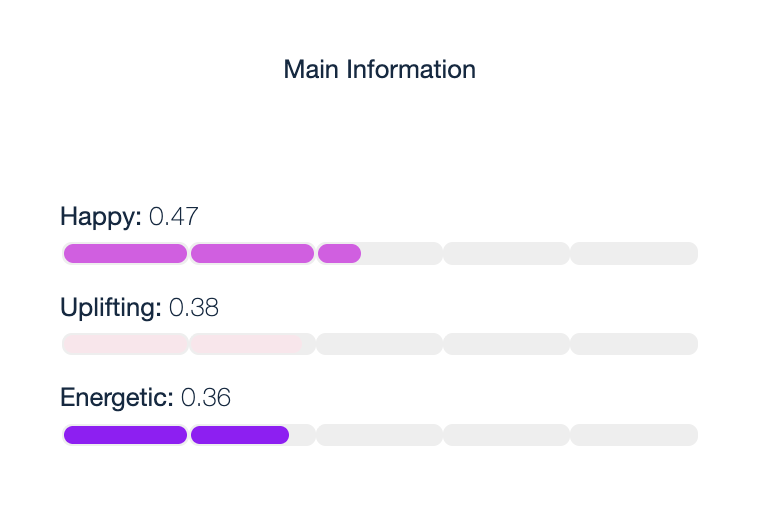
Horizontal bar charts display individual attribute scores in a simple, scannable format. They show mood scores like “Energetic,” “Sexy,” and “Happy,” making it easy to compare strengths at a glance.

  • Use case: Quickly assess which attributes dominate a track before adding it to a playlist or pitching it for a specific brief.

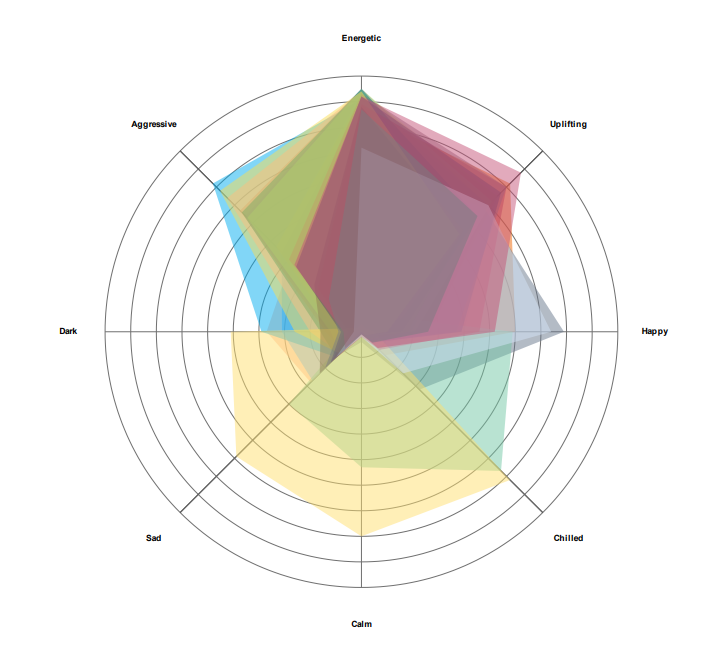
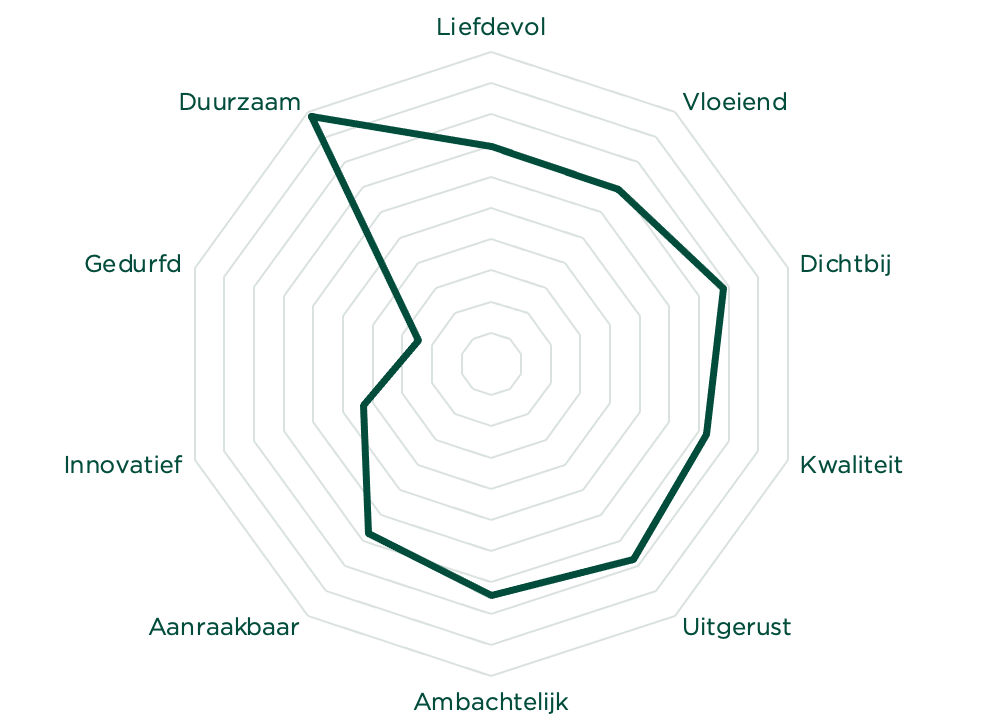
Radar charts by Cyanite visualize a track’s mood profiles in a circular format. Each axis represents a different mood attribute, and the resulting shape reveals the track’s overall emotional signature. This makes it easy to see which emotions dominate and how they balance against each other. When comparing multiple tracks, radar charts can overlay several mood profiles at once, revealing which tracks share similar emotional characteristics and which diverge.

  • Use case: Evaluate a single track’s emotional profile before pitching, or compare multiple tracks side by side to find the best match for a specific brief. Useful when a music supervisor asks for “uplifting but not aggressive,” or when you’re building emotionally cohesive playlists.

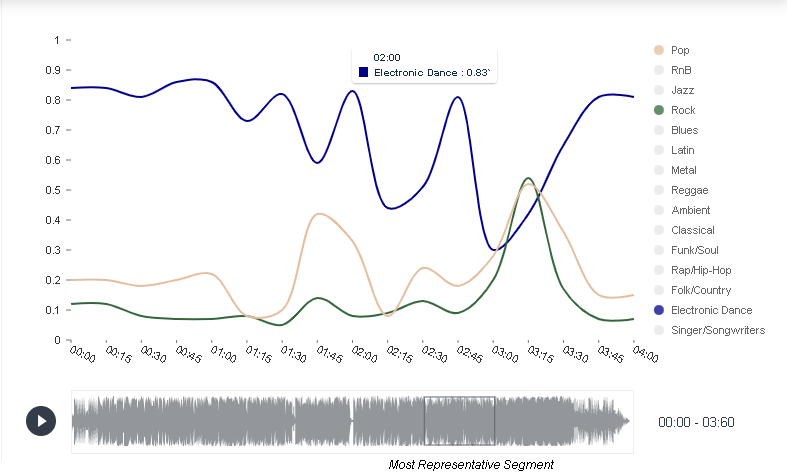
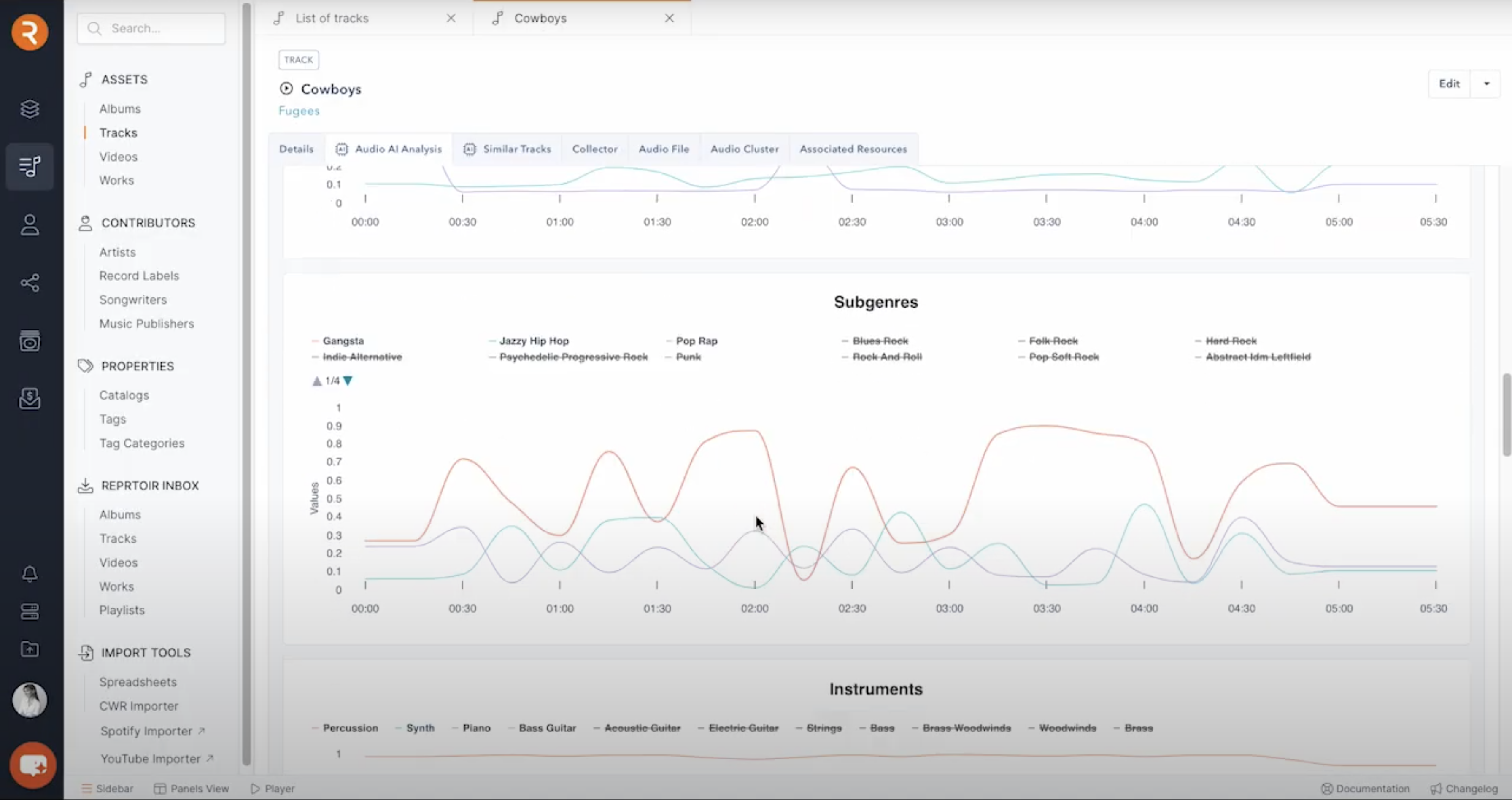
Trend charts reveal how attributes change over time within a track. They show how genre shifts throughout a track’s duration, segment by segment. In this example, you can see a track that starts as electronic dance, briefly touches pop and rock elements, then returns to its electronic dance foundation.

  • Use case: Find tracks that transition between moods or energy levels. Useful for scene changes, dynamic playlist sequencing, or identifying tracks with intro/outro sections that differ from the main body.

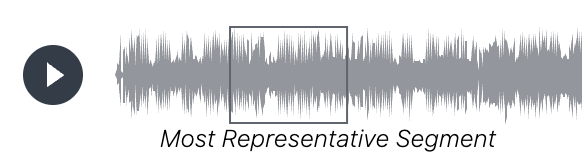
Representative segments identify the 30-second portion of a track that best captures its overall character. Cyanite highlights this segment in the waveform below each visualization, making it easy to preview the essence of a track without listening to the full duration.

  • Use case: Create teaser clips for social media, quickly evaluate tracks during pitching, or provide samples for music supervisors who need fast decision-making tools.

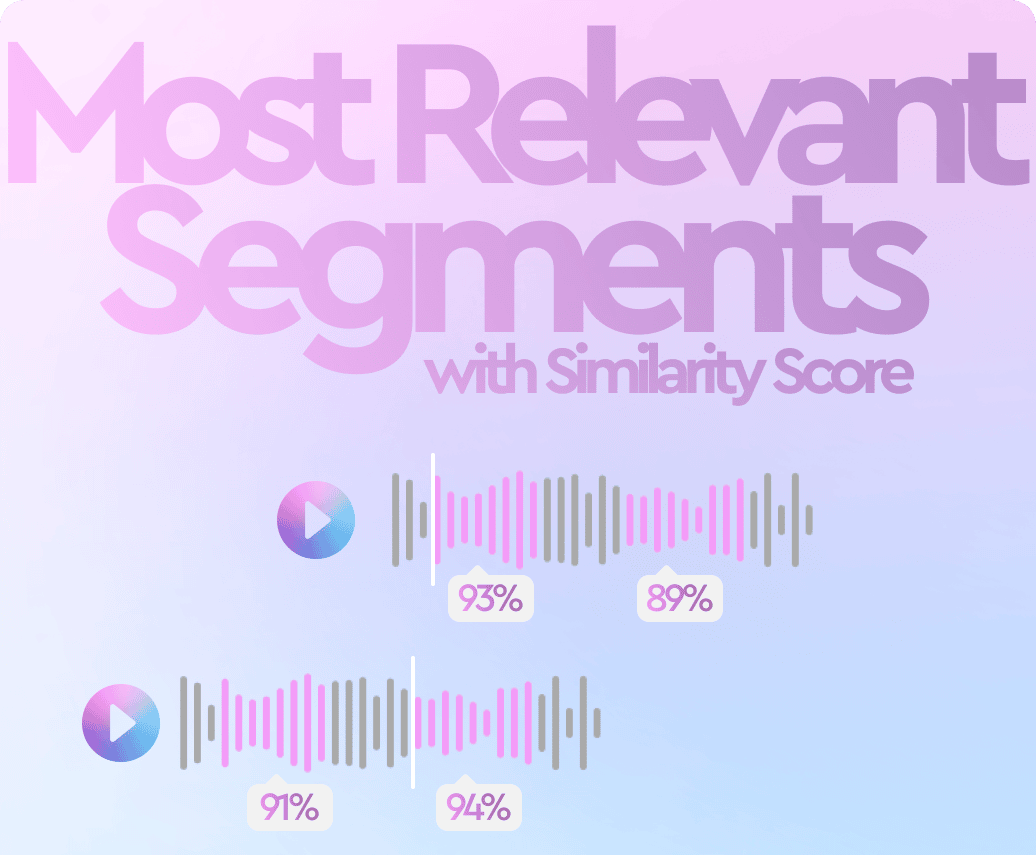
Most relevant segments in Cyanite visualize which moments within a track best match a search query. The system analyzes tracks in short segments and highlights the sections that correspond most closely to the intent of a Similarity Search or Free Text Search.

  • Use case: Jump directly to the section of a track that fits a brief. This is useful when searching for specific moments like intros, breakdowns, or choruses, and when reviewing many search results in a limited time.

Together, these visualization formats make track composition visible at different scales. With a foundation of consistent tagging, they turn raw data into actionable insight that supports confident decisions about what to pitch, license, or prioritize.

How music companies use data visualization today

Music companies use data visualization to understand their catalogs. Instead of working through raw metadata, teams can use visuals to understand what the catalog includes, how tracks are distributed across genres and moods, and where there are limitations or opportunities.

In practice, it’s helpful in several scenarios:

  • Catalog analysis: By reviewing visualizations across multiple tracks, teams can identify patterns, such as which moods dominate their catalog and where gaps exist.
  • Brief and pitch preparation: Visualization helps coordinate decisions across people by providing a shared frame of reference when commercial pressure is involved.
  • Programming and curation: Visual cues help teams avoid sonic repetition and maintain contrast between neighboring tracks when building playlists or radio schedules.
  • Catalog development: Teams can check how new releases sit alongside existing music before they are added or promoted.

Visualization needs to be embedded inside operational tools, where catalog work already takes place, because that’s where decisions are made. 

Platforms like Reprtoir and MusicMaster have integrated Cyanite’s visualizations into their products for this reason. By offering sound-based visuals directly within existing workflows, they reflect how central visual analysis has become to modern catalog management.

Why visual appeal matters in music data

In day-to-day work, visualizations help people make decisions. But good visuals need to do more than organize information. They should catch the eye and invite attention to make people want to spend time with the data.

This becomes especially important when data is meant to be shared. As streaming metrics became part of how musical success is discussed, labels began looking for ways to turn abstract performance data into something tangible and visible beyond internal tools.

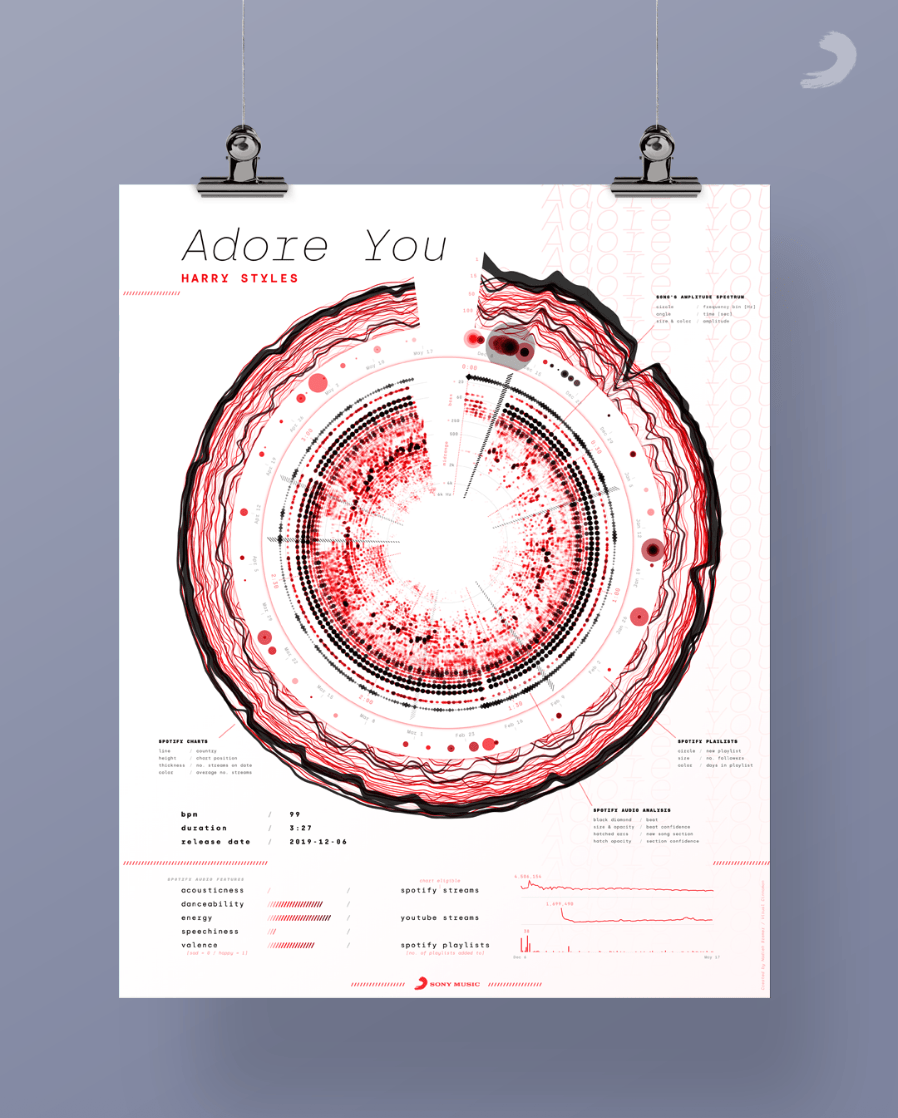
Visual Cinnamon’s work is one example. They created data art posters for Sony Music based on streaming releases such as “Adore You” by Harry Styles. These posters translate audio structure into circular spectrograms and combine it with streaming context, turning listening data into visual objects people want to look at and share.

Poster design by Visual Cinnamon for the song “Adore You” by Harry Styles

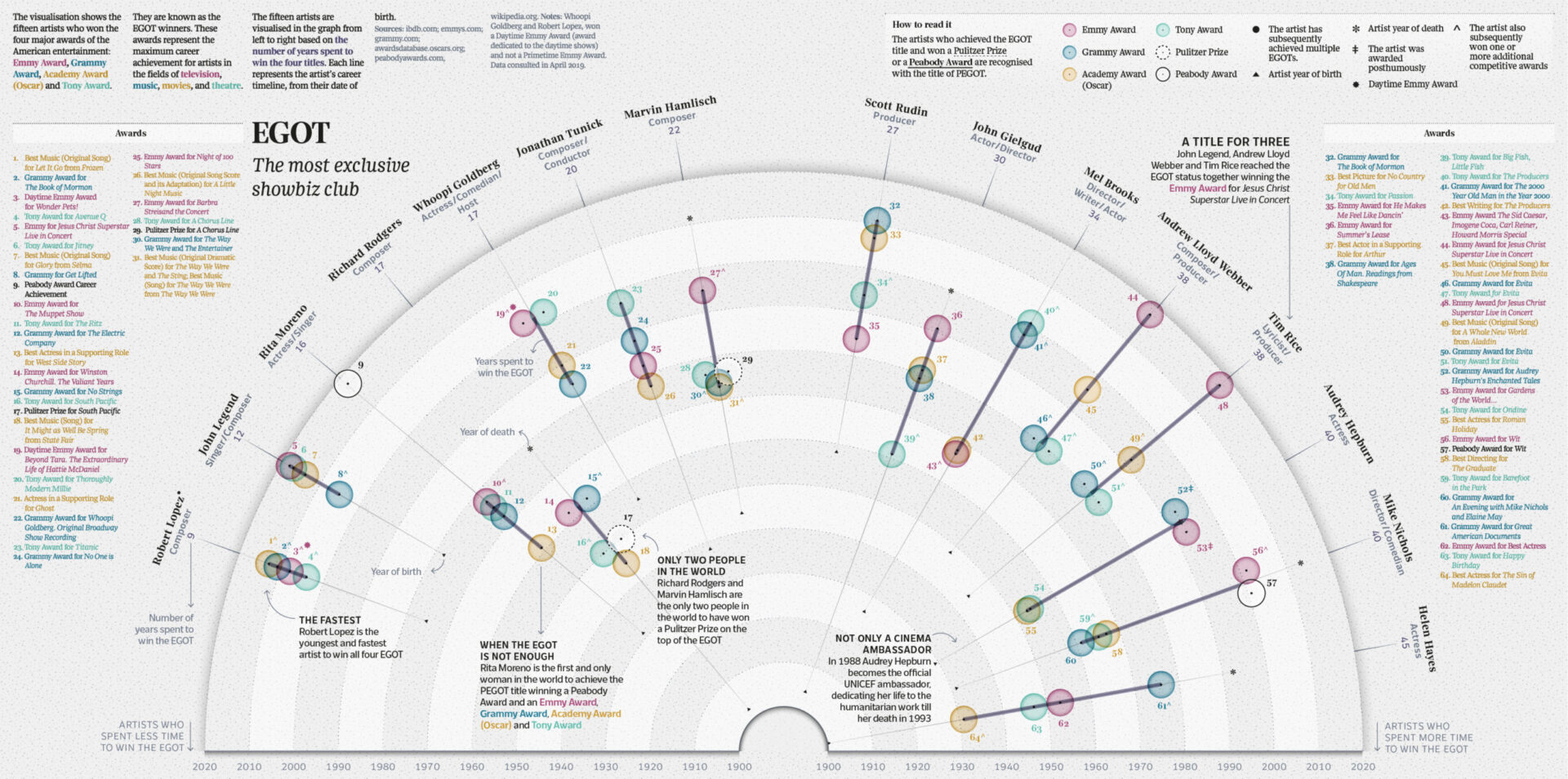
London-based Italian information designer Tiziana Alocci shows us a more expansive take on visual engagement. She uses visualizations for many different use cases: album covers, corporate visualizations, and editorial infographics.

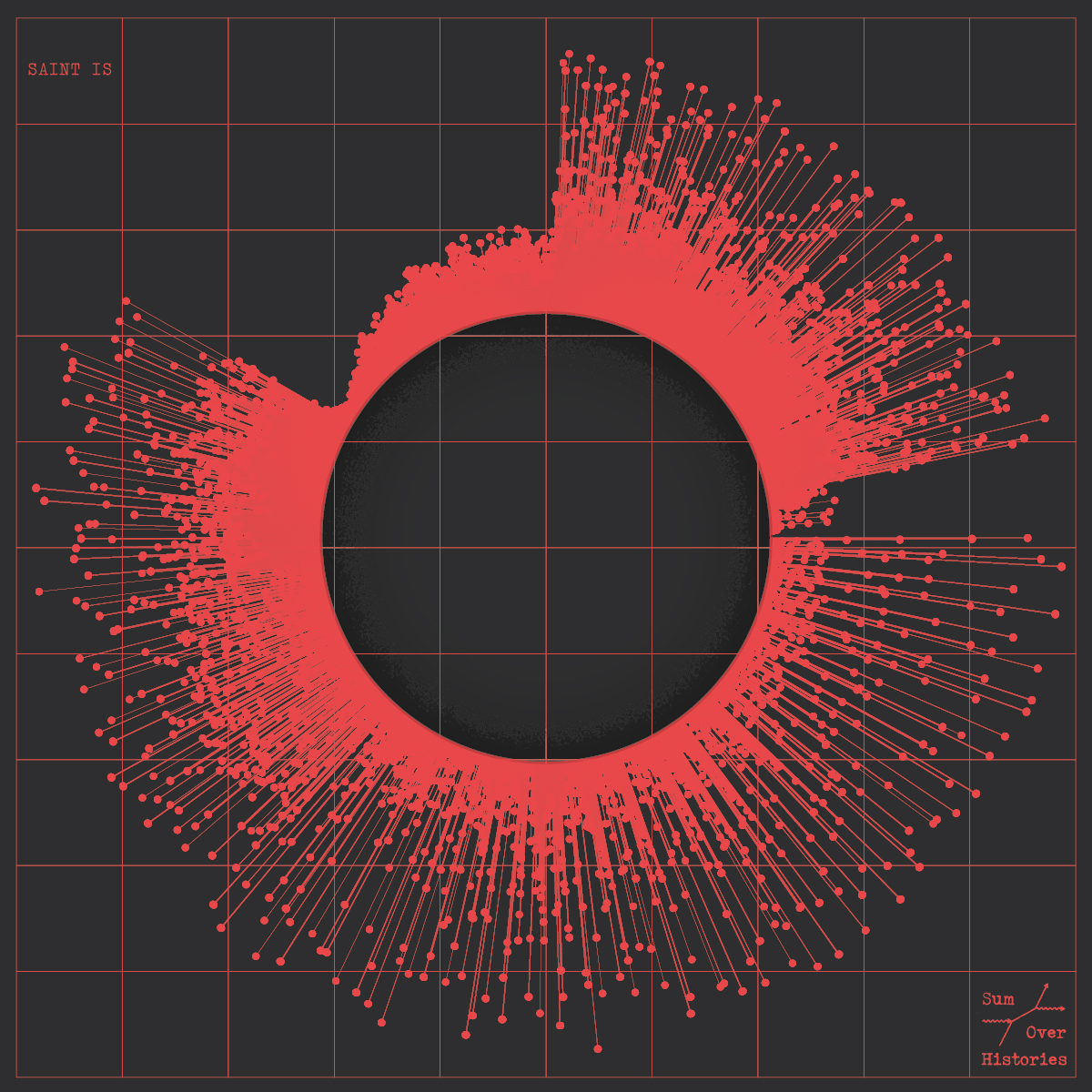
Data-driven album cover by Tiziana Alocci, 2019.

EGOT Club, by Tiziana Alocci for La Lettura, Corriere della Sera, 2019.

As an information designer, my job is to visualize data and represent information visually. My most traditional data visualization works involve the design of insight dashboards, thought-provoking data visualizations, and immersive data experiences. For me, the entire process of researching, sorting, organising, connecting, feeling, shaping, and acting is the highest form of human representation through data.

See Tiziana’s works on Instagram. 

Tiziana Alocci

Information Designer and Art Director, Tiziana Alocci Ltd, Associate Lecturer at University of the Arts London

In business settings, visualizations are still expected to be clear and easy to interpret. But these examples show why visual appeal also matters. When data is readable and visually compelling, people engage with it for longer and trust it more.

Learn more: Benchmarking in the music industry—knowledge layer of the Data Pyramid

How sound branding teams use music data visualization

The balance between design and data science becomes especially important in sound branding, where visualizing music helps teams align on abstract qualities before creative work begins.

We asked companies specializing in sound branding and data analysis how they use data visualizations in their work.

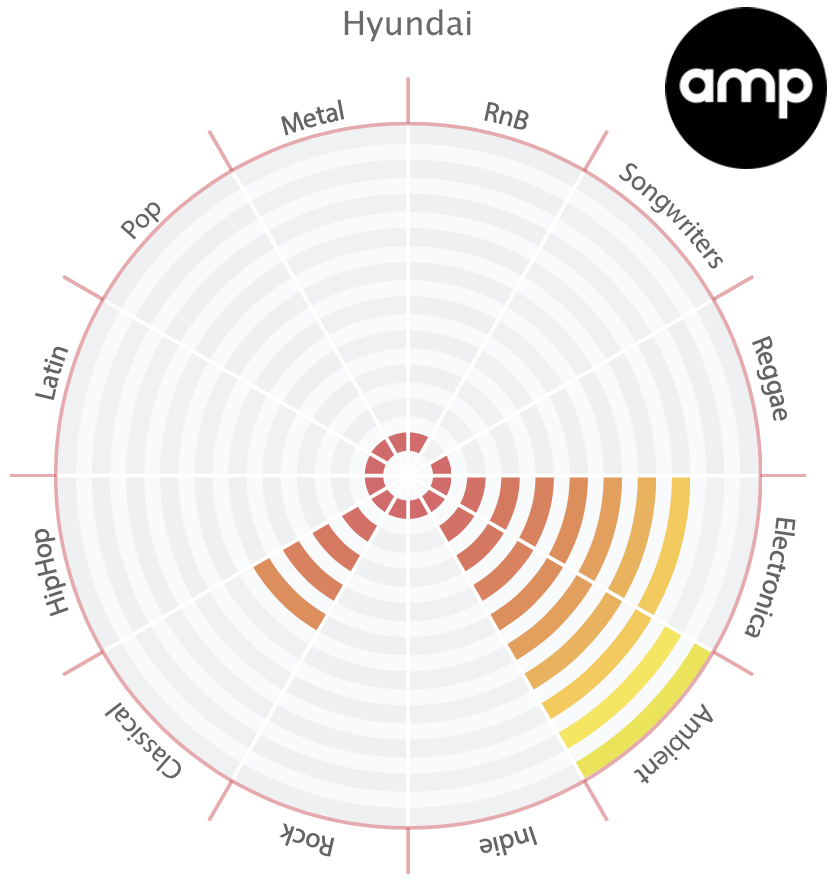
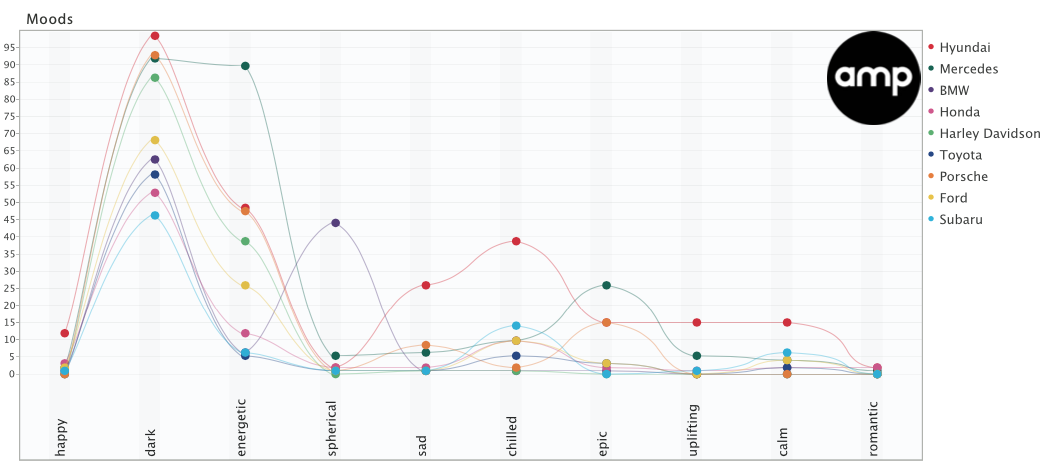
amp Sound Branding works with data visualization experts. Depending on where the company plans on using the data, they visualize it in different ways. 

We try to use whatever technique fits the data and the story we are telling best. Often we use polar area charts and spider-graphs as we find them a good fit for the Cyanite data.

Bjorn Thorleifsson

Head of Strategy & Research, amp Sound Branding

In their research on automotive industry sound, for example, amp used a combination of polar area charts and line charts to visualize and compare brand moods.

Hyundai Genre by AMP

Overall Moods by AMP

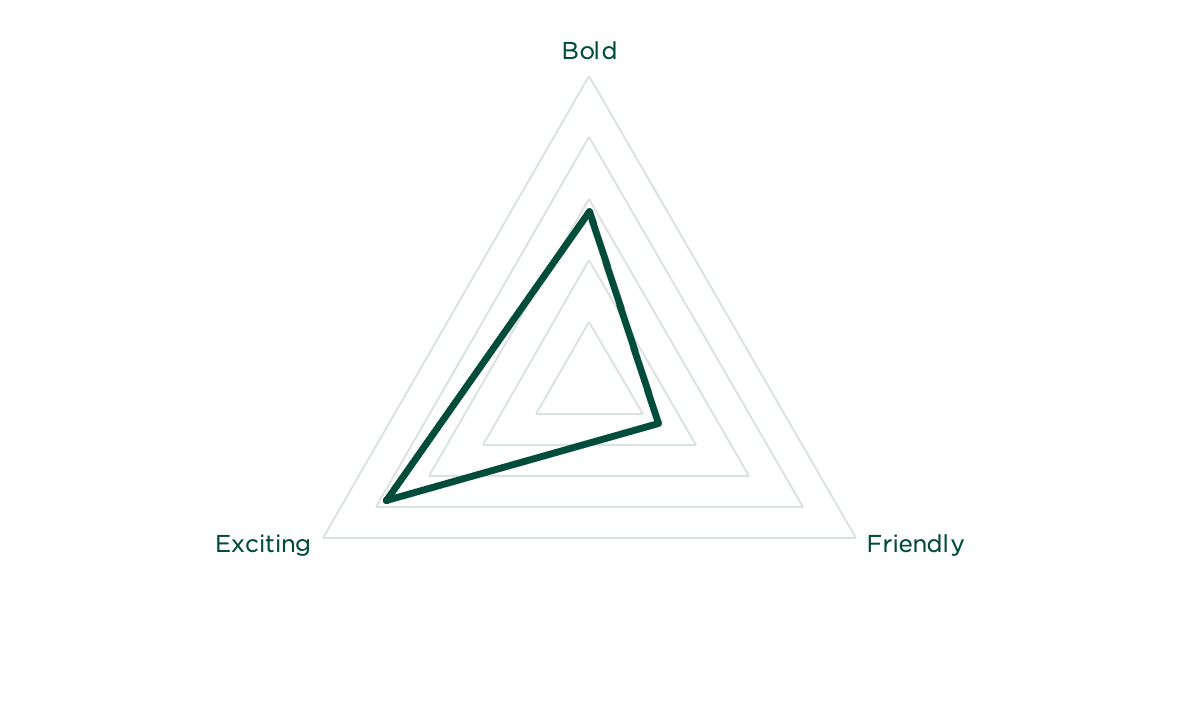
At TAMBR sonic branding, a large portion of their work is creating a shared understanding of the musical parameters that surround a brand. 

They say music is a universal language, but more often than not, talking about music is like dancing about architecture. As such, we only start composing once we have agreed on a solid sonic moodboard. For this to happen, we always start with a Cyanite-powered music search based on the brand associations of our client. For each track we present, we also visualize how it scores on the required associations.

Niels de Jong

Sonic Strategist, TAMBR Sonic Branding

TAMBR visualizations remove some of the subjectivity when choosing the right music for a brand. However, these visualizations are merely guidelines, not strict pointers. TAMBR believe that magic happens where data and creativity meet.

Data Visualizations by TAMBR

These examples show how visualization supports real creative and commercial decisions. But what tools make this kind of work possible?

Music data visualization tools

Before music data can be analyzed and visualized, teams need to decide which data is relevant and ensure it’s reliable. Once a dataset has been analyzed, visualization becomes a vehicle for that information to be used in practice. Different tools support this at different points in a music workflow, depending on who is using them and for what purpose.

1. Music analysis and discovery tools

Music analysis and discovery tools consistently categorize and tag tracks, so teams can easily find what they are looking for. They show core musical characteristics, such as genre, mood, emotional profile, and energy level, and make sound-based relationships between tracks readable at scale.

Cyanite falls into this category. It analyzes the audio itself, then applies Auto-Tagging to generate consistent metadata and Auto-Descriptions to provide quick, neutral summaries of how tracks sound. For music search, Cyanite’s Similarity Search (sound-based search), Free Text Search (prompt-based search), and Advanced Search (an add-on to both searches, allowing for custom contextual metadata) help teams locate relevant music efficiently across large catalogs.

Alongside tagging and search, Cyanite visualizes analyzed metadata directly within the web app on each track through graphs. These visualizations show a song’s key characteristics, with a strong focus on mood, so it’s easier to compare tracks without relying on text labels alone. When using Cyanite via the API, the developing team creates the visualizations. 

2. Music visualization tools for researchers

These tools are used in research contexts to study music at a broader level. The focus is on analysis and documentation.

Researchers also use these visualization tools to prove a thesis or provide an overview of a musical field. For example, Ishkur’s Guide to Electronic Music was originally created as a genealogy of electronic music over 80 years. It consists of 153 subgenres and 818 sound files.

Through Cyanite for Innovators, we support research and creative projects built on our sound-based music analysis.

3. Music marketing tools

Music marketing tools use data visualization to track how music performs once released. Unlike analysis and discovery tools, they don’t visualize sound itself. Instead, they focus on audience behavior, platform performance, and market response, helping teams understand reach, traction, and growth over time.

Many platforms have native analytics tools, such as Spotify for Artists, Apple Music for Artists, Bandcamp for Artists, and YouTube Studio. These provide first-party data limited to a single platform, including listener counts, streams, saves, playlist additions, and audience location. They can help users understand performance in detail, but only reflect activity within that specific ecosystem.

Tools like Pandora AMP and Soundcharts are often used to provide performance insights beyond a single streaming platform, especially for tracking discovery and audience response at a market level.

In marketing and pitching, Cyanite describes and positions music based on how it sounds. This helps teams explain fit and intent when presenting tracks to clients or partners.

Read more: For a concrete example of how sound-based analysis supports music marketing and pitching workflows, see how Chromatic Talents uses Cyanite in practice.

The promise and limits of data visualization

Music data visualization helps teams make sense of large catalogs by turning structured sound data into something that’s readable and comparable. At its best, it supports clearer decisions and shared understanding around music. But it also has limitations.

A graph is not meant to replace judgment. When the underlying metadata is inconsistent, incomplete, or treated as an absolute truth rather than a point of reference, visuals can be misleading. This is why visualization only works when paired with domain knowledge and active listening.

The quality of a visualization always reflects the quality of the data beneath it. Clean, consistent tagging is what makes patterns meaningful and comparisons reliable. Without that foundation, visuals become surface-level representations with little value.

Cyanite is built with the benefits of data visualization in mind, as well as its challenges. By combining sound-based analysis, structured tagging, search, and visualization in one place, it helps teams compare tracks, spot patterns, and make decisions without disrupting their workflow. 

If you want to explore how structured music data supports clearer visualization, try Cyanite for free and see how it works in practice.

FAQs

Q: What is music data analytics?

A: Music data analytics is the process of collecting and organizing information to uncover what’s in a music catalog and how it’s structured. It helps teams understand the whole content of a catalog, not just individual tracks.


Q: Why isn’t metadata alone enough for large catalogs?

A: Metadata is essential, but it has limits at scale. Tags can be inconsistent, incomplete, or too broad to capture nuance. As catalogs grow, it becomes harder to spot patterns, gaps, or overlaps using text alone. Visualization and sound-based analysis make those patterns visible, helping teams compare tracks and make decisions with greater clarity.

Q: What kinds of graphs are used to visualize music data?

Common music data visualization graphs include comparison charts, trend charts, similarity clusters, and catalog distribution views.

Q: Who uses music data visualizations in practice?

A: Music data visualizations are used by catalog managers, music supervisors, sound branding teams, researchers, and analysts.

Q: How does Cyanite support music data visualization?

A: Cyanite analyzes audio directly and turns it into structured data that can be visualized consistently at catalog level. 

Q: What are the limits of data visualization in music?

A: Visuals help guide attention, but they don’t provide context or replace human judgment. Charts can be misread if the underlying data or its limitations are ignored, which is why music data visualization graphs work best when paired with listening and domain knowledge.

How Do AI Music Recommendation Systems Work

How Do AI Music Recommendation Systems Work

Upgrade your music discovery. Try Similarity Search in Cyanite.

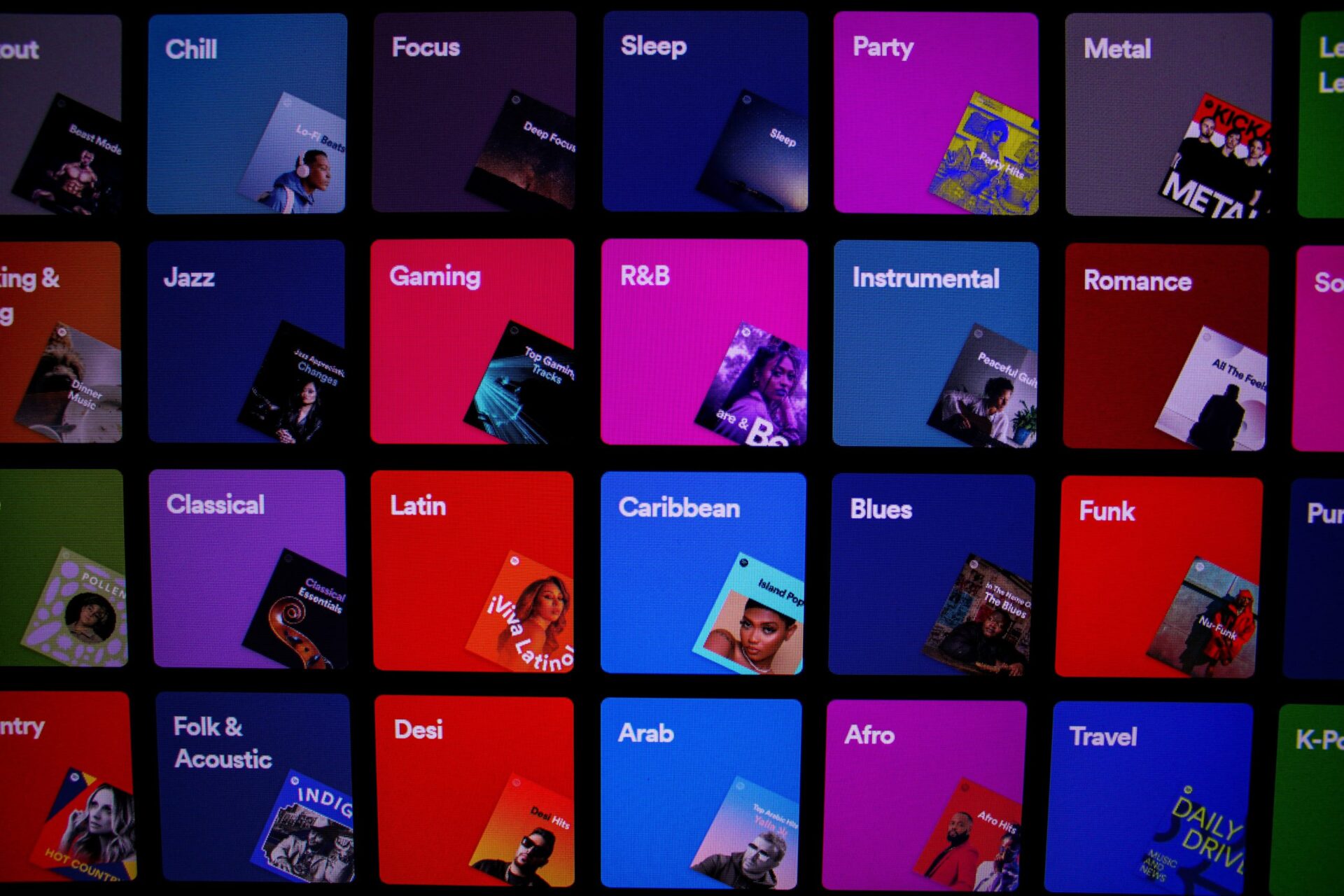
Music recommendation systems support discovery in large music libraries and applications. As access to digital music has expanded, the volume of available tracks has grown beyond what users can navigate through a simple search or browsing alone.

Music services address this by relying on algorithmic recommendation systems to guide listeners and surface relevant tracks. These systems differ in how they generate recommendations and in the types of data they use, which leads to different results and tradeoffs depending on the use case.

In this article, we’ll go through how music-suggestion systems work and introduce the main approaches behind them, outlining how they are applied in practice.

Why music catalogs struggle

As music catalogs grow, manual search slows down. Results become less reliable and predictable. This is reinforced by inconsistent metadata, often caused by missing tags or legacy catalogs, which makes it difficult to surface the right tracks at the right time.

Lost opportunities are the result.

  • Pitching and licensing take longer because relevant tracks are harder to find.
  • Monetization suffers when parts of the catalog remain unseen.
  • In streaming services and music-tech platforms, weak discovery limits engagement and narrows what users actually explore.

The three different music recommendation approaches

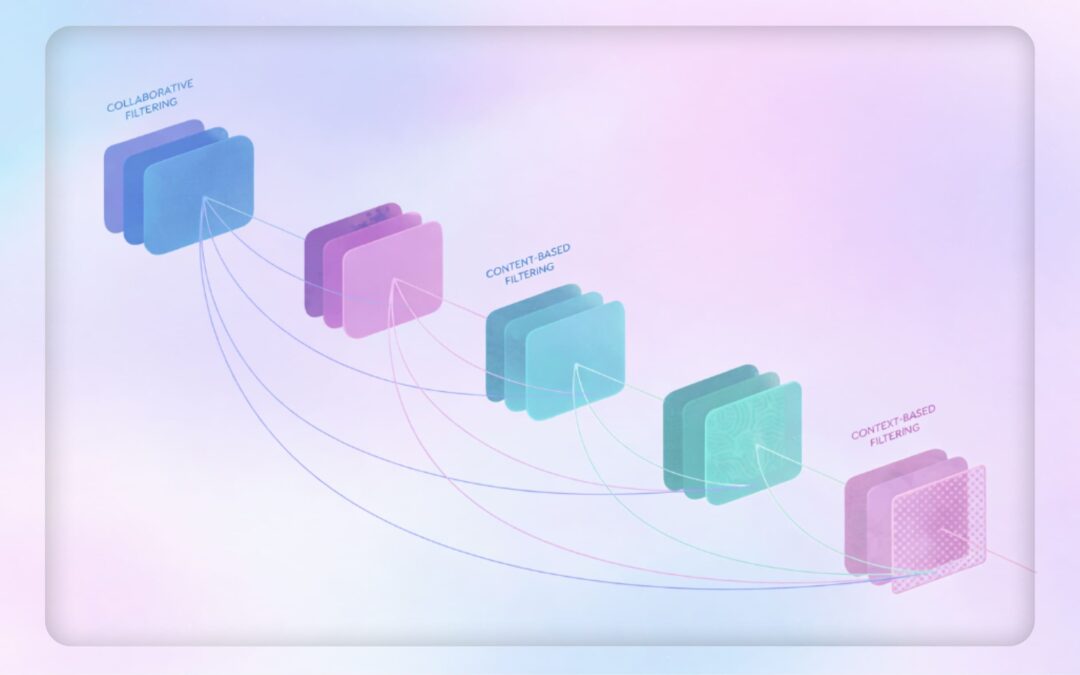
A music recommendation system suggests tracks by analyzing information such as audio similarity, metadata, user behavior, and context. Based on this analysis, the system surfaces music that fits a specific intent or situation.

In practice, this supports catalog workflows like finding tracks for sync projects, building playlists, and generating personalized recommendations within large music libraries.

1. Collaborative filtering

The collaborative filtering approach predicts what users might like based on their similarity to other users. To determine similar users, music-suggestion algorithms collect historical user activity such as track ratings, likes, and listening time.

People used to discover music through recommendations from friends with similar tastes, and the collaborative filtering approach recreates that. Only user information is relevant, since collaborative filtering doesn’t take into account any of the information about the music or sound itself. Instead, it analyzes user preferences and behavior and predicts the likelihood of a user liking a song by matching one user to another. 

This approach’s most prominent problem is filter bubbles, which can arise when collaborative filtering algorithms reinforce existing user preferences, potentially narrowing musical exploration. Despite being designed to personalize experiences, these systems may inadvertently create echo chambers by prioritizing content similar to what users have already engaged with.

Another problem with this approach is the cold start. The system doesn’t have enough information at the beginning to provide accurate recommendations. This applies to new users whose listening behavior has not yet been tracked. New songs and artists are also affected, as the system needs to wait before users interact with them.

Collaborative filtering approaches

Collaborative filtering can be implemented by comparing users or items:

  • User-based filtering establishes user similarity. User A is similar to user B, so they might like the same music.
  • Item-based filtering establishes the similarity between items based on how users have interacted with them. Item A can be considered similar to item B because users rated them both 5/10. 

Collaborative filtering also relies on different forms of user feedback:

  • Explicit rating is when users provide obvious feedback for items such as likes or shares. However, not all items receive ratings, and sometimes users interact with an item without rating it. In that case, the implicit rating can be used. 
  • Implicit ratings are predicted based on user activity. When the user doesn’t rate the item but listens to it 20 times, it is assumed that the user likes the song.

2. Context-aware recommendation approach

Context-aware recommendation focuses on how music is used in a given setting. This involves factors like the listener’s activity and circumstances. These things can influence music choice but are not captured by collaborative filtering or content-based approaches.

Research by the Technical University of Berlin links music listening choices to the listener context. This could be environment-related or user-related.

Environment-related context

In the past, recommender systems were developed that established a link between the user’s geographical location and music. For example, when visiting Venice, you could listen to a Vivaldi concert. When walking the streets of New York, you could blast Billy Joel’s “New York State of Mind.” Emotion-indicating tags and knowledge about musicians were used to recommend music that fit a geographical place.

User-related context

User-related context describes the listener’s current situation, including what they are doing, how they are feeling, where they are, the time of day, and whether they are alone or with others.

These factors can significantly influence music choice. For example, when working out, you might want to listen to more energetic music than your usual listening habits and musical preferences would suggest.

3. Content-based filtering

Content-based filtering uses metadata attached to the audio, such as descriptions or keywords (tags), as the basis of the recommendation. When a user likes an item, the system determines that they are likely to enjoy other items with similar metadata.

There are two common ways to assign metadata to content items: through a human-based or automated approach.

The human-based approach can take two forms: professional curation by library editors who characterize content with genre, mood, and other classes, or crowdsourced metadata assignment where a community manually tags content. The more people participate in crowdsourcing, the more accurate and less subjectively biased the metadata becomes.

Human-based approaches require significant resources, particularly crowdsourcing. As Alex Paguirian, Product Manager at Marmoset, comments: “When it comes down to calculating the BPM and key of any given song, you would have to put someone behind a piano with a metronome, which is completely unsustainable and a strange use of labor.” This illustrates why automated systems are increasingly used to characterize music at scale.

The automated approach is where algorithmic systems automatically characterize content. This is what we’re doing at Cyanite. We use AI to understand music and assign relevant tags to the songs in our system.

Musical Metadata

Musical metadata is information that is adjacent to the audio file. It can be objectively factual or subjectively descriptive. In the music industry, the latter is also often referred to as creative metadata.

For example, artist, album, and year of publication are factual metadata. Creative metadata describes the actual content of a musical piece; for example, the mood, energy, and genre. Understanding the types of metadata and organizing the library’s taxonomy in a consistent way is very important, as the content-based recommender uses this metadata to select music. If the metadata is flawed, the recommender might pull out the wrong track.

Content-based recommender systems can use factual metadata, descriptive metadata, or a combination of both. They allow for more objective evaluation of music and can increase access to long-tail content, improving search and discovery in large catalogs.

When it comes to automating this process, companies like Cyanite step in.

Music Metadata extraction through MIR 

Music information retrieval (MIR) refers to the techniques used to extract descriptive metadata from music. It’s an interdisciplinary research field combining digital signal processing, machine learning, artificial intelligence, and musicology. In music analysis, its scope ranges from BPM and key detection to higher-level tasks such as automatic genre and mood classification. It also involves research on musical audio similarity and related music search algorithms.

At Cyanite, we apply a combination of MIR techniques and neural network models to analyze full audio tracks and generate structured, sound-based metadata, such as genre, mood, energy, tempo, and instrumentation, at catalog scale.

How Cyanite powers AI recommendations

Most consumer music platforms rely on behavior-based recommendation systems. Spotify is one example of a platform that uses collaborative filtering, now likely supported by AI. These systems learn from listening behavior and user similarity, which can lead to filter bubbles. For artists who already have a lot of listeners, this can give them a consistent advantage.

Cyanite’s AI recommendations are based purely on sound. Each track is analyzed to capture its audible musical characteristics through MIR. These characteristics are translated into embeddings, which represent how a track sounds in a form that can be compared at scale.

The algorithms we have built through MIR are considered industry standard and are all developed entirely in-house.

The embeddings serve two purposes. 

  1. They are used to generate musical metadata, also called Auto-Tagging. This produces structured, sound-based metadata such as genre, mood, energy, tempo, key, instrumentation, and voice presence. Auto-Tagging analyzes the full audio of each track and applies these labels consistently across the catalog.

  2. The same embeddings enable sound-based comparison. When teams work with search and recommendations, Similarity Search compares a reference track with the rest of the catalog by measuring the similarity of embeddings. Tracks that are most alike in sound are returned as a ranked recommendation list. The same embeddings also power Free Text Search, where teams can describe a desired sound in natural language and find tracks that fit that description. In both cases, artist size and popularity don’t influence the result, which helps democratize the search process.
Custom interval

You can try our search algorithms via our Web App, with five free monthly analyses. For more advanced discovery workflows, Advanced Search is available through the API. It builds on Similarity Search and Free Text Search by adding similarity scores, multiple reference tracks, and the option to upload custom tags, which can be used as filters. This allows teams to refine results against their own taxonomy or brief requirements.

The API lets teams run Auto-Tagging and search directly inside their own tools or platforms. They don’t need to work in a separate interface. Auto-Tagging can be used on its own, or teams can combine it with Music Search to find the right tracks for sync, playlists, marketing, and similar day-to-day use cases.

AI recommendation use cases

The following use cases highlight where AI recommendations add practical value in professional music discovery.

  • Finding alternatives that are musically similar to a known reference track: Sometimes, a desired sound is easier to point to than describe. At Melodie Music, Marmoset, and Chromatic Talents, reference tracks are used in these situations as concrete starting points. Teams upload or link a reference track, then use Similarity Search to explore alternatives that share comparable musical characteristics.

  • Turning vague or subjective descriptions into usable search results: At Melodie Music, users often struggled to translate creative intent into fixed keywords, even in a well-curated catalog. Free Text Search allows them to describe a desired sound in their own words, while Similarity Search lets them move from a reference track to close matches that are alike in feel and structure. This reduces the need to guess the “right” tags and shortens the trial-and-error loop between searching and listening.

  • Reducing time spent browsing large music catalogs: Similarity Search and Free Text Search guide users to a smaller, relevant set of tracks. This means teams working with large catalogs spend less time browsing. Instead of scanning hundreds of options, users begin with a reference or written description and listen with clear intent, helping them reach confident decisions faster while retaining creative control.

Finding what your catalog needs

Choosing a music recommendation approach depends on your personal needs and the data you have available. A trend we’re seeing is a hybrid approach that combines features of collaborative filtering, content-based filtering, and context-aware recommendations. However, all fields are under constant development, and innovations make each approach unique. What works for one music library might not be applicable to another.

Common challenges across the field include access to sufficiently large data sets and a clear understanding of how different musical characteristics influence people’s perception and use of music. These challenges become especially visible in large or underutilized catalogs, where discovery can’t rely on user behavior alone.

To try out Cyanite’s technology, register for our free web app to analyze music and try similarity searches without the need for any coding.

FAQs

Q: What is an AI music recommendation system?

A: An AI music recommendation system suggests tracks by analyzing data such as audio characteristics, metadata, user behavior, or listening context. The goal is to surface music that fits a specific intent, use case, or situation within a large catalog. These systems are commonly used in music recommendation apps, professional catalogs, and music-tech platforms.

Q: What are the main types of music recommendation approaches?

A: The three most common approaches are collaborative filtering, content-based filtering, and context-aware recommendation. Many systems combine elements of all three to balance accuracy, scale, and flexibility.


Cyanite uses a content-based, sound-driven approach, generating recommendations by analyzing the audio itself rather than relying on user behavior or listening history. This means our sound-based music recommender system is suited to large and professional catalogs.


Q: How do music companies use AI recommendations today?

A: Music companies use AI song recommendations to speed up sync pitching, build playlists, surface underused catalog assets, support personalization in music-tech products, and select music for branding or retail projects. These workflows rely on music recommendation engines to reduce manual search and improve discovery.

Q: How does Cyanite approach music recommendations?

A: Cyanite analyzes the sound of full tracks to generate structured, audio-based metadata and embeddings. These embeddings are used for Auto-Tagging and Similarity Search and Free Text Search in music catalogs, allowing tracks to be compared and recommended based on how they sound rather than on user interaction data.

From upload to output: how Cyanite turns audio into reliable metadata at scale

From upload to output: how Cyanite turns audio into reliable metadata at scale

Explore how Cyanite turns sound into structured metadata: Just upload a couple of songs to our web app.

Managing a music catalog involves more than just storing files. As catalogs grow, teams start running into a different kind of challenge: music becomes harder to find, metadata becomes inconsistent, and strong tracks remain invisible simply because they are described differently than newer material.

Many teams still rely on manual tagging or have inherited metadata systems that were never designed for scale. Over time, this leads to uneven descriptions, slower search, and workflows that depend more on individual knowledge than on shared systems. Creative teams spend valuable time navigating the catalog instead of working with the music itself.

Cyanite’s end-to-end tagging workflow was built to address this challenge. It gives teams a stable, shared foundation they can build on, supporting human judgement—not replacing it. It complements subjective, manual labeling with a consistent, audio-based process that works the same way for every track, whether you’re onboarding new releases or making a legacy catalog more organized.

This article walks through how that workflow functions in practice—from the moment audio enters the system to the point where structured metadata becomes usable across teams and tools.

Why tagging workflows tend to break down as catalogs grow

Most tagging workflows start with care and intention. A small team listens closely, applies descriptive terms, and builds a shared understanding of the catalog. But as volume increases and more people get involved, the system begins to stretch.

As catalogs scale, the same patterns tend to appear across organizations:

  • Different editors describe the same sound in different ways.
  • Older metadata no longer aligns with newer releases.
  • Genre and mood definitions shift over time.
  • Search results reflect wording more than sound.

When this happens, teams increasingly rely on memory instead of the systems in place. This leads to strong tracks getting overlooked, response times increasing, and trust in the metadata eroding.

Cyanite’s workflow addresses this fragility by grounding metadata in the audio itself and applying the same logic across the entire catalog.

Preparing your catalog for audio-based tagging

Teams can adopt Cyanite very quickly, as there’s very little preparation involved. The system doesn’t require existing metadata, spreadsheets, or reference information. It listens to the audio file and derives all tags from the sound alone.

Getting started requires very little setup:

  • MP3 files up to 15 minutes in length
  • No pre-existing metadata
  • No manual pre-labeling
  • No changes to your current file structure

Even 128 kbit/s MP3s are usually sufficient, which means older archive files can be analyzed as they are—no need for additional audio preparation. Teams can then choose how they want to bring audio into Cyanite based on volume and workflow. Once that’s decided, tagging can begin immediately.

If you’re unsure about uploading copyrighted audio to Cyanite, you can explore our security standards and privacy-first workflows, including options to process audio in a copyright-safe way using encrypted or abstracted data.

Bringing audio into Cyanite in a way that fits your workflow

Different organizations manage music in different ways, so Cyanite supports several ingestion paths that all lead to the same analysis results.

Teams working with smaller batches often start in the web app. This is common for sync teams reviewing submissions, catalog managers auditing older libraries, or teams testing Cyanite before deeper integration. Audio can be uploaded directly, selected from disk, or referenced via a YouTube link, with analysis starting automatically once the file is added.

Platforms and larger catalogs usually integrate via the API. In this setup, tagging runs inside the organization’s own systems. Audio is uploaded programmatically, and results are delivered automatically via webhook as structured JSON as soon as processing is complete. This approach supports continuous ingestion without manual steps and fits naturally into existing pipelines.

For very large catalogs, Cyanite can also provide a dedicated S3 bucket with CLI credentials. This allows high-throughput ingestion without relying on browser-based uploads. It’s often used during initial onboarding of catalogs containing thousands of tracks.

Some teams prefer not to upload files themselves at all. In those cases, audio can be shared via common transfer tools before the material is processed and delivered in the agreed format.

What happens once the analysis is complete?

Cyanite produces a structured, consistent description of how each track sounds, independent of who uploaded it or when it entered the catalog.

Metadata becomes available either in the web app library or directly inside your system via the API. We can also deliver an additional CSV and Google Spreadsheet export on request.

Each track receives a stable set of static tags and values, including:

  • Genres and free-genre descriptors
  • Moods and emotional dynamics
  • Energy and movement
  • Instrumentation and instrument presence
  • Valence–arousal values
  • The most representative part of the track
  • An Auto-Description summarizing key characteristics

All tags are generated through audio-only analysis, which ensures that legacy tracks and new releases follow the same logic. Over time, this consistency becomes the foundation for faster search, clearer filtering, and more reliable collaboration across teams.

The full tagging taxonomy is available for teams that want deeper insight into how attributes are defined and structured. Explore Cyanite’s tagging taxonomy here.

Curious how the Google Spreadsheet export looks? Check out this sample.

How long tagging takes at different catalog sizes?

Cyanite processes audio quickly. A typical analysis time is around 10 seconds per track. Because processing runs in parallel, turnaround time depends more on workflow setup than on catalog size.

In practice, teams can expect:

  • Small batches to be ready almost instantly
  • Medium-sized libraries to complete within hours
  • Enterprise-scale catalogs to be onboarded within 5–10 business days, regardless of size

For day-to-day use via the API, results arrive in near real time via webhook as soon as processing finishes. This makes the workflow suitable both for large one-time onboarding projects and continuous ingestion as new music arrives.

Understanding scores, tags, and why both matter

Cyanite’s models produce two complementary layers of information.

Numerical scores describe how strongly an attribute is present, both across the full track and within time-based segments. These values range from zero to one, with 0.5 representing a meaningful threshold.

Cyanite creates final tags by using an additional decision layer that considers how different attributes relate to one another. It doesn’t just apply a simple cutoff. This approach helps resolve ambiguities, stabilize hybrid sounds, and produce tags that make musical sense in context.

This means you get metadata that remains robust even for tracks that blend genres, moods, or production styles—a common challenge in modern catalogs.

Exporting metadata into your existing systems

Once tags are available, your team can export them in the format that best fits your workflow.

API users typically work with structured JSON, delivered automatically via webhook and accessible through authenticated requests. Cyanite’s Query Builder allows teams to explore available fields and preview real outputs before integration.

For one-time projects or larger deliveries, metadata can also be provided as CSV files. Web app users can request CSV export through Cyanite’s internal tools, which is especially useful during catalog cleanups or migrations.

Because the structure remains consistent across formats, metadata can be reused across systems without rework.

Learn how to quickly build your queries for the Cyanite API with our Query Builder.

How teams use tagged metadata in practice

Once audio-based tagging is in place, teams tend to notice changes quickly. Search becomes faster and more predictable. Creative teams can filter by sound instead of guessing keywords. Catalog managers spend less time fixing metadata and more time shaping the catalog strategically.

In practice, tagged metadata supports workflows such as:

  • Catalog management and cleanup
  • Creative search and curation
  • Ingestion pipelines
  • Licensing and rights
  • Sync briefs and pitching
  • Internal discovery tools
  • Audits and reporting

Over time, consistent metadata reduces friction between departments and makes catalog operations more resilient as libraries continue to grow.

Best practices from real-world usage

Teams see the smoothest results when they work with clean audio sources, batch large uploads, manage API credentials carefully, and switch to S3-based ingestion as catalogs become larger. Thinking about export formats early also helps avoid rework during onboarding projects.

None of this changes the outcome of the analysis itself, but it does make the overall process more predictable and easier to manage at scale.

With Cyanite, we have a partner whose technology truly matches the scale and diversity of our catalog. Their tagging is fast and reliable, and Similarity Search unlocks a whole new way to discover music, not just through filters, but through feeling. It’s a huge step forward in how we help creators connect with the right tracks.

Stan McLeod

Head of Product, Lickd

Final thoughts

Cyanite’s tagging workflow is designed to scale with your catalog without making your day-to-day work more complex. Whether you upload a handful of tracks through the web app or process tens of thousands via the API, the result will be the same: structured, consistent metadata that reflects how your music actually sounds.

If you’re ready to move away from manual tagging and toward a more stable foundation for search and discovery, explore the different ways to work with Cyanite and choose the setup that fits your workflow.

Want to work with Cyanite? Explore your options, and get in touch with our business team, who can provide guidance if you’re unsure how to start.

FAQs

Q: Do I need to send existing metadata to use Cyanite’s tagging workflow?

A: No. Cyanite analyzes the audio itself. It doesn’t rely on existing tags or descriptions.

Q: Can Cyanite handle both legacy catalogs and new releases?

A: Yes, it can. The same analysis logic applies to all tracks, which helps unify older and newer material under a single metadata structure.

Q: How are results delivered when using the API?

A: Results are sent automatically via webhook as structured JSON as soon as processing is complete.

Q: Is the tagging output consistent across export formats?

A: Yes. JSON and CSV exports use the same underlying structure and values.

Q: Who typically uses this workflow?

A: Music publishers, production libraries, sync teams, music-tech platforms, and catalog managers use Cyanite’s tagging workflow to support search, licensing, onboarding, and catalog maintenance.

Q: How long will it take to tag my music?

A: Small batches are tagged almost immediately. For larger catalogs, we usually need 5–10 business days for the complete setup.

Best of Music Similarity Search: Find Similar Songs With the Help of AI

Best of Music Similarity Search: Find Similar Songs With the Help of AI

Jakob

Jakob

CMO at Cyanite

Want a faster way to find tracks with similar sound profiles? Explore Similarity Search in Cyanite.

Searching for similar tracks by typing out what you need in the search bar can limit what a large catalog shows you. When sound isn’t a factor in the search, it can be easy to overlook songs, even if they are a great fit for a brief or playlist.

Our similar song finder AI complements our Free Text Search. It’s an alternative search method that lets you use reference tracks to search your catalog rather than text input.

Similarity Search is designed for music catalogs and platforms that need to navigate large libraries efficiently, whether for sync, marketing, playlisting, or discovery. It’s built to meet the needs of professional catalog workflows, but individual creators and artists can also use it.

In this guide, find out how Similarity Search can help you get the most out of your catalog and uncover matches with more clarity.

How does Cyanite’s Music Similarity Search Work?

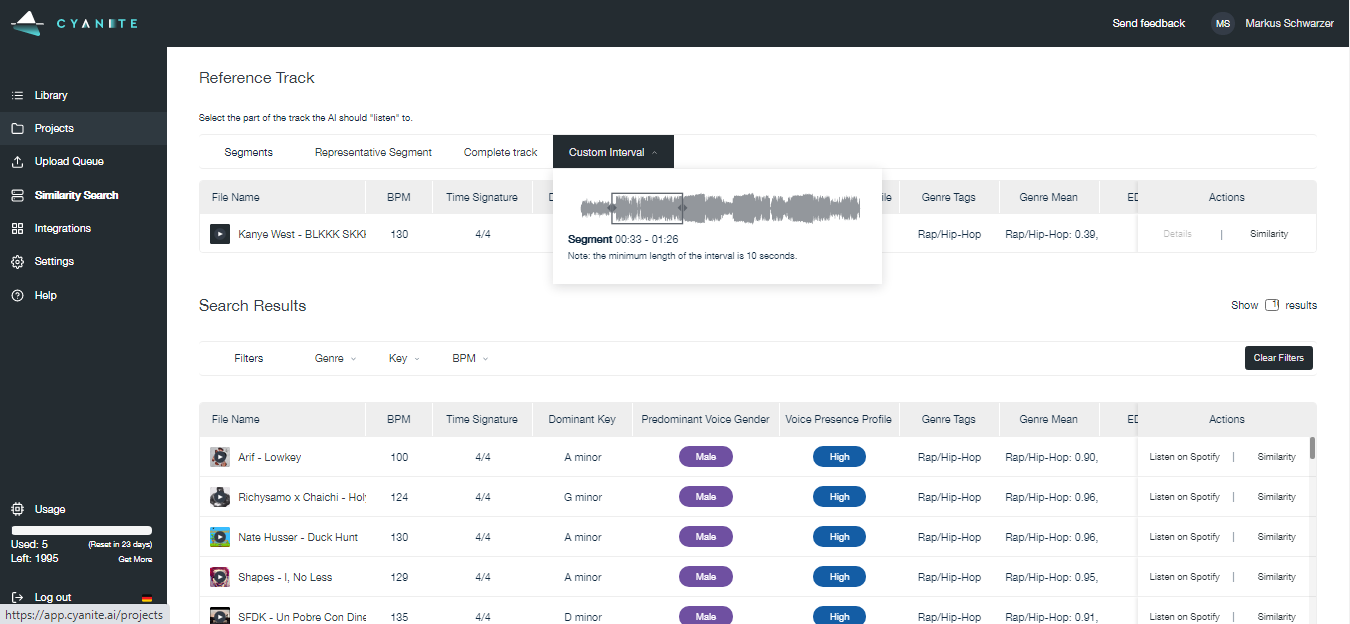
Similarity Search, Cyanite’s AI similar song finder, compares a reference track’s audio with the rest of your catalog. It’s available in Cyanite through the API or web app.

You can get started by using a track from your library, a YouTube link, or a Spotify preview as the reference. Library and YouTube tracks are analyzed in full, while Spotify previews use 30-second snippets.

This audio analysis is especially useful when a song’s metadata is incomplete or when the qualities you’re matching are hard to describe in words.

Unlike consumer-facing recommendation systems, Similarity Search is built to operate on entire catalogs, giving teams consistent results across thousands or millions of tracks.

You can start Similarity Search in two ways:

1. From the library

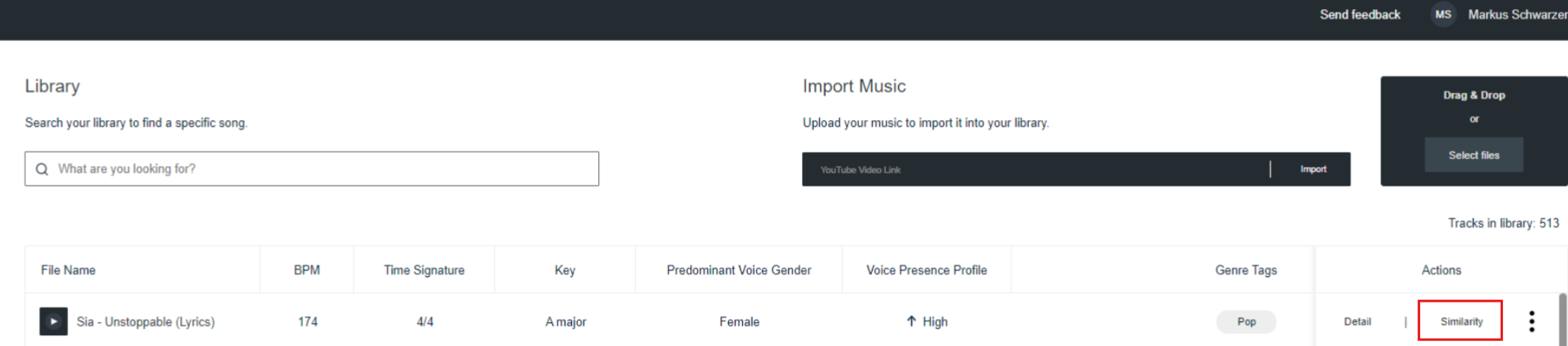
  • Select a track and click “Similarity.”
  • Choose the part of the reference you want to use: Representative Segment, Complete Track, or Custom Interval.

2. From the Search tab

  • Open the Search tab and select Similarity Search.
  • Add a reference track from your Library or an external source.

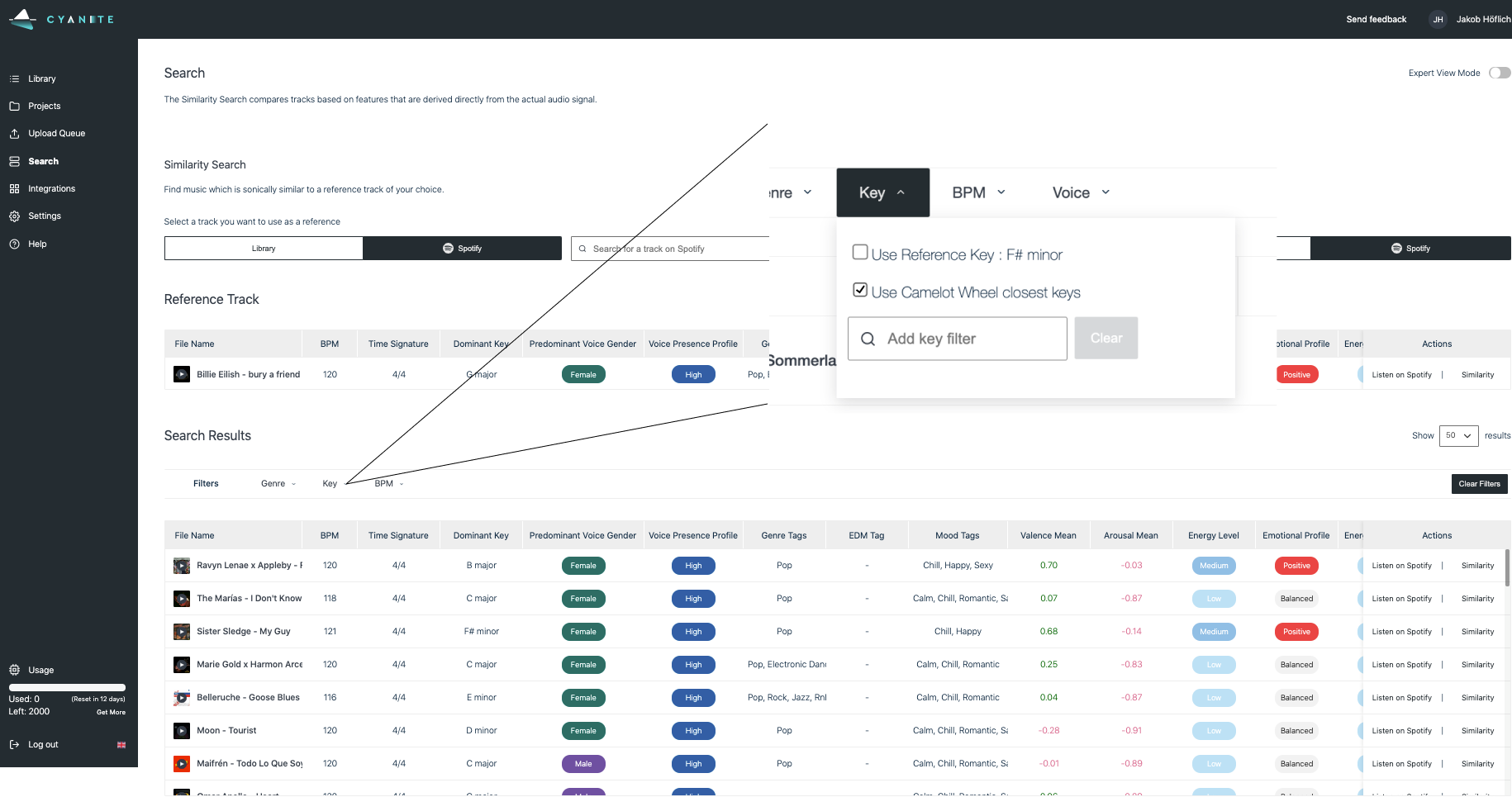
In both cases, you can review the results and switch between Library or Spotify suggestions, then refine the output using filters like genre, key, BPM, or voice presence to guide the search in a specific direction.

Important note: The similar results from Spotify in the web app solely function as a showcase and cannot be used for commercial purposes.


How our AI identifies similarity between tracks

The most common search function in music catalogs is tagging, which relies on accurate metadata to surface the right tracks. But to use tags, you need to have a few keywords that describe at least the mood you’re looking for. 

Similarity Search was designed for the moments when words are not the best starting point. Cyanite’s AI compares the audio of one track with the audio of another. It analyzes measurable elements inside a song’s spectrogram, such as rhythm, harmony, instruments, timbre, and movement, and places each song in relation to the reference. Tracks with closer matches in sound are considered more similar.

For instance, Similarity Search is the perfect feature for tackling briefs that start with a reference track. Instead of relying on tags or descriptions, Similarity Search compares the sound of the reference directly to the rest of your catalog and surfaces close matches.

Another search method is using prompts to find the right track. Cyanite’s Free Text Search lets you describe the sound you’re looking for in natural language. This is useful when you don’t have a specific reference song and you want to express a mix of mood, instrumentation, pacing, or context in one query. In that case, rigid tags may be too limiting for you to find what you’re looking for.

Use Similarity Search when:

  • You have a reference track. 
  • You want to surface tracks that may not appear when searching with keywords.
  • You’re reviewing back catalog areas where descriptors vary or are incomplete.
  • You want to find tracks that may be near-duplicates or versions of the same recording.
  • You want to find sound-adjacent tracks that help build clearer audience segments for marketing or promotion.

Use Free Text Search when:

  • The qualities you need are simple to describe.
  • You want to filter by specific attributes.
  • You want to include your own tags or catalog-specific terms in the query.
  • You’re shaping a query that mixes mood, instrumentation, or context in a way that benefits from natural language.
  • You need flexibility to search in several languages.

Use tag-based search with Auto-Tagging when:

  • You want full control and transparency over why tracks appear in the results.
  • You need reliable, repeatable filtering across a catalog.
  • You’re working with defined attributes, such as genre, mood, tempo, or instrumentation.
  • You want to include or exclude specific characteristics with precision.
  • You’re preparing exports, deliverables, or structured shortlists where consistency matters.

Use cases for Similarity Search

Similarity Search is used across many workflows where sound-based matching is essential.

1. Executing sync and music briefs

Sync work often involves working to short timelines while still needing a precise sound match. Similarity Search supports this by allowing teams to compare the sound of a reference track directly against the catalog, reducing the time spent translating musical intent into tags or keywords. This makes it easier to build focused, sound-accurate shortlists efficiently, without diluting the brief through broad genre or mood labels.

Unlike Spotify’s “Similar Artists” feature, Cyanite’s Similarity Search analyzes the sound itself. That makes our tool better suited for precise sync work.

2. Uncovering catalog blind spots

In large catalogs, attention naturally concentrates on a small subset of tracks, while others quietly fall out of circulation. Similarity Search helps rebalance selection by reconnecting less prominent material to tracks that are already in use, based on sound. This allows overlooked parts of the catalog to surface naturally in real workflows, without relying on re-tagging or manual curation.

With the help of Cyanite’s AI tags and the outstanding search results, we were able to find forgotten gems and give them a new life in movie productions. Without Cyanite, this might never have happened.

Miriam Rech

Sync Manager, Meisel Music

3. Finding duplicates and versions

Large catalogs often contain duplicate or near-duplicate tracks, such as alternate exports or slightly different versions. Similarity Search helps teams identify and manage these overlaps, improving search quality and keeping the catalog consistent.

4. Supporting marketing and audience segmentation

When promoting a new artist, it helps to understand which established artists they genuinely sound similar to. Similarity Search identifies those musical similarities, so marketing teams can target fans of those artists more precisely and align campaigns with listener expectations.

This leads to more relevant targeting, stronger engagement, and less wasted ad spend, without relying on guesswork or genre labels alone.

Read more: Custom audiences for pre-release music campaigns

5. Pitching and optimizing playlists at scale

In playlisting, a single track often sets the sonic frame for the rest of the selection. Similarity Search allows labels, artists, and curators to find other songs that fit the same direction before pitching or publishing.

Matching tracks by sound rather than genre labels alone results in playlists that feel more coherent and pitches that are more likely to resonate.

6. Offering customized recommendations based on user behavior

Many music businesses already run their own recommendation systems based on how people interact with their catalog. Cyanite’s Advanced Search fits into this setup as an API-based sound filter that connects to existing infrastructure.

Teams can use reference tracks and custom metadata filters to generate a sonically coherent set of results, which their own systems then rank or adapt based on user behavior. This keeps sound similarity consistent while allowing each platform to control how recommendations are applied.

7. Similarity Search for creators and artists

Sound matching with Similarity Search can support creative decisions in individual workflows:

  • Determining type beats: Beat producers often create “type beats” to mimic the style of popular artists.
  • Optimizing DJ crates: Creators can surface tracks that mix well with a reference song and use key and harmonic filters to build crates with smoother transitions and consistent energy.
  • Finding samples: Creators can start from a sample they already use and find alternatives that match in rhythm, groove, or harmonic feel. Then, they can narrow options by key and BPM to fit a project directly.

Read more: Optimizing playlists and DJ sets

7. Similarity Search for creators and artists

Sound matching with Similarity Search can support creative decisions in individual workflows:

  • Determining type beats: Beat producers often create “type beats” to mimic the style of popular artists.
  • Optimizing DJ crates: Creators can surface tracks that mix well with a reference song and use key and harmonic filters to build crates with smoother transitions and consistent energy.
  • Finding samples: Creators can start from a sample they already use and find alternatives that match in rhythm, groove, or harmonic feel. Then, they can narrow options by key and BPM to fit a project directly.

Read more: Optimizing playlists and DJ sets

Take music search to the next level with Advanced Search

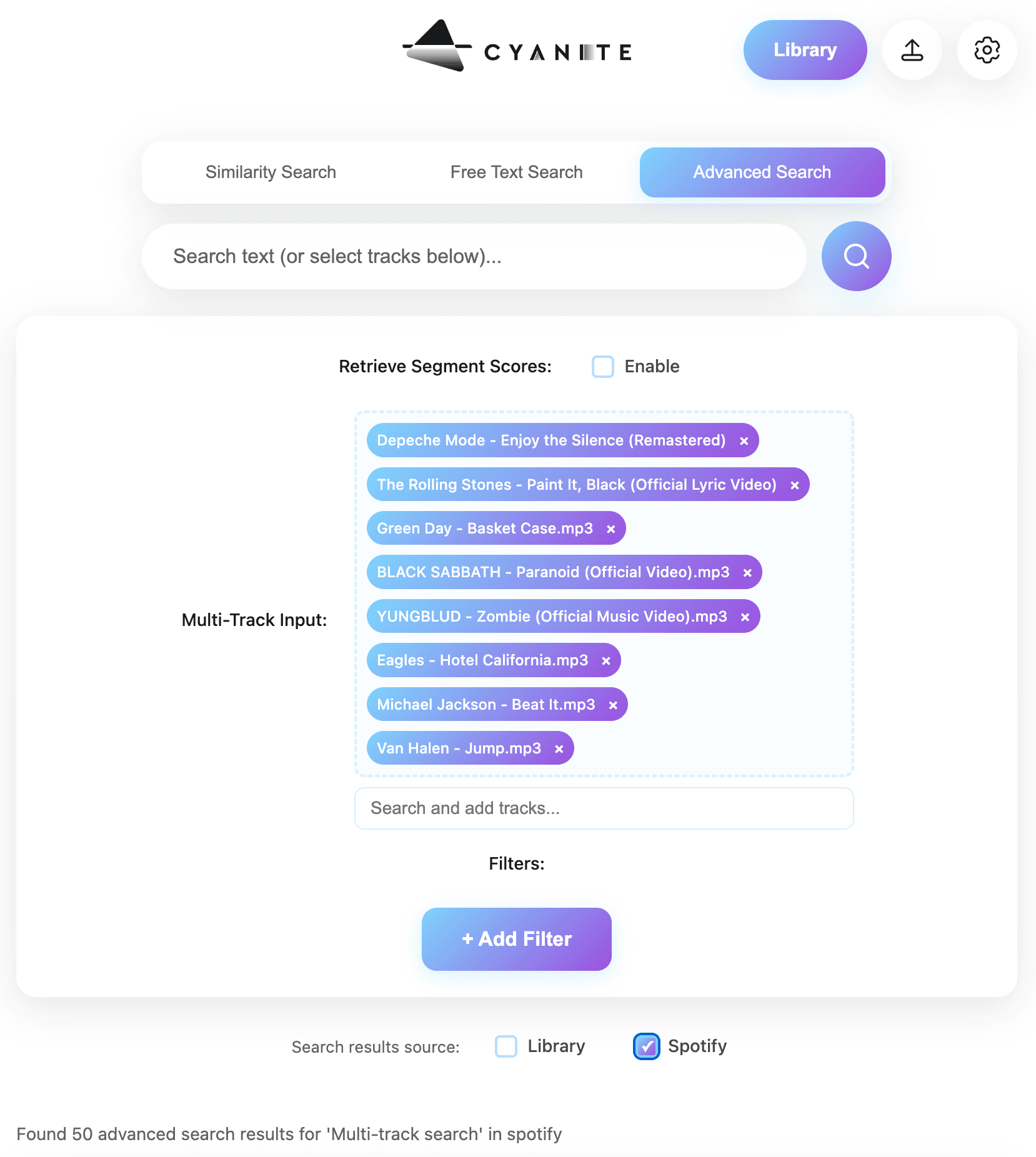
For even more intuitive catalog searches, try Advanced Search, our search add-on. It works with multiple reference tracks and custom metadata filters, and also lets you include your own tags as part of the search.

Each result includes a score that reflects the full track’s likeness to your reference, and it points out the moments in the audio where that similarity is strongest. When you need a broader set of tracks to review, the mode can return up to 500 results. It also accepts prompts in any language.

Once enabled, you can use Advanced Search by:

  • Adding one or more reference tracks from your Library, YouTube, or Spotify
  • Setting custom or existing tags as filters for Similarity Search and Free Text Search
  • Seeing the most relevant segments to your search highlighted
  • Reviewing the similarity scores for both the track and its top-scoring segments

Note: Advanced Search is an API-only feature intended for teams with developer resources who want to integrate Cyanite’s intelligence directly into their own systems.

Bringing sound and text into one search system

Finding the right music often depends on how clearly you can define what you’re looking for. When you have a reference track, Similarity Search offers the most direct route through a catalog, comparing sound to sound and surfacing close matches without relying on labels, genres, or interpretation. This makes it especially effective for large libraries, where great tracks can be missed when search depends on text alone.

Text-based methods still play an important role. Our Free Text Search lets you explore a catalog from a descriptive starting point.

The Advanced Search add-on builds on both approaches, giving you more control through custom metadata filters, multiple reference tracks, and similarity scoring that explains why each result appears.

Create a free account and start testing Cyanite’s search algorithms to see how this works firsthand.

FAQs

Q: How can Cyanite help me find similar music by song?

A: You can select any track in your catalog and run Similarity Search to find similar music by song. The system compares the audio of your reference with the rest of your library and surfaces tracks that are sonically similar.

Q: How accurate is Cyanite’s Similarity Search compared to Spotify’s recommendations?

A: Unlike Spotify, which relies on user behavior, Cyanite focuses on the track’s actual sound. This makes our matches more sonically accurate for use cases where the song’s tonality is crucial.

Q: Can I use Similarity Search without coding skills?

A: Yes! Our free web app lets you analyze music and run similarity searches without any coding knowledge.

Q: How does Similarity Search help in marketing campaigns?

A: Similarity Search can help you identify which artists and tracks share a similar sound to the music you’re planning to promote, helping you understand the musical landscape and pinpoint your target audience. With this insight, you can target fans of those sonically similar artists on social media and streaming platforms, making your campaigns more precise and effective.

Q: How can I use Similarity Search on my own platform?

A: You can easily connect your platform with our API and offer Similarity Search within your service to your users. Similarity Search is also available in most CMS for music such as SourceAudio, HarvestMedia, and Cadenzabox.

Q: What’s the difference between Similarity Search and Free Text Search?

A: Similarity Search compares audio and surfaces tracks that sit sonically close to a reference. Free Text Search interprets your wording and returns music that aligns with your description.

How Cyanite protects your sensitive audio: privacy-first workflows for every catalog

How Cyanite protects your sensitive audio: privacy-first workflows for every catalog

Looking for secure AI music analysis? Discover Cyanite’s integration options. 

For many music teams, a significant hesitation about AI analysis is not about its capability or quality. It’s about trust. When teams explore AI-driven tagging or search, the conversation almost always leads to the same question: What happens to our audio once it leaves our system?

At Cyanite, we’ve built our technology around that concern from the very beginning. Rather than offering a single security promise, we provide multiple privacy-first workflows designed to meet different levels of sensitivity and compliance. This gives teams the flexibility to choose how their audio is handled, without compromising on tagging quality or metadata depth.

This article outlines the three privacy models Cyanite offers, explains how each one works in practice, and helps you decide which setup best fits your catalog and internal requirements.

Why audio privacy matters in modern music workflows

For those who manage it, audio represents creative identity, contractual responsibility, and, often, years of human effort. It’s not just another data type. Sending that material outside an organization can feel risky, even when the technical safeguards are strong and the operational benefits are clear.

Teams that evaluate our services often raise concerns about protecting unreleased material, complying with licensing agreements, and maintaining long-term control over how their catalogs are used. They look for assurances around:

  • Safeguarding confidential or unreleased content
  • Complying with NDAs and contractual obligations
  • Meeting internal legal or security standards
  • Maintaining full ownership and control

These are not edge cases. They reflect everyday realities for publishers, film studios, broadcasters, and music-tech platforms alike. That’s why Cyanite treats privacy as a core design principle.

Security option 1: GDPR-compliant processing on secure EU servers

For many organizations, strong data protection combined with minimal operational complexity is the right balance. In Cyanite’s standard setup, all audio is processed on secure servers located in the EU and handled in full compliance with GDPR.

In practical terms, this means:

  • Audio files are never shared with third parties.
  • Songs can be deleted anytime.
  • Ownership and control of the music always remains with the customer.

This model works well for publishers, production libraries, sync platforms, and music-tech companies that want to scale tagging and search workflows without maintaining their own infrastructure. For most catalogs, this level of protection is both robust and sufficient.

That said, not every organization is able to send audio outside its own environment, even under GDPR. For those cases, Cyanite offers additional options.

Learn more: See how AI music tagging works in Cyanite and how it supports large catalogs.

Security option 2: zero-audio pipeline—tagging without transferring audio

Some teams manage catalogs that cannot be transferred externally at all. These include confidential film productions, enterprise music departments, and archives operating under strict internal compliance rules. For these situations, Cyanite provides a spectrogram-based workflow that enables full tagging without the audio files ever being sent.

Three spectograms

Spectrograms from left to right: Christina Aguilera, Fleetwood Mac, Pantera

Instead of uploading MP3s, audio is converted locally on the client side into spectrograms using a small Docker container provided by Cyanite. A spectrogram is a visual representation of frequency patterns over time. It contains no playable audio, cannot be converted back into a waveform without significant quality loss, and does not expose the original performance in any usable form.

From a metadata perspective, the results are identical to audio-based processing. From a privacy perspective, the original audio never leaves the customer’s environment. This makes the zero-audio pipeline a strong middle ground for teams that want AI-powered tagging while maintaining strict control over their content.

From a product perspective, all Cyanite features can be fully leveraged.

For us at Synchtank, the spectrogram-based upload was key. Many of our clients are cautious about where their audio goes, and this approach lets us use high-quality AI tagging and search without transferring any copyrighted audio. That balance, confidence for our customers without compromising on quality, is what made the difference for us.Amy Hegarty, CEO at Synchtank 

Learn more: What are spectrograms, and how can they be applied to music?

Security option 3: fully on-premise deployment via the Cyanite Audio Analyzer on the AWS Marketplace

For organizations with the highest security and compliance requirements, Cyanite also offers a pseudo-on-premises deployment option via the AWS Marketplace. In this setup, Cyanite’s tagging engine runs entirely inside the customer’s own AWS cloud infrastructure via the Cyanite Audio Analyzer.

This approach provides:

  • Complete pseudo-on-premise processing
  • Zero data transfer outside your AWS cloud environment
  • Full control over storage, access, and compliance
  • Tagging accuracy identical to cloud-based workflows

This option is typically chosen by film studios, broadcasters, public institutions, and organizations working with unreleased or highly sensitive material that must pass strict internal or external audits.

Because the pseudo-on-premise container operates in complete isolation (no internet connection), search-based features—including Similarity Search, Free Text Search, and Advanced Search—are not available in this setup. In pseudo-on-premise environments, Cyanite therefore focuses exclusively on audio tagging and metadata generation.

Important note: The rates on the AWS Marketplace are intentionally high to deter fraudulent activity. Please contact us for our enterprise rates and find the best plan for your needs.

Choosing the right privacy model for your catalog

Selecting the right setup depends less on catalog size and more on how tightly you need to control where your audio lives. A useful way to frame the decision is to consider how much data movement your internal policies allow.

In practice, teams tend to choose based on the following considerations:

  • GDPR cloud processing works well when secure external processing is acceptable.
  • Zero-audio pipelines suit teams that cannot transfer audio but can share abstract representations.
  • Pseudo-on-premise deployment is best for environments requiring complete isolation.

All three options deliver the same tagging depth, consistency, and accuracy. The difference lies entirely in how data moves, or doesn’t move, between systems.

Final thoughts

Using AI with music requires trust—trust that audio is handled responsibly, that ownership is respected, and that workflows adapt to real-world constraints rather than forcing compromises. Cyanite’s privacy-first architecture is designed to uphold that trust, whether you prefer cloud-based processing, a zero-audio pipeline, or a fully isolated pseudo-on-premise deployment.

If you’d like to explore which setup best fits your catalog, workflow, and compliance needs, you can review the available integration options.

FAQs

Q: Where is my audio processed when using Cyanite’s cloud setup?

A: In the standard setup, audio is processed on secure servers located in the EU and handled in full compliance with GDPR. Audio is not shared with third parties and remains your property at all times.

Q: Can I use Cyanite without sending audio files at all?

A: Yes. With the zero-audio pipeline, you convert audio locally into spectrograms and send only those abstract frequency representations to Cyanite. The original audio never leaves your environment, while full tagging results are still generated.

Q: What is the difference between the zero-audio pipeline and pseudi-on-premise deployment?

A: The zero-audio pipeline sends spectrograms to Cyanite’s cloud for analysis. The pseudo-on-premise deployment runs the Cyanite Audio Analyzer entirely inside your own AWS cloud infrastructure, which is cut off from the internet and only connected to your system. Pseudo-on-premises offers maximum isolation but only supports tagging, without search features.

Q: Are Similarity Search and Free Text Search available in all privacy setups?

A: Similarity Search, Free Text Search, and Advanced Search are available in cloud-based and zero-audio pipeline workflows. In fully pseudo-on-premise deployments, Cyanite focuses exclusively on tagging and metadata generation due to the isolated environment.

Q: Which privacy option is right for my catalog?

A: That depends on your internal security, legal, and compliance requirements. Teams with standard protection needs often use GDPR cloud processing. Those with higher sensitivity choose the zero-audio pipeline. Organizations requiring full isolation opt for on-premise deployment. Cyanite supports all three.