AI Music Recommendation Fairness: Gender Balance

AI Music Recommendation Fairness: Gender Balance

Eylül

Eylül

Data Scientist at Cyanite

Part 2 of 2. To get a more general overview of AI Music recommendation fairness – more specifically the topic of gender bias, click here to check out part 1.

Diving Deeper: The Statistics of Fair Music Discovery

While the first part of this article introduced the concept of gender fairness in music recommendation systems in an overview, this section delves into the statistical methods and models that we employ at Cyanite to evaluate and ensure AI music recommendation fairness, particularly in gender representation. This section assumes familiarity with concepts like logistic regression, propensity scores, and algorithmic bias, so let’s dive right into the technical details.

Evaluating Fairness Using Propensity Score Estimation

To ensure our music discovery algorithms offer fair representation across different genders, we employ propensity score estimation. This technique allows us to estimate the likelihood (or propensity) that a given track will have certain attributes, such as the genre, instrumentation, or presence of male or female vocals. Essentially, we want to understand how different features of a song may bias the recommendation system and adjust for that bias accordingly to enhance AI music recommendation fairness.

Baseline Model Performance

Before diving into our improved music discovery algorithms, it’s essential to establish a baseline for comparison. We created a basic logistic regression model that utilizes only genre and instrumentation to predict the probability of a track featuring female vocals. 

A model is considered well-calibrated when its predicted probabilities (represented by the blue line) closely align with the actual outcomes (depicted by the purple dashed line in the graph below). 
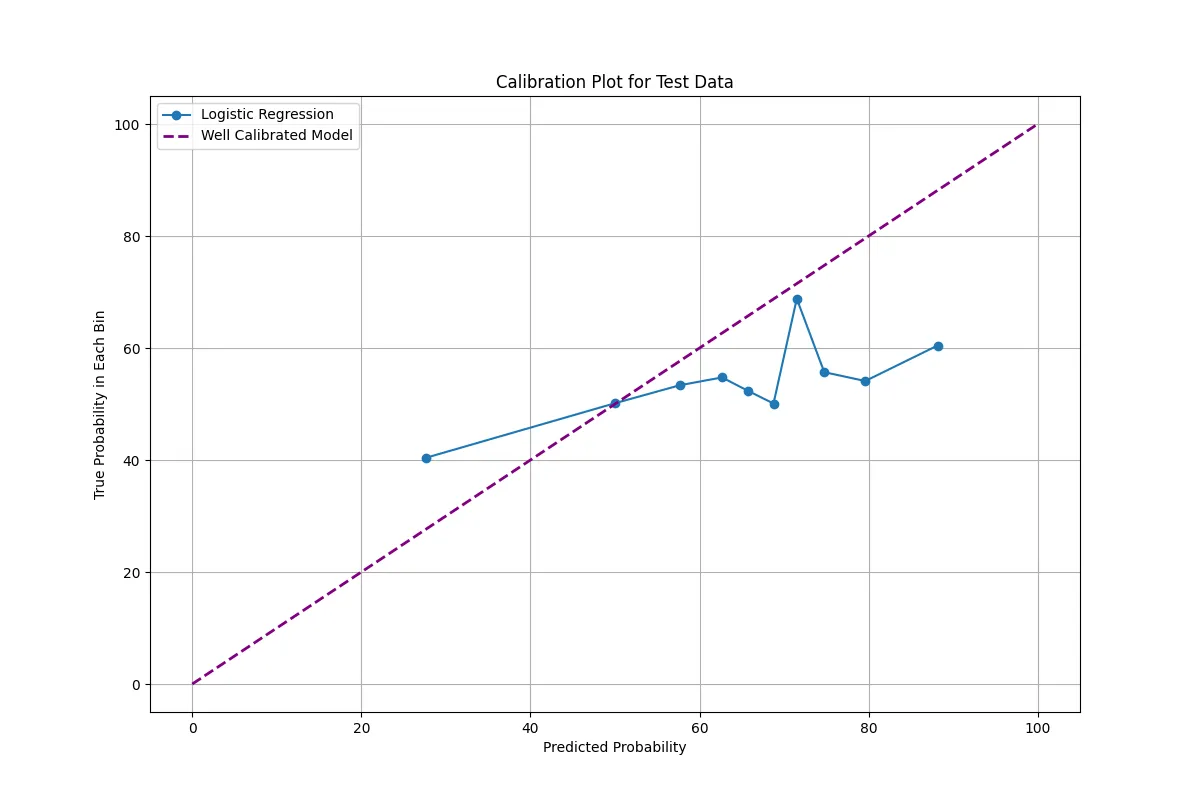
Calibration plot comparing the predicted probability to the true probability in a logistic regression model. The solid blue line represents the logistic regression performance, while the dashed purple line represents a perfectly calibrated model. The x-axis shows the predicted probability, and the y-axis shows the true probability in each bin

Picture 1: Our analysis shows that the logistic regression model used for baseline analysis tends to underestimate the likelihood of female vocal presence within a track at higher probability values. This is evident from the model’s performance, which falls below the diagonal line in reliability diagrams. The fluctuations and non-linearity observed suggest the limitations of relying solely on genres and instrumentation to predict artist representation accurately.

Propensity Score Calculation

In Cyanite’s Similarity Search – one of our music discovery algorithms – we model the likelihood of female vocals in a track as a function of genre and instrumentation using logistic regression. This gives us a probability score for each track, which we refer to as the propensity score. Here’s a basic formula we use for the logistic regression model:
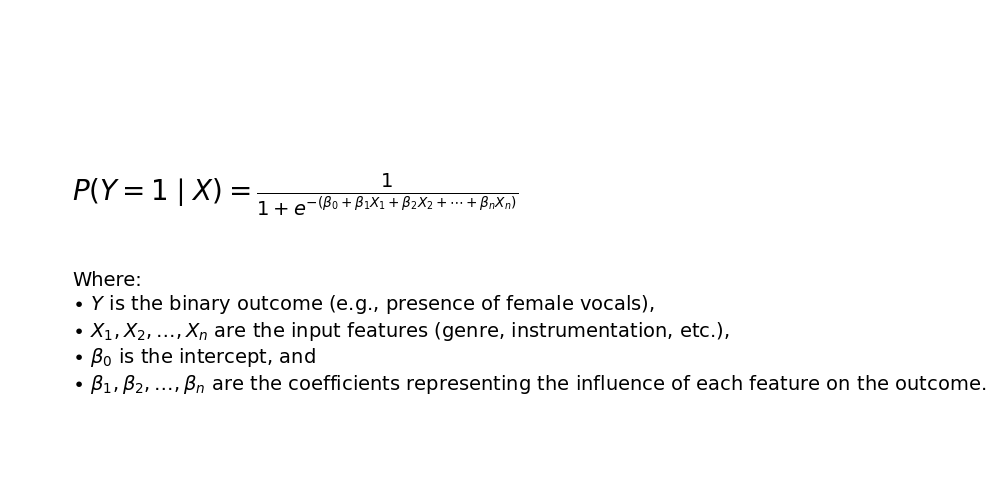
Logistic regression formula used to calculate the probability that a track contains female vocals based on input features like genre and instrumentation. The equation shows the probability of the binary outcome Y being 1 (presence of female vocals) given input features X. The formula includes the intercept (β0) and coefficients (β1, β2, ..., βn) for each input feature.

Picture 2: The output is a probability (between 0 and 1) representing the likelihood that a track will feature female vocals based on its attributes. 

Binning Propensity Scores for Fairness Evaluation

To assess the AI music recommendation fairness of our models by observing the correlations between the input features such as genre and instrumentation with the gender of the vocals, we analyze for each propensity the model outcome of the female artist ratio. To see the trend of continuous propensity scores into discrete variables and the average of female vocal presentation for that range, binning has been applied. 

We then calculate the percentage of tracks within each bin that have female vocals as the outcome of our models. This allows us to visualize the actual gender representation across different probability levels and helps us evaluate how well our music discovery algorithms promote gender balance.
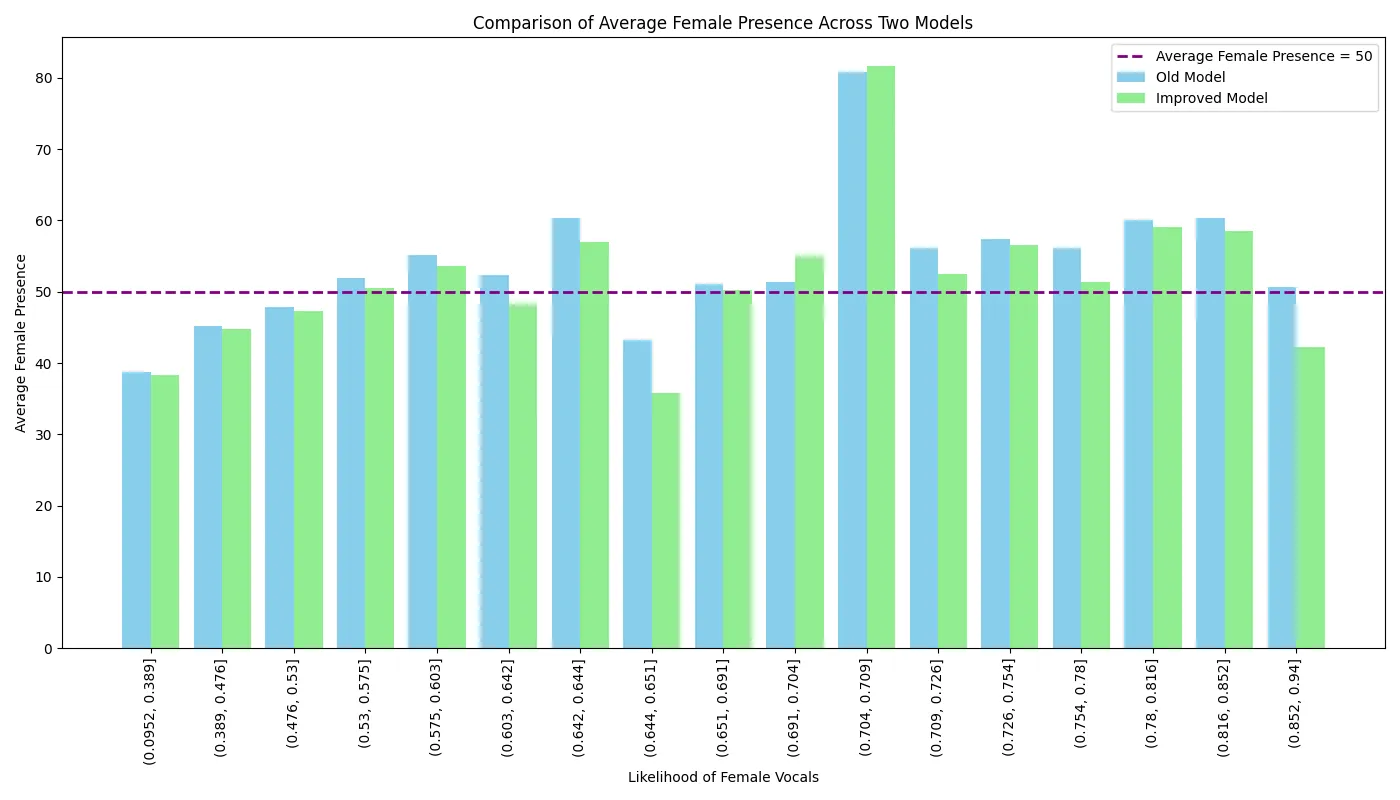
 

A bar chart comparing the average female vocal presence in Cyanite's Similarity Search results across different metadata groups.

Picture 3: We aim for gender parity in each bin, meaning the percentage of tracks with female vocals should be approximately 50%. The closer we are to that horizontal purple dashed line, the better our algorithm performs in terms of gender fairness.

Comparative Analysis: Cyanite 1.0 vs Cyanite 2.0

By comparing the results of Cyanite 1.0 and Cyanite 2.0 against our baseline logistic regression model, we can quantify how much fairer our updated algorithm is.

  • Cyanite 1.0 showed an average female presence of 54%, indicating a slight bias towards female vocals.

  • Cyanite 2.0, however, achieved 51% female presence across all bins, signaling a more balanced and fair representation of male and female artists.

This difference is crucial in ensuring that no gender is disproportionately represented, especially in genres or with instruments traditionally associated with one gender over the other (e.g., guitar for males, flute for females). Our results underscore the improvements in AI music recommendation fairness.

How Propensity Scores Help Balance the Gender Gap

Propensity score estimation is a powerful tool that allows us to address biases in the data samples used to train our music discovery algorithms. Specifically, propensity scores help ensure that features like genre and instrumentation do not disproportionately affect the representation of male or female artists in music recommendations.

The method works by estimating the likelihood of a track having certain features (such as instrumentation, genre, or other covariates) using and checking if those features directly influence our Similarity Search by putting our algorithms to the test. Therefore, we investigate the spurious correlation which is directly related to gender bias in our dataset, partly from the societal biases. 

We would like to achieve a scenario where we could represent genders equally in all kinds of music. This understanding allows us to fine-tune the model’s behavior to ensure more equitable outcomes and further improve our algorithms.

Conclusion: Gender Balance 

In conclusion, our comparative analysis of artist gender representation in music discovery algorithms highlights the importance of music recommendation fairness in machine learning models.

Cyanite 2.0 demonstrates a more balanced representation, as evidenced by a near-equal presence of female and male vocals across various propensity score ranges.

If you’re interested in using Cyanite’s AI to find similar songs or learn more about our technology, feel free to reach out via mail@cyanite.ai.

You can also try our free web app to analyze music and experiment with similarity searches without needing any coding skills.
Music CMS Solutions Compatible with Cyanite: A Case Study

Music CMS Solutions Compatible with Cyanite: A Case Study

In today’s digital age, efficiently managing vast amounts of content is crucial for businesses, especially in the music industry. For those who decide not to build their own library environment, music Content Management Systems (CMS) have become indispensable tools. At Cyanite, we integrate our AI-powered analysis and search algorithms with these systems – helping you create music moments.

In this blog post, we’ll delve into Cyanite’s compatibility with various CMS. We’ll provide an overview of the features Cyanite offers for each platform, recommend the ideal user types for each CMS, and include relevant examples

Additionally, you’ll find information on how to use Cyanite via each of these providers.

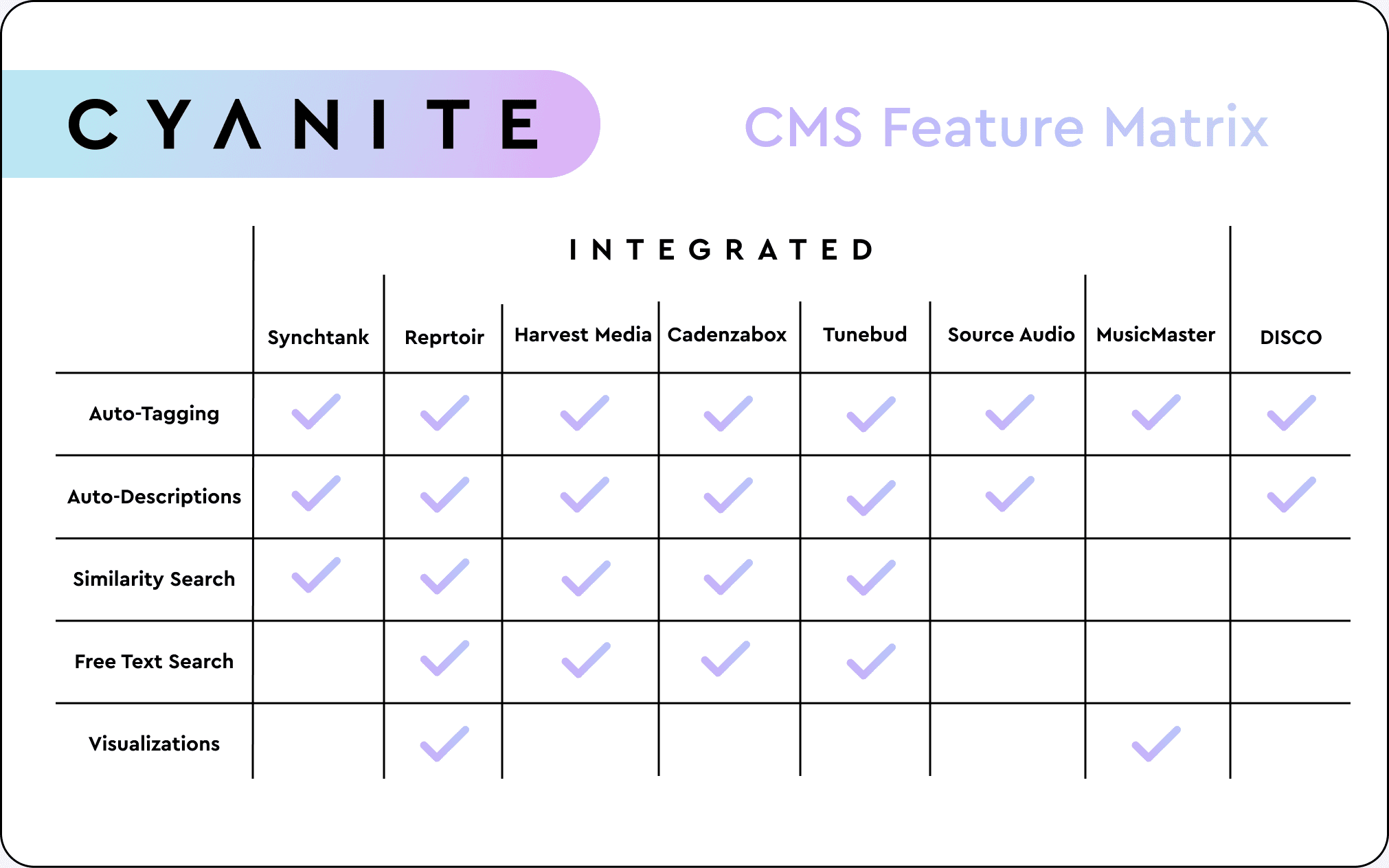
A Spreadsheet giving an overview of what Cyanite features are implemented into which content management system.

    Synchtank

    Synchtank provides cutting-edge SaaS solutions specifically designed to simplify and streamline asset and rights management, content monetization, and revenue processing. 

    It is trusted by some of the world’s leading music and media companies, including NFL, Peermusic, Warner Music, and Warner Bros. Discovery, to drive efficiency and boost revenue.

    Cyanite Features Available

    • Auto-Tagging
    • Auto-Descriptions
    • Similarity Search

    Recommended for

    • Music Publishers
    • Record Labels
    • Production Music Libraries
    • Broadcast Media/Entertainment Companies
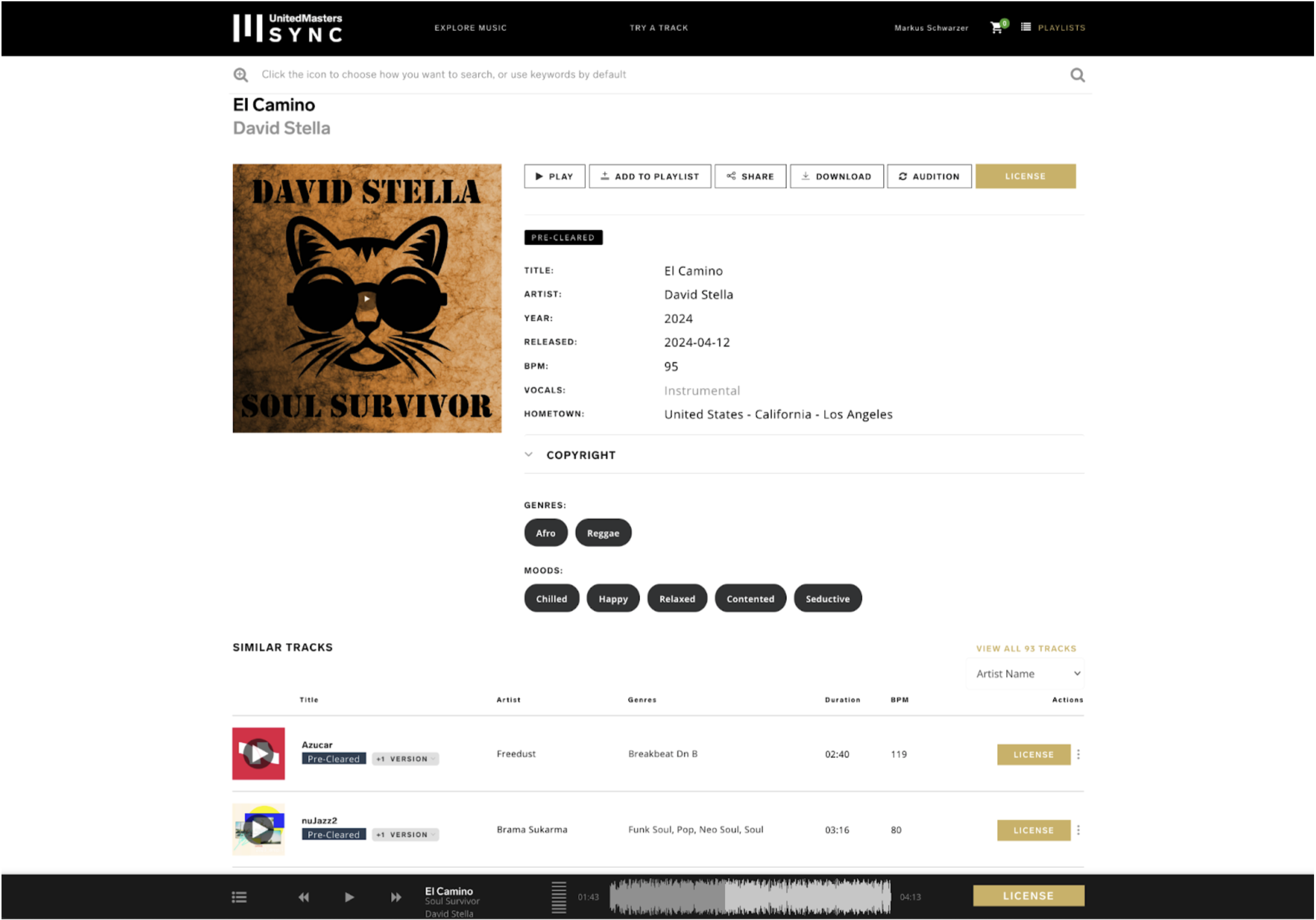
    A Screenshot showing United Masters Sync's website using the CMS Synchtank

    Synchtank in United Masters Sync

    How to use Cyanite via Synchtank

    Cyanite is directly integrated into Synchtank.

    If you want to use Cyanite with Synchtank, please get in touch with a member of the Synchtank team or schedule a call with us to learn more via the button below.

    Reprtoir

    Reprtoir is a France-based CMS offering solutions for asset management, playlists, contacts, contracts, accounting, and analytics – providing supported data formats for various music platforms, distributors, music techs, and collective management organizations.

    Cyanite Features Available

    • Auto-Tagging
    • Auto-Descriptions
    • Similarity Search
    • Free Text Search
    • Visualizations

    Recommended for

    • Record Labels
    • Music Publishers
    • Production Music Libraries
    • Sync Teams
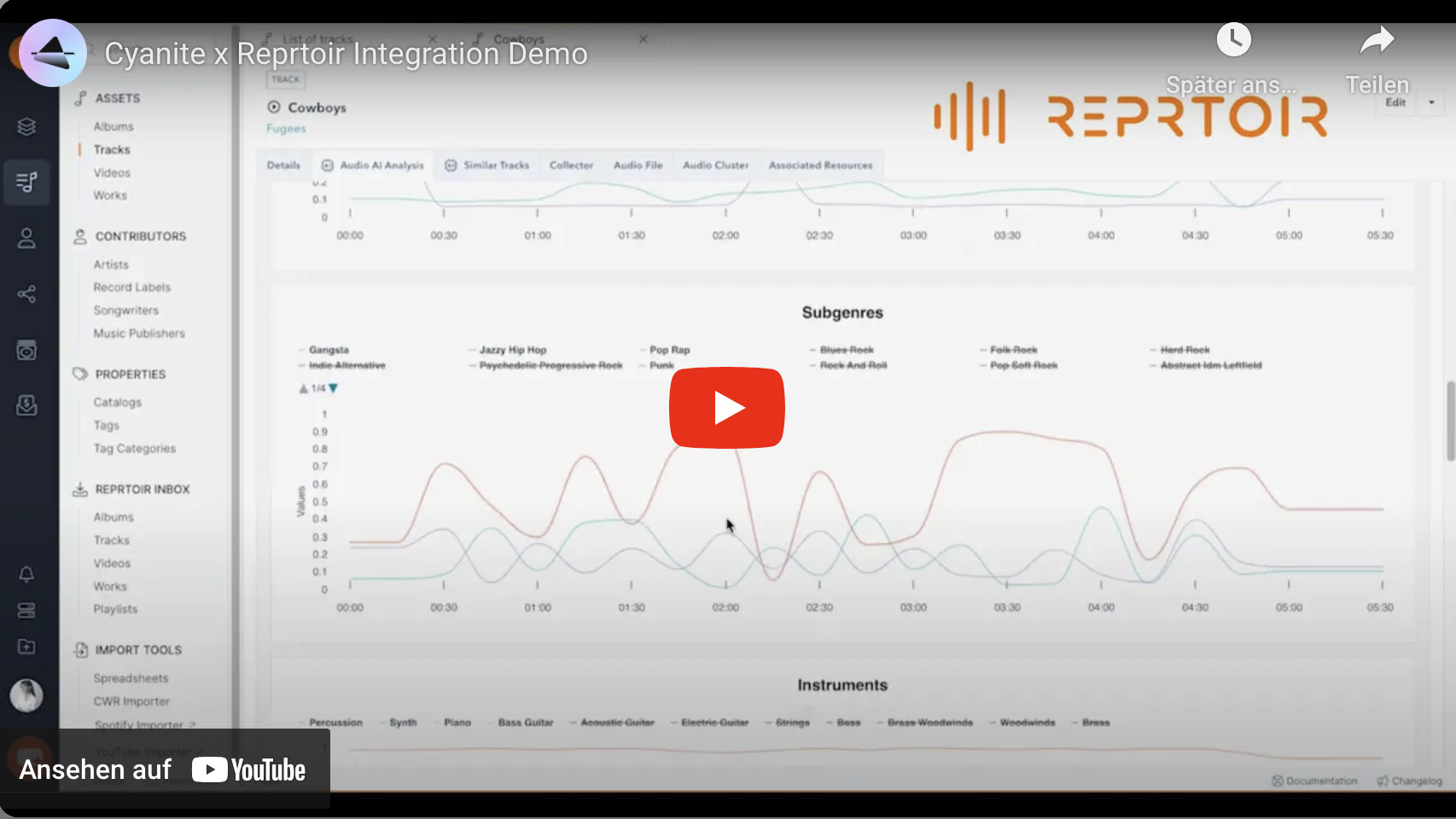
    A screen recording of Reprtoir, a music content management system. It provides a brief overview of Cyanite's integration into the platform.
    Screen Recording of Reprtoir with Cyanite

    How to use Cyanite via Reprtoir

    Cyanite is directly integrated into Reprtoir.

    If you want to use Cyanite with Reprtoir, please get in touch with a member of the Reprtoir team or schedule a call with us to learn more via the button below.

    Source Audio

    US-based Source Audio is a CMS that features built-in music distribution and offers access to broadcasters and streaming networks. Whilst offering its own AI tagging and search functions, again, specifically larger catalogs will find deeper, more accurate tagging necessary to effectively navigate their repertoire.

    Cyanite Features Available

    • Auto-Tagging
    • Auto-Descriptions

    Recommended for

    • Production Music Libraries
    • TV-Networks and Streaming Services
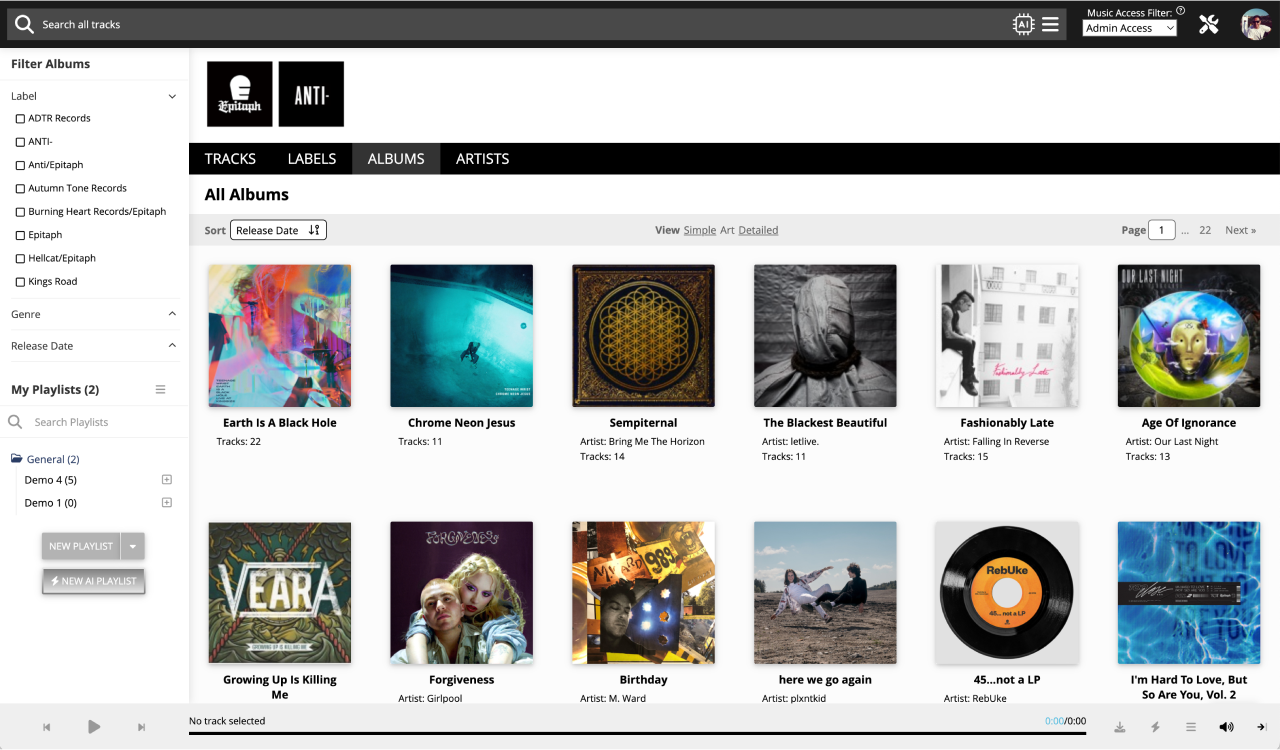
    A Screenshot showing the Interface of the Music CMS Source Audio

    How to use Cyanite via Sourceaudio

    Cyanite is directly integrated into Sourceaudio.

    If you want to use Cyanite inside Sourceaudio, send us an email or schedule a call below.

    Harvest Media

    Harvest Media is an Australian cloud-based music business service. They were founded in 2008 and offer catalog managing, licensing, and distribution tools based on standardized metadata and music search engines.

    Cyanite Features Available

    • Auto-Tagging
    • Auto-Descriptions
    • Similarity Search
    • Free Text Search

    Recommended for

    • Production Music Libraries
    • Music Publishers
    • Music Licensing & Subscription Services
    • Record Labels
    • TV Production, Broadcast and Entertainment Companies
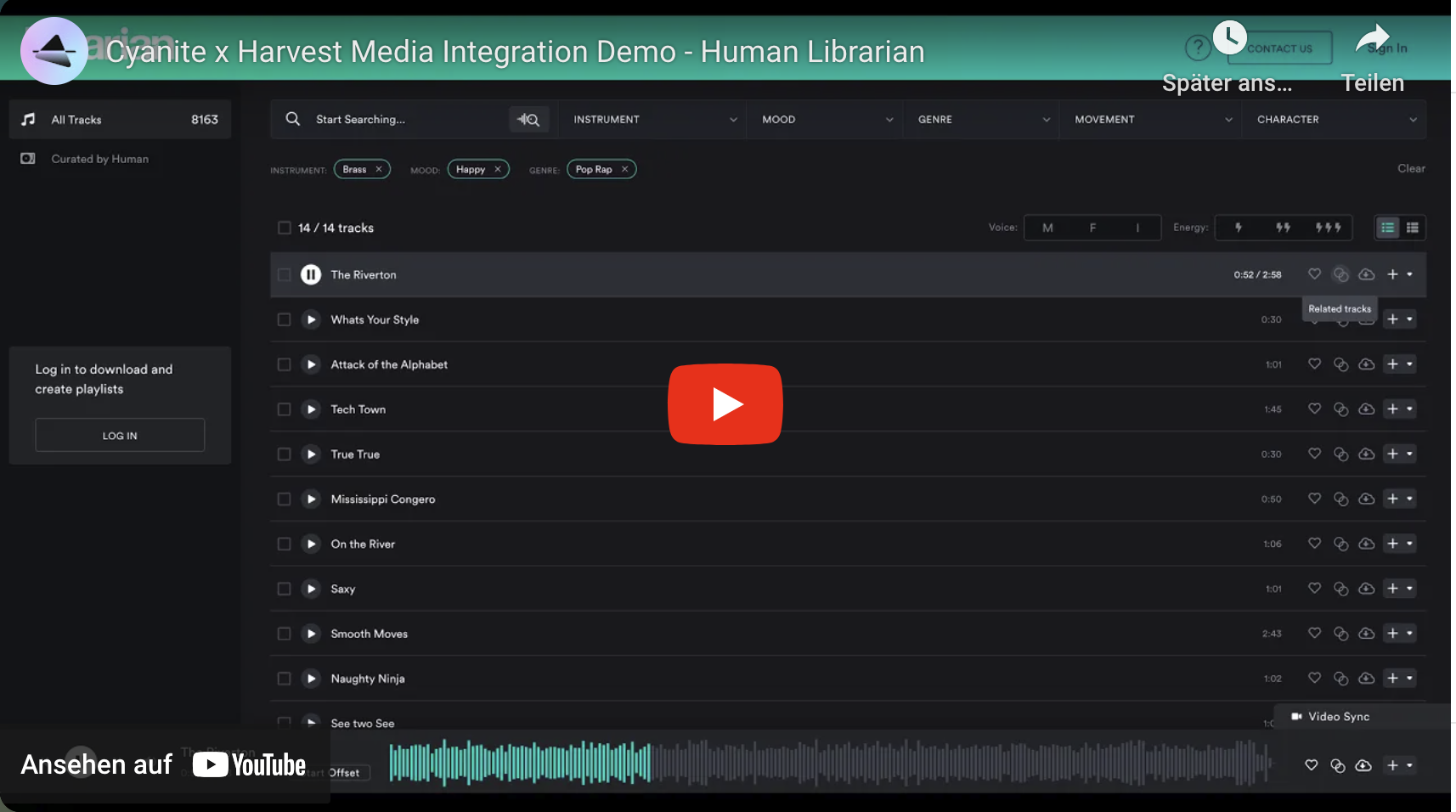
    A screen recording of Human Librarian's interface, based on the CMS Harvest Media. It provides a brief overview of Cyanite's integration into the platform.

    Screen Recording of Harvest Media in Human Librarian

    How to use Cyanite via Harvest Media

    Cyanite is directly integrated into Harvest Media.

    If you want to use Cyanite inside Harvest Media, send us an email or schedule a call below.

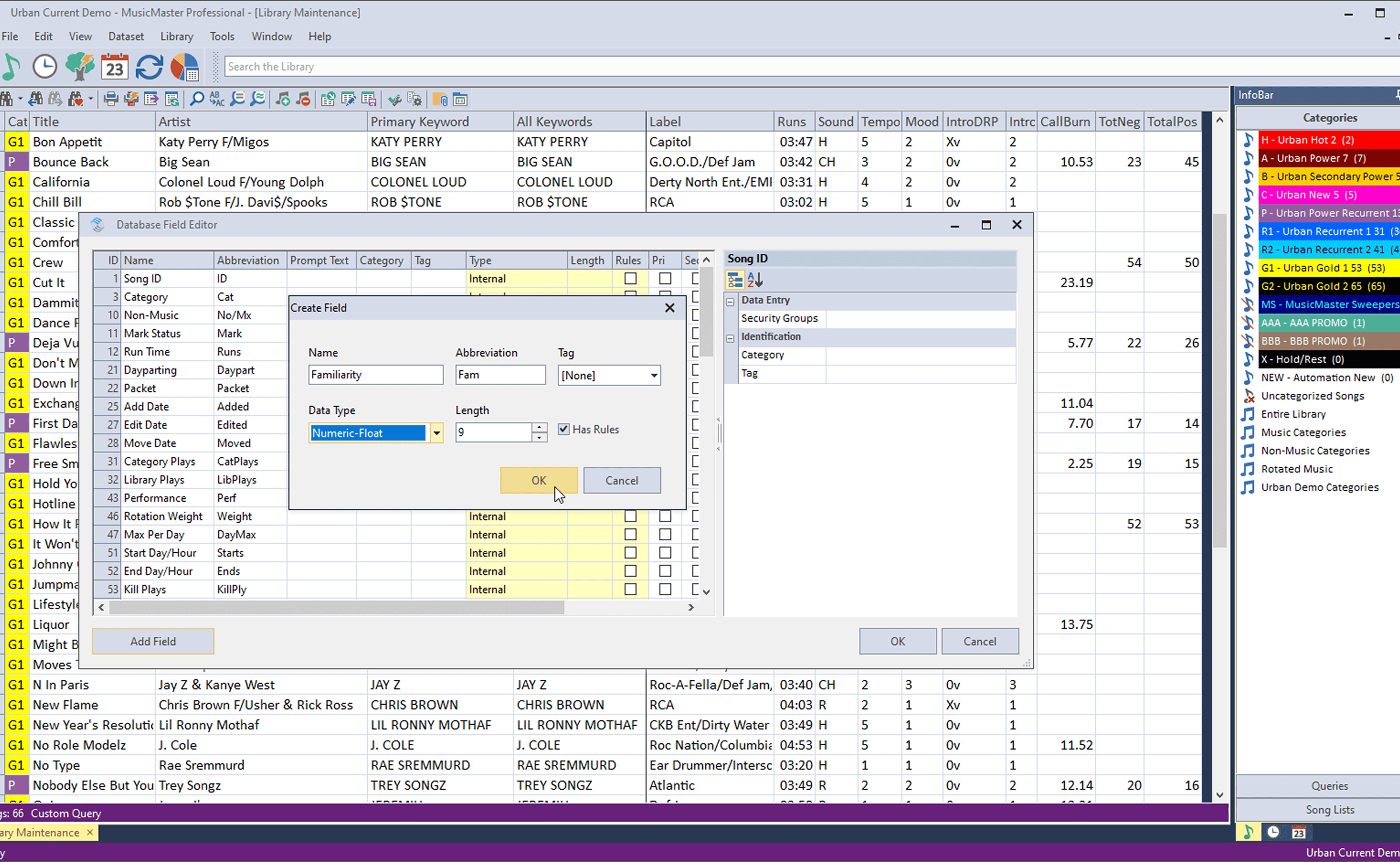
    MusicMaster

    MusicMaster is the industry-standard software for professional music scheduling. It offers flexible rule-based planning, seamless integration with automation systems, and scalable tools for managing music programming across single stations or complex broadcast networks.

    Cyanite Features Available

    • Auto-Tagging
    • Visualizations

    Recommended for

    • Broadcast radio groups
    • FM/AM radio stations
    • Satellite radio networks
    A screen recording of Human Librarian's interface, based on the CMS Harvest Media. It provides a brief overview of Cyanite's integration into the platform.

    Screenshot of MusicMaster Scheduling Software

    How to use Cyanite via MusicMaster

    Cyanite is directly integrated into MusicMaster.

    If you want to use Cyanite inside MusicMaster, send us an email or schedule a call below.

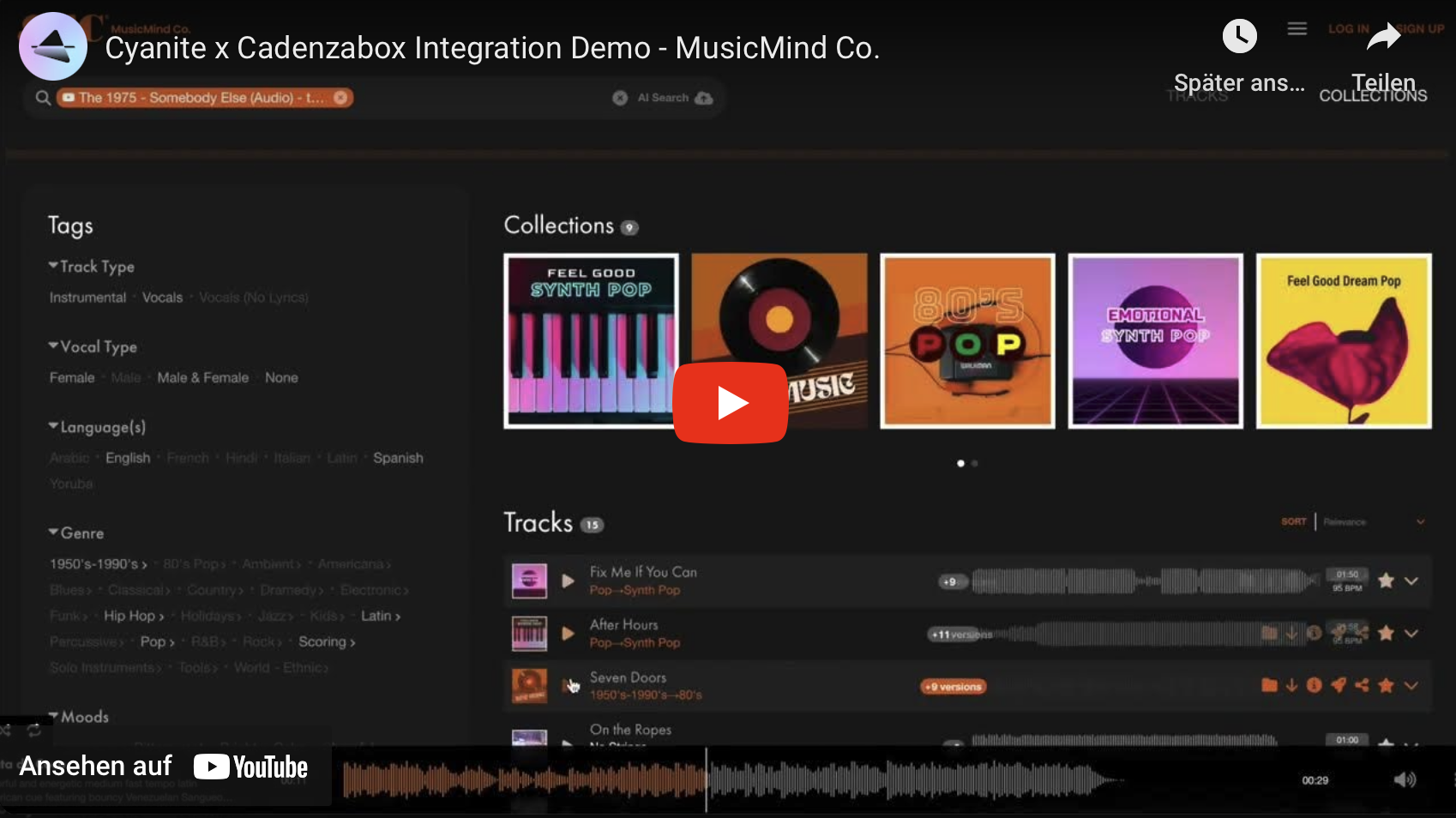
    Cadenzabox

    Cadenzabox is one of the UK-based music Content Management Systems offering tagging, search, and licensing tools as a white-label service, enabling brand-specific designs and a deep level of customization built by Idea Junction – a full-service digital creative studio. 

    Cyanite Features Available

    • Auto-Tagging
    • Auto-Descriptions
    • Similarity Search
    • Free Text Search

    Recommended for

    • Production Music Libraries
    • Music Publishers
    A screen recording of Music Mind Co., a music library using the content management system Cadenzabox. It provides a brief overview of Cyanite's integration into the platform.

    Screen Recording of Cadenzabox in MusicMind Co.

    How to use Cyanite via Cadenza Box

    Cyanite is directly integrated into Cadenzabox.

    If you want to use Cyanite inside Cadenzabox, send us an email or schedule a call below.

    Tunebud

    UK-based Tunebud offers an easy, no-code music library website-building solution complete with extensive file delivery features, music search, playlist creation, e-commerce solutions, watermarking, and bulk downloads. It’s an all-in-one music library website solution suitable for individual composers wanting to showcase their works to music publishers and labels looking for a music sync solution for catalogs of up to 500k tracks.  

    Cyanite Features Available

    • Auto-Tagging
    • Auto-Descriptions
    • Similarity Search
    • Free Text Search

    Recommended for

    • Musicians
    • Composers
    • Music Publishers
    • Record Labels
    • Music Library and SFX Library Operators
    A Screenshot showing an example website using the CMS Tunebud
    Tunebud with Cyanite’s similarity search

    How to use Cyanite via Tunebud

    Cyanite is directly integrated into Tunebud.

    If you want to use Cyanite with Tunebud, please get in touch with a member of the TuneBud team or schedule a call with us to learn more via the button below.

    Supported CMS

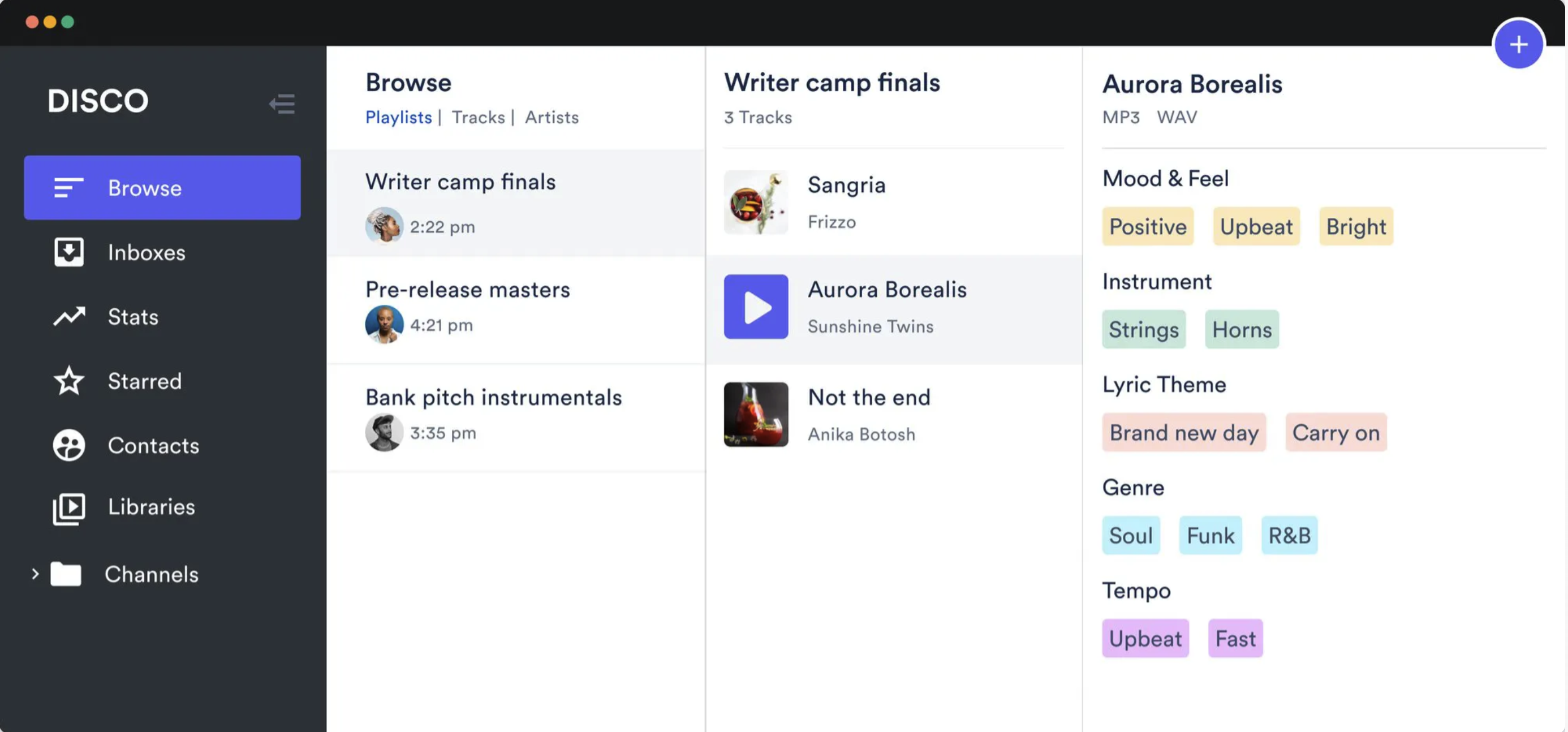
    DISCO

    DISCO is an Australia-based sync pitching tool to manage, share, and receive audio files. While DISCO offers its own audio tagging version, particularly catalogs north of 10,000 songs may prefer using Cyanite’s deeper, more accurate tagging to organize and browse its catalog. 

    Cyanite Features Available

    • Auto-Tagging
    • Auto-Descriptions

    Recommended for

    • Music Publishers
    • Record Labels
    • Sync Teams
    A Screenshot of the Music CMS DISCO

    DISCO

    How to use Cyanite via DISCO

    All you need to do is reach out to your DISCO customer success manager and ask for a CSV spreadsheet of your catalog including mp3 download links. We’ll download, analyze, and tag your music, according to your requirements, and you can effortlessly upload the updated spreadsheet back to DISCO.

    You decide which tags to use, which to keep, and which to replace.

    Are you missing any music Content Management Systems? Feel free to chat with us and share your thoughts!

    Haven’t decided on a CMS yet? Contact us for free testing periods.

    Your Cyanite Team.

    The Importance of Music Auto-Tagging for Content Strategies

    The Importance of Music Auto-Tagging for Content Strategies

    An Introduction

    By Jakob Höflich, Co-Founder and CMO of Cyanite

    When I was 19, I worked at community radio 4ZZZ in Brisbane, tasked with digitizing daily CD deliveries, tagging their genre, and sorting them in the library. It was a tedious and challenging task – every mistake could persist in the library until corrected. And let’s face it, this rarely was the case. This was one of the experiences that motivated me to found Cyanite many years later, also to help catalog owners tag their catalogs with AI and to eradicate the legacy of tagging mistakes made in the past 25 years of digitization.

    While Auto-Tagging to create a clean and better searchable library has become a commodity, with various music companies worldwide leveraging this to alleviate the burden on their tagging teams and create more space for creative work, there is one underappreciated use case that has recently grown in significance: using Auto-Tagging data on a global catalog basis to derive actionable insights for your content strategy.

    From Hunches to Data-Driven Insights

    If you own or work with a music catalog, you likely have a solid understanding of its character. But what if the number of songs goes in the tens of thousands or even beyond? How confident can you be to know the profile of the catalog and what it stands for? When making important decisions about the creative direction of your catalog, especially with multiple stakeholders involved, this ‘feeling’ can tend to be subjective and leave room for guesswork. It’s the music’s subjective and “magical” nature that makes it hard to quantify and discuss.

    That’s why keywords remain crucial when managing and developing a catalog where AI can be so helpful to your work. By providing data insights, AI can turn these hunches into consistent and concrete knowledge.

    Here are three benefits of leveraging music Auto-Tagging for your content strategy.

    1. Deep Understanding of a Catalog’s Character

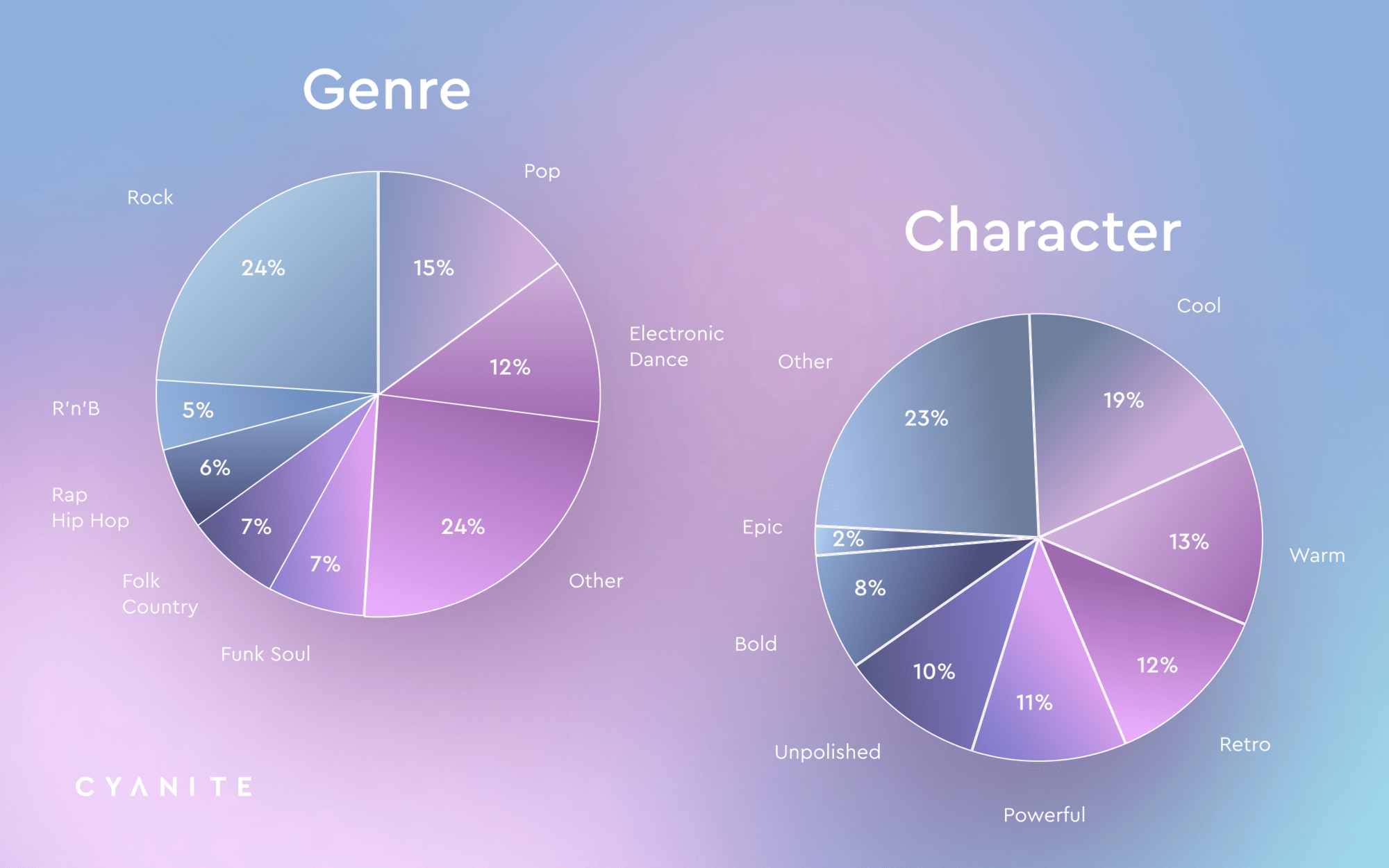
    AI music Auto-Tagging dives deep into the sound character of a catalog. By translating the complexity of music into concrete datapoints such as genres and moods, it allows for a shared, objective and consistent understanding across your team or company. Imagine having a precise breakdown of your catalog’s characteristics at your fingertips. Like, which percentage of my repertoire is Rock, Funk, Disco? Does it stand for upbeat or more melancholic tones? Do I maybe have a gender problem by favoring one more over the other? This not only enhances internal cohesion but also aligns strategies and decisions.

    Pro Tip: Our Auto-Tagging focuses on creative metadata, extracting information such as genres, BPM, key, and energy. Curious? Check out our full taxonomy. It does not extract copyright or performance metadata. A smart move here is to pair the AI-driven insights with other data pools. For example, pairing AI-insights with performance and sales data can reveal things like: Only 2% of my catalog is Hip Hop, yet this content has a 200% higher performance rate.

    2. Uncovering Blind Spots and Highlighting Trends

    AI’s ability to uncover blind spots and highlight trends within a catalog is another significant benefit. This data-driven approach can reveal underutilized niches or trends when data is placed on a timeline. Whether it’s identifying a resurgence in a particular genre or pinpointing areas with high sync opportunities, AI insights shed light on the hidden corners of a catalog. Particularly for sync teams of companies that do not have a distinct genre profile it is beneficial to have a balanced catalog to answer to the upmost possible amounts of briefs with adequate content.

    3. Informed Decisions for Catalog Acquisition

    Lastly, AI-driven insights are not limited to managing your existing catalog. They are invaluable when evaluating to-be-acquired catalogs. While frontline repertoire might be familiar, B-sides and deep cuts often remain mysterious territories. By thoroughly analyzing these lesser-known tracks, AI can contribute a creative due diligence aspect by providing a comprehensive understanding, which in turn informs better acquisition decisions. This ensures you’re investing in a catalog that has the ability to complement your existing one.

    Contrarily, if you want to sell a catalog, comprehensive tagging data on your repertoire can help you identify the perfect acquirer or prove the future longevity of your catalog to drive up the multiple.

    A Real-World Example

    A German publisher utilizing Cyanite’s AI insights discovered previously underappreciated genres, allowing them to optimize their catalog strategy effectively. The analysis showed that the genres Hip Hop, Funk, and RnB and the mood Epic were underrepresented even though both have been extremely valuable qualities for successful sync placements in the last years.

    Visual representations, such as pie charts and graphs, can further show how AI can dissect and categorize catalog elements, providing clear, actionable insights.

    All data above can be retrieved via our API.

    Conclusion: Embracing the Future with AI

    AI music Auto-Tagging can be a great help for developing content strategies in the music industry. These actionable insights provide a deep, data-driven understanding of catalogs, uncover blind spots, highlight trends, and inform strategic decisions for catalog acquisitions.

    Undoubtedly, AI can’t and shouldn’t replace the final decision-making process as it can’t anticipate the future as us humans do. But it can be used as a great tool to navigate this process with data that make it easier – and often more convincingly – to talk about the magic of music.

    As we live in a time where content production is at an all-time peak providing the sync market with opportunities as never before, every song in the catalog should have the same chance of being discovered. Having a well-organized and indexed catalog is key to that.


    How to Use AI Music Search for Your Music Catalog

    How to Use AI Music Search for Your Music Catalog

    The burgeoning field of artificial intelligence has brought forth more tools than we can count, aiming to revolutionize the music industry. Amidst this landscape, AI-based music tagging and search stand out as proven technologies with quantifiable benefits for music companies worldwide.

    This article aims to demystify the potential of AI music search and recommendation systems, offering insights to help music catalog owners and distributors determine the relevance of this technology for their businesses. Whether navigating a vast catalog or seeking innovative solutions for content discovery, this guide is tailored to your needs.

    If you are also interested in Auto-Tagging music, please check out our article on The Power of Automatic Music Tagging with AI.

    Assessing Your Needs

    Understanding the suitability of AI music search begins with assessing your specific requirements. Consider the following prompts:


      • Has your catalog experienced significant growth from various sources?
      • Do a variety of different users access and search through your catalog?
      • Is sync a key aspect of your company?
      • Do you find yourself repeatedly using the same tracks while underutilizing others?

    If you answer affirmatively to at least two of these questions, further exploration of AI music search is advisable.

    Exploring Options

    Two primary AI-driven search options dominate this landscape:

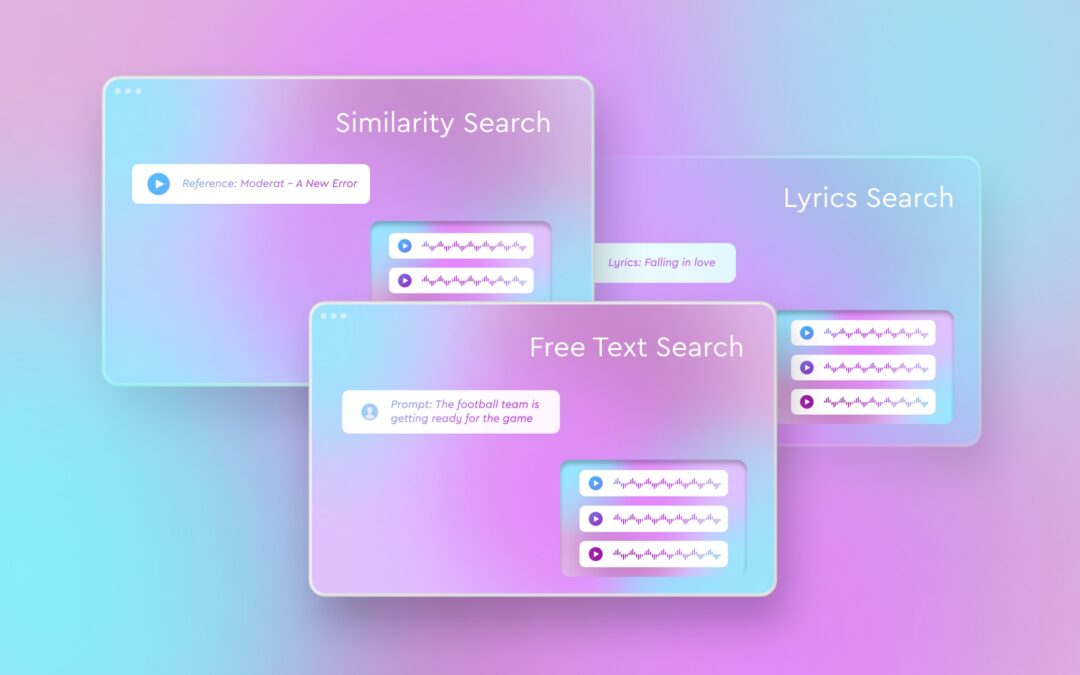
    Similarity Search: Ideal for discovering tracks similar to a reference song, this feature aids sync and licensing teams worldwide. Whether finding similar songs in your catalog to worldwide hits or augmenting your song collection for your sync pitch, this tool enhances any music search.

    Free Text Search (Searching by natural language): Utilizing text prompts, this search method facilitates music discovery for visual projects and instances where translating thoughts into keywords proves challenging. Its versatility extends from B2B applications, common in music licensing, to B2C scenarios, as demonstrated by Cyanite’s collaboration with streaming platforms like Sonu.

    Lyrics Search: Enhance your search experience by delving into the lyrical content of songs. This feature adds a contextual dimension to sound-based searches, allowing users to find songs based on specific words or themes within their lyrics. Whether you’re searching for songs containing a particular word like “love” or exploring themes such as “falling in love,” this functionality offers a nuanced approach to music discovery.

    If you want to test those AI music search options, you can easily create a free account for Cyanite’s web app and try it out.

    Building vs. Buying

    Choosing between building an in-house AI solution or licensing from an external provider hinges on several factors:


      • Do you possess an internal data science and development team?
      • Do you have a meticulously tagged library of at least 500,000 audios?
      • Can you allocate a significant budget for AI development (mid-six-figure sum) and ongoing updates?
      • Are you prepared to invest in monthly maintenance costs for a proprietary AI system (monthly five-figure sum)?

    Building your AI may be viable if you answer at least two of these questions positively. Alternatively, partnering with an AI provider like Cyanite presents a compelling option for those lacking the resources or expertise for independent development.

    To book an individual and free consultation with our experts, please follow the button below.

    Long Story Short

    AI music search offers a transformative solution for navigating the complexities of music catalogs, empowering businesses with enhanced efficiency and discovery capabilities. Whether leveraging similarity search or text-based prompts, the adoption of AI-driven technologies promises to redefine content discovery in the music industry.

    Explore the possibilities of AI music search with Cyanite, and unlock the full potential of your music catalog today.


    Your Cyanite Team.

    How to Create Mood- and Contextual Playlists With Dynamic Keyword Search

    How to Create Mood- and Contextual Playlists With Dynamic Keyword Search

    In the last article on the blog, we covered how Cyanite’s Similarity Search can be used in music catalogs. In this article, we explore another way to search for songs using Dynamic Keyword Search and how to leverage it to create mood- and contextual-based playlists. 

    Rather than relying on a reference track, Dynamic Keyword Search allows you to select and combine from a list of 1,500 keywords and adjust the impact of these keywords on the search. This is especially helpful to create playlists where songs match in mood, activity, or other characteristics. 

    But before we explain how this feature works, let’s explore how playlists are created. What makes a perfect playlist? Why are playlists so essential when utilizing a music catalog? And how can the Dynamic Keyword Search help with that?

    How are playlists created?

    There are three techniques for playlist creation:

    1. Manual creation (individually picking songs) 
    2. Automatic generation and recommendation 
    3. Assisted playlist creation. 

    Historically, manual creation has been the most basic and old approach. It involves picking songs individually for playlists. It might be the simplest technique but the amount of time and effort that goes into it can be overwhelming. Imagine you are working 100,000 audios in a catalog and have to create an “Energetic Workout” and “Beach Party” playlist. 

    Automatic generation uses various algorithms to create playlists with no human intervention. One of the most famous ones is, for example, “Discover Weekly” by Spotify. 

    Assisted playlist creation uses music technology to guide and support manual playlist creation. 

    In the research by Dias, Goncalves, and Fonseca, manual playlist creation was found to be most effective in terms of control, engagement, and trustiness. This means that people trust handmade playlists. Also, manual creation provides the most amount of control over the outcome and it engages editors in the creation process. 

    Automatic creation was found to be the most effective in adapting to the listeners’ needs. There is no manual control involved, so automatic tools can adapt and change playlists in no time. 

    Assisted techniques were found to be most effective in terms of engagement and trustiness whilst being quick to create. They also performed well on the song selection criteria. Song selection has been defined as the most critical factor in the playlist creation process according to this study. However, while song selection is considered very important, the question of what makes a song right for the particular playlist is still open. Apart from that, assisted techniques proved to be optimal in control, and serendipity and they also can adapt to listening preferences rather easily. 

    To anticipate things already: The Dynamic Keyword Search is exactly such an assisted technique in playlist creation.

    Why are search tools for playlist creation important in a catalog?

    Playlists have been known to be the ultimate tool for promoting music. We already covered the ways artists can get on Spotify and other people’s playlists in other articles on the blog. But creating playlists can also be beneficial for catalog owners and catalog users, be it professional musicians or labels. Here is why: 

    • You can realize new and passive modes to exploit and monetize your catalog. If you make it easier for your users and/or customers to explore your catalog, you directly increase its value.
    • Playlists are used as a promotional tool to showcase the works of an artist or the inspirations behind the artist. This article recommends creating two playlists: a vibe playlist and a catalog playlist for brand engagement and streams. 
    • Playlists help organize music by theme or context
    • With playlist creation features, users save time on finding the right fitting songs
    • Playlists can be indexed separately in search results. This helps music get discovered. 

    So playlist creation tools in a catalog are pretty important. Similarity Search is one of these tools. Another one, which we focus on in this article is Dynamic Keyword Search.

    How does Dynamic Keyword Search Work?

    Cyanite’s Dynamic Keyword Search allows for searching tracks based on multiple keywords simultaneously where each keyword can be weighted for its impact on the search. This feature leads to more relevant search results with less time-effort spent on search.

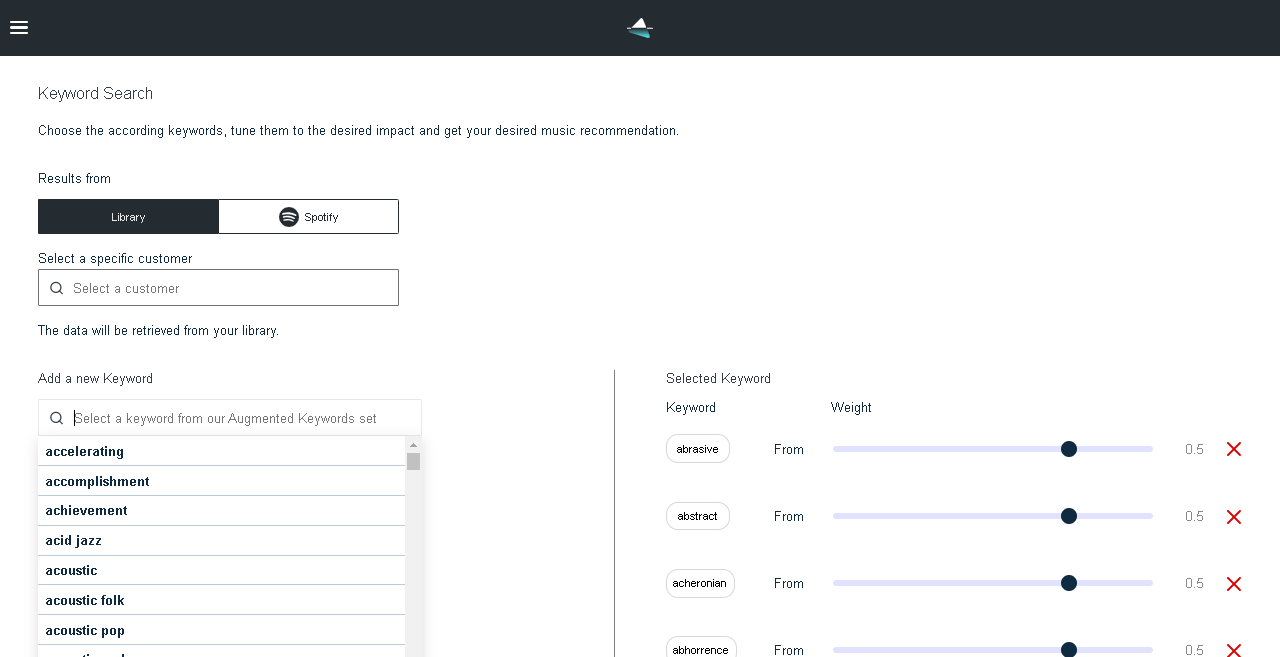
    Usually, the keywords you choose represent your idea of what you’re searching for. But you don’t have full control over the search. With Dynamic Keyword Search, you can increase the precision of the search results by adjusting the impact of the keywords on the search. So you can express exactly what you’re looking for. There are 1,500 keywords to choose from representing such characteristics of the song as mood, genre, situation, brand values, and style. These keywords’ impact on search can then be adjusted on the scale from -1 to 1 from no impact at all to “heavy impact”.

    Cyanite Dynamic Keyword Search interface

    What playlist features can be improved with Dynamic Keyword Search?

    Not all playlists are created equal. Some are better than others. This study outlines 5 characteristics of playlists that can indicate a good or bad playlist. The authors of the study assumed that user-generated playlists could be an indicator for the algorithms to create good playlists. Here are the 5 playlist characteristics they outlined: 

    • Popularity – most user-generated playlists feature popular tracks first. This, however, is not too obvious though but grabbing the attention spans of the listeners from the start is important. 
    • Freshness – playlists should contain recently released tracks. Most playlists in the study contain tracks released on average in the last 5 years.
    • Homogeneity and diversity –  playlists on average cover a very limited number of genres so playlists should be rather homogenous. However, diversity plays a significant part in listeners’ satisfaction so it should be incorporated into the playlist as well.
    • Musical Features – in terms of energy, playlists with a narrow energy spectrum with a low average energy level are preferred, but there can be some high-energy tracks in the list. 
    • Transition and Coherence – the similarity between the tracks defines the smoothness in transition and coherence of the playlist. Usually, user-generated playlists have a better similarity in the first half and a lesser similarity in the second half. 

    As the study deals with a variety of user-generated playlists, it can’t be said that all of them were equally good playlists. But the criteria outlined above can help improve playlists by understanding the character of the playlist. With Dynamic Keyword Search, you can control such criteria as homogeneity and diversity, musical features such as energy level, and similarity between the tracks to ensure transition and coherence

    PRO TIP: To improve a playlist’s transition and coherence you can combine the Dynamic Keyword Search with our Similarity Search to further filter music on Camelot Wheel. The Camelot Wheel indicates which songs transition harmonically well giving you an extremely powerful tool to perfect the song order. You can find a deeper explanation of that in this article.

    Creating Playlists with Dynamic Keyword Search – Step-by-step

    Here is how to access Dynamic Keyword Search in the Cyanite app. This feature is also available through our API

    1. Go to Search in the menu and select the Keyword Search tab. Choose whether to display results from the Library or Spotify. 
    2. Select keywords from the Augmented Keywords set. For example, these are some of the keywords in the list: joy, travel, summer, motivating, pleasant, happy, energetic, electro, bliss, gladness, auspicious, pleasure, forceful, determined, confident, positive, optimistic, agile, animated, journey, party, driving, kicking, impelling, upbeat. We recommend selecting up to 7 keywords out of 1,500. 
    3. Adjust the weights for each keyword from 1 to -1 to define their impact on search. For example, let’s set  the search input as sparkling: 0.5, sad: -1, rock: 1, dreamy: 1 
    4. Scroll down for search results. The search results will return tracks from the library that are dreamy, slightly sparkling, and not at all sad. They will also all be rock songs.

    Dynamic Keyword Search can be requested from our support team.

    Conclusion

    There are various ways to create playlists from manual creation to automatic and assisted techniques. An assisted approach that combines automatic and manual creation has proved to be the most effective in playlist creation. It meets almost all the editors’ needs such as providing control over the process, maintaining a high level of engagement and trustworthiness, and offering a good selection of songs. However, the automatic approach is fast developing and algorithms might substitute human work completely in the future. 

    Our Dynamic Keyword Search feature can help you create playlists as one of the assisted techniques. It can provide search results that take into account the search intent  in terms of keywords and the impact of those keywords on search. This doesn’t mean that Dynamic Keyword Search replaces the manual work completely, but it can help artists, labels, and catalog owners do the creative work and engage fans and listeners with the support of the right tools to save time, money, and effort. This is what we’re striving to achieve here at Cyanite – to help you fully unlock your catalog’s potential.

    Let us know if this article has been helpful and stay tuned for more on the Cyanite blog! 

    I want to try Dynamic Keyword Search – how can I get started?

    Please contact us with any questions about our Cyanite AI via mail@cyanite.ai. You can also directly book a web session with Cyanite co-founder Markus here.

    If you want to get the first grip on Cyanite’s technology, you can also register for our free web app to analyze music and try similarity searches without any coding needed.

    Best of Music Similarity Search: Find Similar Songs With the Help of AI

    Best of Music Similarity Search: Find Similar Songs With the Help of AI

    In the past, music search was limited to basics like artist name and song title. Today’s vast and diverse music landscape calls for better ways of discovering music. Studies show that people connect with music for emotional and social reasons, making style, mood, genre, and similarity crucial to music discovery.

    In this article, we explore how AI-driven music similarity search works and practical ways to find songs that sound alike using Cyanite’s Similarity Search tool.


    How does Cyanite’s Music Similarity Search Work?

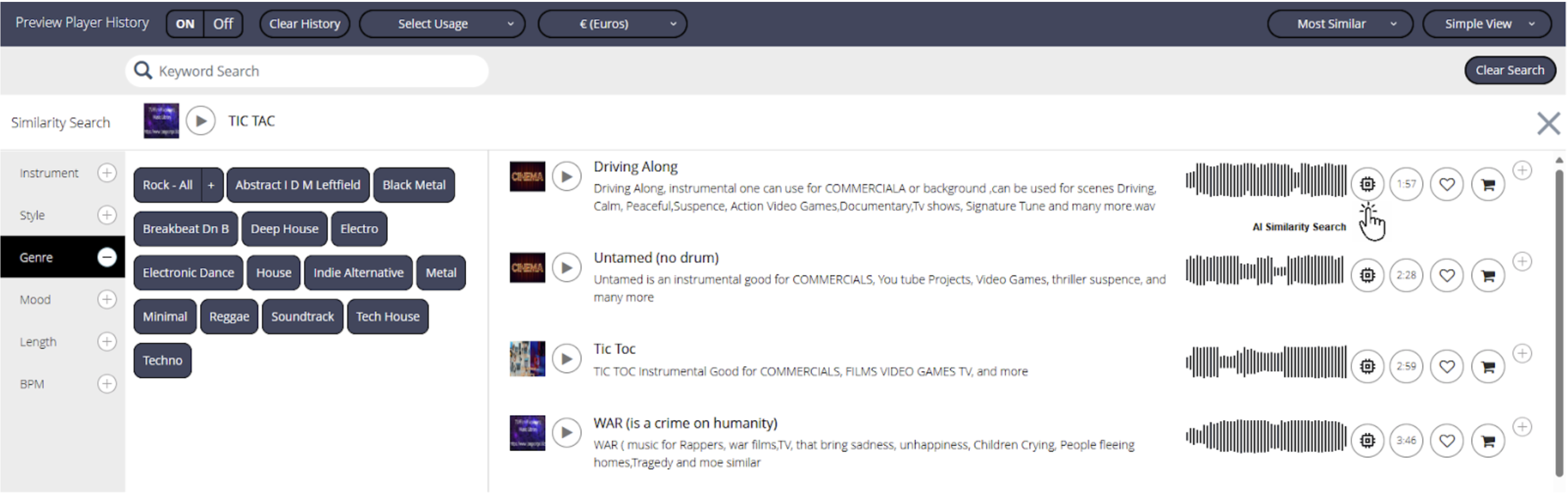
    Our AI-powered music Similarity Search uses a reference track to pull a list of matching songs from a library. First, the AI analyzes the entire catalog, comparing the audio features of each song to enable accurate similarity searches. You can also filter results, for example, by BPM or genre to refine your search.

    These algorithms compute the distance between songs based on their audio features. The smaller the distance, the more similar the tracks are. As music libraries expand, Similarity Search makes finding music easier and more efficient. Unlike platforms like Spotify that recommend songs based on user behavior, Cyanite focuses purely on sound, making our matches more accurate.

    Find Similar Songs by Audio – 9 Best Practices

    Here we outline 9 best ways to use music Similarity Search in a music catalog.

    1. Finding similar songs using audio references for sync and music briefs

    Music supervisors often work under tight deadlines. Our research with the University of Utrecht shows that 75% of music searches are done in a rush. Using a reference track within music Similarity Search can speed up this process and boost the chances of licensing tracks that otherwise get overlooked. Unlike Spotify’s “Similar Artist” feature, Cyanite analyzes sound characteristics, making it perfect for precise sync projects.

    With the help of Cyanite’s AI tags and the outstanding search results, we were able to find forgotten gems and give them a new life in movie productions. Without Cyanite, this might never have happened.

    Miriam Rech

    Sync Manager, Meisel Music

    Photo at Unsplash @dillonjshook


    2. Finding duplicates

    Music libraries often have duplicates, which can clutter your catalog. Similarity Search easily identifies and removes these duplicates, saving time and effort.

    3. Social media campaigns

    Want to promote a new artist? Use Similarity Search to find songs by popular artists with similar sounds. This data helps target fans on platforms like Facebook, Instagram, and Google, increasing campaign effectiveness.

    Read more about this use case in our article on Custom Audiences for Pre-Release Music Campaigns.

    Photo at Unsplash @William White


    4. Determining type beats

    Beat producers often create “type beats” to mimic the style of popular artists. With Similarity Search, they can compare their beats to the intended style and refine them. Catalog users can also find unique, niche matches to avoid oversaturation.

    5. Playlist pitching

    Use music Similarity Search to target your pitches to Spotify editors and playlist curators. Ingest full playlists and find the closest match for a more personalized approach. Providing references, like “Fans of Max Richter and Dustin O’Halloran,” makes your pitch stronger and more relatable.

    Learn more in our article on Playlist pitching with Cyanite.

    ???? Ready to try it out? Register for our free web app and start using Similarity Search here.

    6. Playlist optimization

    Similarity Search helps generate playlists automatically based on a reference track, inspiring playlist curators to create cohesive collections for study sessions or specific moods.

    7. Dj mixing and DJ Crates optimization

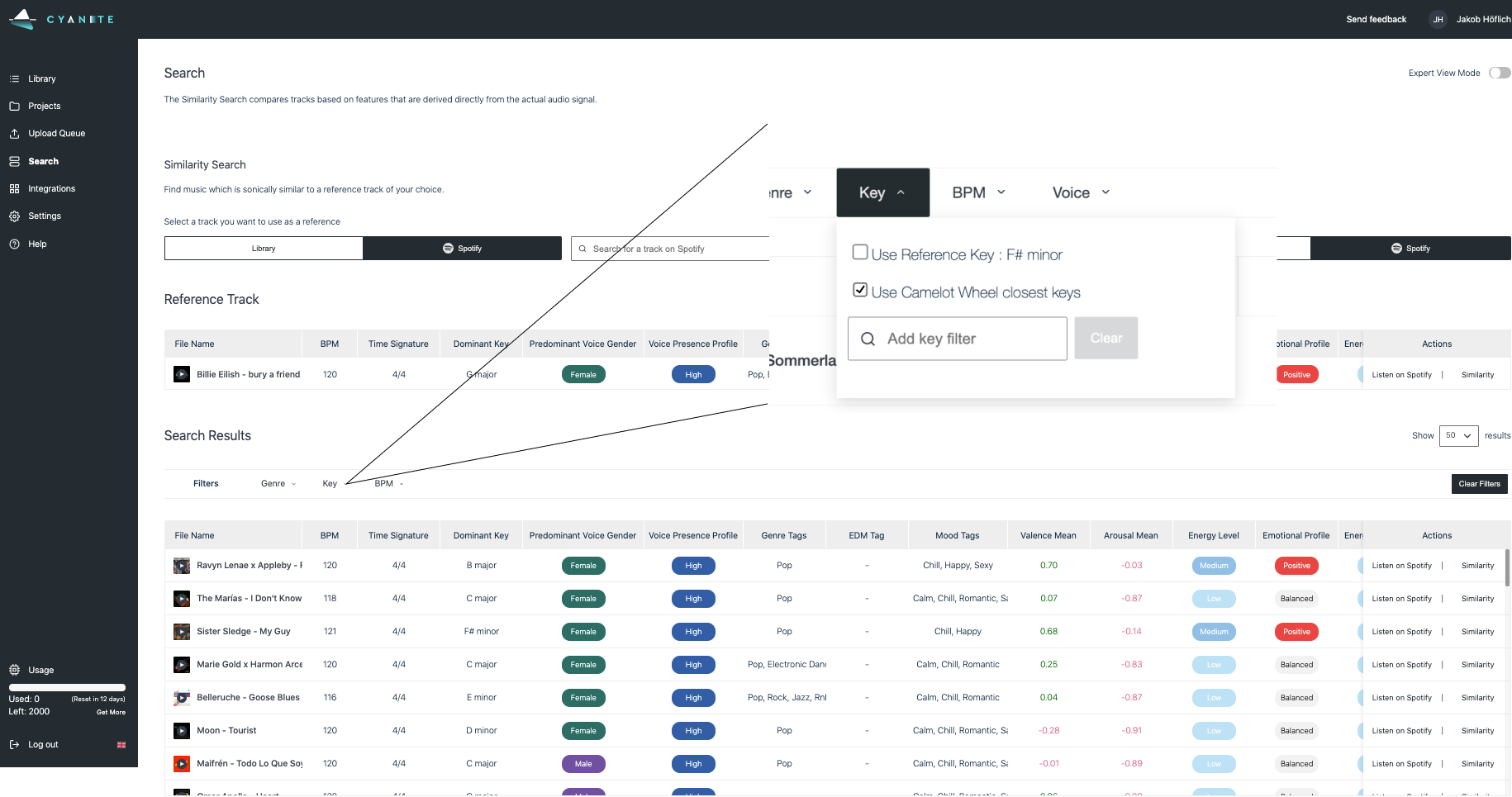
    DJs can use Similarity Search to find tracks that match in key and vibe, creating smoother transitions. The Camelot Wheel filter ensures harmonic mixing for an optimal DJ set.

    Discover more in our article on Optimizing Playlists and DJ Sets.


    A screenshot showing Cyanite's Music Similarity Search interface.

    Cyanite’s music Similarity Search interface

    8. Uncovering Catalog Blind Spots 

    Older or niche songs often get lost in catalogs. Similarity Search reveals hidden gems, expanding your options and keeping users engaged with more variety.

    9. Finding Samples

    Instead of wasting hours searching for samples, Similarity Search pulls up similar sounds instantly. Refine results by key or BPM to quickly build your ideal sample stack.

    Why use music Similarity Search in a Catalog?

    Similarity Search doesn’t just find similar tracks. It helps clean up your catalog, surface hidden songs, and optimize playlist curation. It’s also invaluable for strategic playlist pitching and social media targeting. As the music industry evolves, tools like these will be essential for staying competitive.

    Cyanite provides Similarity Search via an API or web app. Our tool uses audio and metadata to deliver results, reducing search time by up to 86% and simplifying tedious tasks. Check out our Cinephonix integration video for a real-world example.

    FAQs

    Q: How accurate is Cyanite’s Similarity Search compared to Spotify’s recommendations?
    A: Unlike Spotify, which relies on user behavior, Cyanite focuses on the actual sound. This makes our matches more sonically accurate for use cases where the song’s tonality is crucial.

    Q: Can I use Similarity Search without coding skills?
    A: Yes! Our free web app lets you analyze music and run similarity searches without any coding knowledge.

    Q: How does Similarity Search help in marketing campaigns?
    A: By finding songs with similar sounds to popular artists, you can target fans of those artists on social media, making your campaigns more effective.

    Q: Can DJs benefit from Similarity Search?
    A: Absolutely. DJs can use it to find tracks that blend well for seamless transitions and harmonic mixing.

    Q: How can I try Similarity Search for free?
    A: Simply register for our free web app here to start using Similarity Search today!